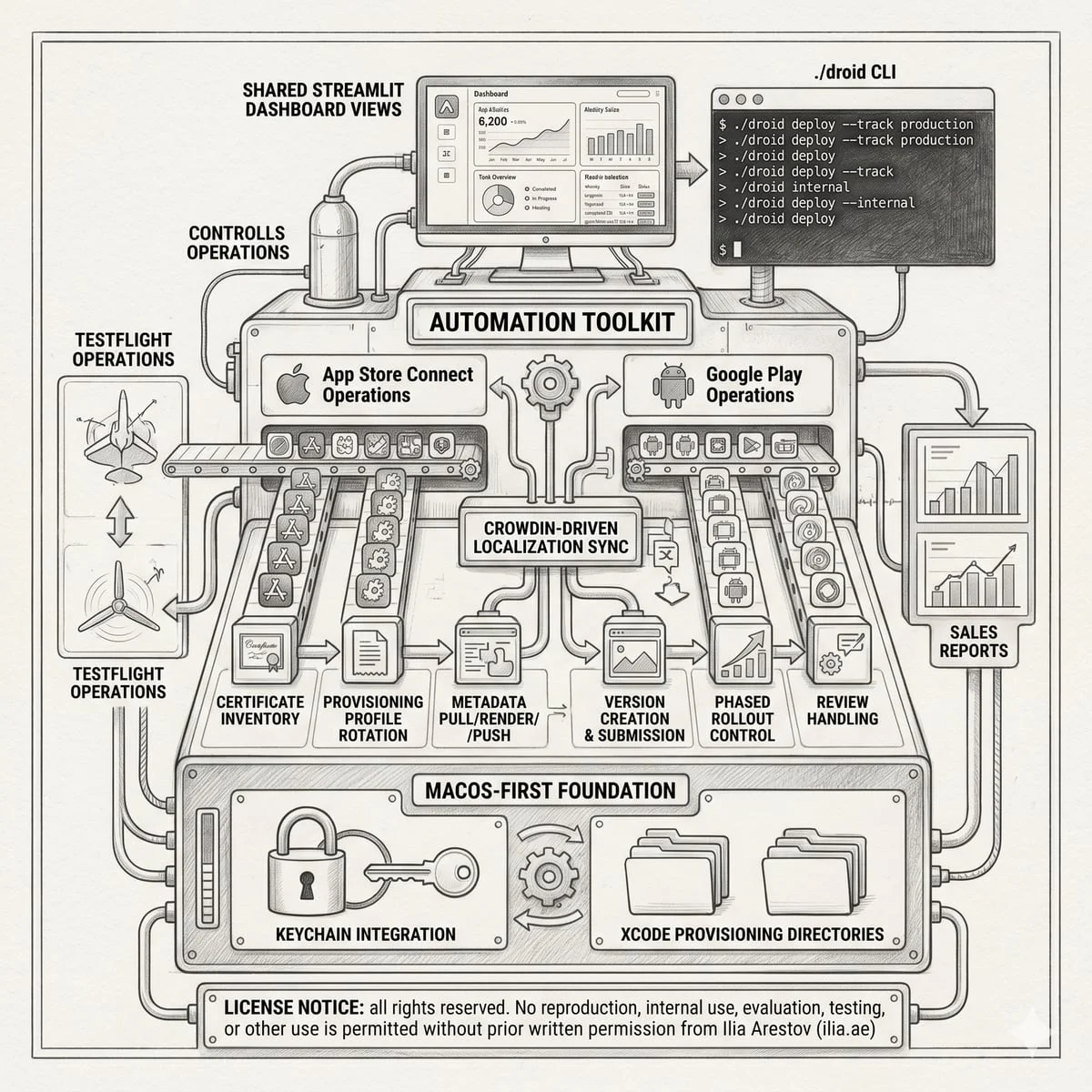
Shipping three iOS apps and their Android counterparts through App Store Connect and Google Play is a full-time operations job. Every release cycle requires certificate rotation, provisioning profile regeneration, metadata updates across four locales, screenshot composition for five device families, TestFlight distribution, App Review submission, phased rollout control, and Play Console track promotion. Multiply that by three apps, two white-label Rocket.Chat messengers and a Flutter security tool, and the manual overhead consumes entire weeks. I built mobile-stores-cicd to replace all of that with a single Python CLI that talks directly to the Apple and Google APIs, renders metadata from Jinja2 templates, automates screenshot capture on iOS Simulator and Android emulators, handles IPA sideloading with code re-signing and Cloudflare R2 delivery, and surfaces everything through an optional Streamlit dashboard.
This article covers all 65 CLI commands (48 for iOS, 17 for Android), the layered metadata pipeline, screenshot automation with Maestro-driven capture and Pillow-rendered device frames, the sideload infrastructure for third-party IPA re-signing and OTA publishing, Crowdin-driven translation sync, and the Streamlit dashboard that ties it all together. I am including real configuration examples, actual workflow sequences, and screenshots from the three live apps the toolkit manages today.
- Why build custom store automation
- Architecture overview
- The app catalog: three production apps, four languages
- iOS command surface: 48 commands across 10 domains
- Certificate and provisioning profile management
- Metadata pipeline: pull, template, render, push
- Screenshot automation: capture, compose, validate, upload
- Release lifecycle: draft to phased rollout
- TestFlight operations
- Sideload pipeline: re-signing, tweak injection, and OTA delivery
- Store setup: set-once forms for both platforms
- Operational commands
- Android / Google Play: 17 commands for the full release cycle
- Streamlit dashboard: the operator console
- Apps overview
- Metadata editor
- Screenshots pipeline
- Translations
- Releases: iOS and Android
- Store setup
- Sideload console
- Settings and environment
- The metadata templating system in depth
- Translation and localization: three parallel surfaces
- Environment credentials
- Safety model and dry-run philosophy
- Testing and continuous integration
- Repository statistics
- Typical workflows
- Full iOS release cycle
- Full Android release cycle
- Complete screenshot pipeline
- Translation sync cycle
- Sideload: from GitHub release to OTA install
- Getting started
- Documentation map
- FAQ
- Does this toolkit replace Fastlane?
- Can I use this on Linux or Windows?
- How many apps can the toolkit manage?
- What happens if the App Store Connect API changes?
- Is the sideload pipeline safe to use with a paid Apple Developer account?
- Can I use this for React Native apps?
- How does the AI translation feature work?
- What comes next
- Need a consultation?
Why build custom store automation
Fastlane is the established standard for mobile CI/CD. It covers a massive surface area: code signing, screenshot capture, metadata upload, TestFlight distribution, and more. For large teams managing dozens of apps, its plugin ecosystem and community support are hard to beat. But for a small portfolio of three apps managed by one person, Fastlane’s weight becomes a liability.
First: Ruby. The entire App Store Connect API surface is already available as a REST API with JWT authentication. Wrapping it in a Python client takes a few hundred lines and gives you direct control over every request, header, and pagination cursor. No Gemfile version conflicts, no Bundler resolution surprises, no dependency on a language you don’t otherwise use in the project.
Second: metadata structure. Fastlane assumes one set of flat text files per locale per app. What I needed was a template system where shared content (privacy policy URL patterns, common promotional text) lives in reusable templates, app-specific values (brand names, version notes) live in per-app YAML, and the rendering engine merges five levels of precedence before generating the final text files that get pushed to App Store Connect. Fastlane’s metadata model doesn’t support that without external scripting.
Third: screenshot composition. Fastlane’s snapshot tool captures screenshots, but composing them with device frames, localized headlines, gradient backgrounds, and custom typography requires frameit or external tools. I wanted a single pipeline: Maestro flows drive the Simulator through each app state, raw PNGs land in a structured directory, Pillow composes them with frame overlays and headline text from locale-specific YAML, and the final images upload directly to ASC via the same Python client.
The result is a toolkit that does less than Fastlane in absolute scope but does it with zero Ruby dependencies, full Python control over every API call, a metadata model designed for multi-app template reuse, and an integrated sideload pipeline that Fastlane doesn’t offer at all.
Architecture overview
The toolkit is a pure Python package structured around two CLI entry points and an optional web dashboard:
./apple <subcommand> [flags]     # App Store Connect (48 commands)
./droid <subcommand> [flags]     # Google Play (17 commands)
./launch                          # Interactive menu (questionary-based)
./apple ui                        # Streamlit dashboard
The iOS client (ios/client.py) handles App Store Connect API authentication using ES256 JWT tokens generated from a .p8 key. The Android client (android/client.py) authenticates through Google’s service account OAuth2 flow. Both clients implement automatic pagination, rate-limit handling, and structured error reporting.
The repository layout:
ios/                     ASC client, CLI, Keychain helpers, 48 commands
ios/sideload/            IPA re-sign, OTA manifest, R2 publish, Telegram pipeline
ios/ui/                  Streamlit dashboard (8 view modules, ~300KB of UI code)
ios/store_sections/      Store setup form handlers (9 sections)
android/                 Google Play client, CLI, 17 commands
android/commands/        Release, screenshot, metadata, store-config commands
common/                  Shared utilities (Play Store scrape, progress bars)
metadata/                App catalog, templates, per-app values, screenshots
metadata/templates/      Jinja2 templates with locale-specific value layers
.rendered/               Generated metadata payloads ready for push (gitignored)
.cache/                  Local state: UI prefs, ASC baselines, sideload state
secrets/                 Credentials: .p8, .p12, service account JSON (gitignored)
tests/                   28 pytest files for non-network regression coverage
docs/                    11 workflow guides + troubleshooting + UI overview
.github/workflows/       Crowdin sync + full pytest CI
The app catalog: three production apps, four languages
Everything starts with metadata/apps.yaml. It maps each app slug to its store identifiers, build configuration, template selection, and platform-specific settings. The current catalog has three production apps:
| App | Platform | Framework | Bundle ID | Role |
|---|---|---|---|---|
| VaultApprover | iOS + Android | Flutter | com.vaultapprover.app | 2FA push approval for Vaultwarden |
| chat.ilia.ae | iOS + Android | React Native | chat.ilia.ae / chat.rocket.ilia.ae | Personal branded Rocket.Chat |
| EL · Hub | iOS + Android | React Native | chat.estateliga.work | Corporate Rocket.Chat for Estateliga |
All three apps are localized into four locales: en-US (base), ru (Russian, UAE Russian-speaking, RU, KZ markets), ar-SA (Arabic, UAE and Middle East, RTL), and zh-Hans (Simplified Chinese, mainland China). This means every metadata operation, screenshot composition, and translation sync runs across four languages simultaneously.
Each app entry in apps.yaml defines its ASC app ID, bundle ID, display name, template selection, upstream repo, local repo path, IPA glob pattern, release notes formatting rules (including multilingual stop-lists for filtering upstream changelog entries about features the branded builds don’t ship), and an optional android: block with the Play Console package name, default release track, Gradle build command, and AAB output path.
iOS command surface: 48 commands across 10 domains
The ./apple CLI has 48 subcommands across 10 functional domains. Every destructive operation exposes a --dry-run flag. Here is the full breakdown:
Certificate and provisioning profile management
Apple certificate rotation is the most error-prone manual task in iOS development. A single expired certificate affects every provisioning profile that references it, across all apps. The toolkit automates the full rotation workflow:
./apple inventory                    # cross-reference Keychain + local profiles + ASC server
./apple list-certs                   # SHA-1 fingerprints, types, expiry dates
./apple list-profiles --sha1 <OLD>   # find all profiles referencing this cert
./apple revoke-cert --sha1 <OLD> --dry-run
./apple regenerate-profiles \
  --old-sha1 <OLD> --new-sha1 <NEW> \
  --type IOS_APP_STORE --save-local  # re-issue on ASC, save .mobileprovision to Xcode
./apple cleanup --dry-run            # preview stale profile backup + expired cert removal
./apple cleanup                      # execute with backup-first safety
The inventory command gives a read-only three-layer cross-reference: what Keychain has installed locally, what .mobileprovision files exist in the Xcode provisioning profile directory, and what ASC reports server-side. The cleanup command backs up stale profiles before removing them and deletes expired Keychain identities, with a configurable --keep-keychain-grace-days parameter. macOS .provisionprofile files are detected but intentionally left untouched.
Metadata pipeline: pull, template, render, push
The metadata system uses Jinja2 templates with a five-level value precedence that enables sharing text across apps while keeping app-specific values declarative:
- Common defaults:
metadata/templates/_common/values/<locale>.yaml - Template-specific values:
metadata/templates/<template>/values/<locale>.yaml - App branding:
metadata/<slug>/brand.yaml - Release values:
metadata/<slug>/release.yaml - Locale-specific overrides:
metadata/<slug>/locales/<locale>.yaml
Rendering uses StrictUndefined mode, any missing variable fails the render immediately rather than producing silently broken text. After values are merged, template files are looked up in the app’s template directory with fallback to _common. File-level overrides in metadata/<slug>/overrides/ bypass Jinja rendering entirely for edge cases that need hand-crafted text.
./apple metadata-pull --app el-hub --version latest    # pull live ASC state
./apple metadata-render --app el-hub --show            # render templates → .rendered/
./apple metadata-push --app el-hub --dry-run           # preview field-level diffs
./apple metadata-push --app el-hub                     # PATCH existing, POST new locales
./apple release-notes-fetch --app el-hub --store ios   # seed from GitHub release notes
./apple translate-locale --app el-hub --field release.notes --dry-run  # LLM fan-out
The release-notes-fetch command pulls upstream GitHub release notes and writes them into the English locale YAML. It applies per-app formatting rules from apps.yaml: pattern-based line dropping (with multilingual stop-lists for features the branded builds don’t ship), text replacements, and markdown stripping. The translate-locale command then generates target-locale drafts via the Anthropic API when ANTHROPIC_API_KEY is configured.
Screenshot automation: capture, compose, validate, upload
The screenshot pipeline takes raw Simulator captures and turns them into App Store-ready images with device frames and localized headlines:
metadata/<slug>/screenshots/
├── _source/                    raw UI captures (iPhone, iPad, per-locale)
│   ├── screens.yaml            screen catalog, devices, styles, frame insets
│   ├── <locale>/              locale-specific iPhone captures
│   └── _ipad/<locale>/        device-specific captures
├── _capture.yaml               capture contract (build, Simulator, locales, modes)
├── _content/                   per-locale headline YAML for composition
├── _frames/                    transparent device frame PNGs
├── _maestro/                   per-mode Maestro flow files
└── <locale>/<device>/         final composed screenshots for ASC upload
The pipeline runs in five stages:
- Frame rendering:
frames-rendergenerates Pillow-rendered fallback device frames (currently ships anAPP_IPHONE_69renderer; other devices use manually sourced PNG frames) - Capture:
screenshots-captureboots the configured Simulator, builds or reuses a.app, installs it per mode, launches with locale overrides (-AppleLanguages,-AppleLocale), runs Maestro flows from_maestro/, and copies PNGs into_source/ - Composition:
screenshots-generatemerges raw UI, device frames, localized headline text, background gradients, and custom typography into final store-ready images in two styles:marketing(frame + headline + gradient) andoverlay(clean UI with text overlay) - Validation:
screenshots-validatechecks folder structure, device coverage, and Apple dimension rules for every locale and device family - Upload:
screenshots-pushuploads screenshot sets to ASC via the multipart S3 upload flow, with--replaceto overwrite existing sets
For the Rocket.Chat white-label apps, the capture harness launches the branded app with -RCDemoMode <mode> so screenshots come from repeatable in-app demo states (splash, auth, rooms, room, profile, settings) rather than from design exports. The screenshots-snap command provides a lightweight single-screen recapture path when you already have a booted Simulator session.
The current screenshot sets cover five device families per app: APP_IPHONE_69 (iPhone 16 Pro Max), APP_IPAD_PRO_3GEN_129 (12.9″ iPad Pro), ANDROID_PHONE (Pixel 8), ANDROID_TABLET_10 (Pixel Tablet), and APP_WATCH_SERIES_10 (Apple Watch). That means 6 screens × 4 locales × 5 devices = 120 screenshots per app, or 360 across the portfolio.
Release lifecycle: draft to phased rollout
The release automation covers the full App Store submission path:
./apple apps-audit --app el-hub           # full state audit before release
./apple version-create --app el-hub --version 4.71.4 --dry-run
./apple version-create --app el-hub --version 4.71.4
./apple upload-ipa --app el-hub           # upload .ipa to TestFlight processing
./apple testflight-list --app el-hub      # confirm build is ready
./apple build-attach --app el-hub --build-version 23   # attach to draft version
./apple testflight-distribute --app el-hub --dry-run   # push to external groups
./apple version-submit --app el-hub --dry-run          # pre-flight checks
./apple version-submit --app el-hub                     # submit for App Review
./apple phased-release --app el-hub --action status    # monitor rollout
./apple phased-release --app el-hub --action pause     # pause if issues
./apple phased-release --app el-hub --action complete  # push to 100%
The version-submit command runs pre-flight checks for build attachment, required localizations, and app review contact data before submission. The version-delete command can discard stale editable drafts, with --force required if a build is already attached. The apps-audit command surfaces everything in one shot: app-level metadata, app info entities, version localizations, missing fields, review contact data, attached builds, and availability settings.
TestFlight operations
TestFlight management goes beyond basic build listing:
testflight-list, shows recent builds and beta groupstestflight-invite, creates or reuses a tester and invites them into a beta grouptestflight-distribute, sends the newest valid build to external groups and optionally submits Beta Reviewtestflight-expire, expires older builds while keeping the newest N processed builds available
Sideload pipeline: re-signing, tweak injection, and OTA delivery
The sideload subsystem handles installing third-party iOS apps on a physical iPhone without jailbreaking: certificate management, device registration, IPA re-signing, OTA manifest publication to Cloudflare R2, and optional Telegram delivery. It works through the App Store Connect API and standard Apple Developer tooling.
./apple sideload-init --email you@example.com         # issue signing cert
./apple sideload-import-cert --p12 ~/cert.p12         # or import existing
./apple sideload-register-device                       # auto-detect USB iPhone
./apple sideload-install \
  --repo https://github.com/SoCuul/SCInsta \
  --refresh-altsource                                  # fetch, re-sign, publish
./apple sideload-build-gh \
  --upstream owner/repo --fork user/fork               # trigger forked CI build
./apple sideload-list                                  # cert, device, published apps
./apple sideload-remove --bundle-id com.example.app    # unpublish from R2
./apple sideload-prune --dry-run                       # clean orphaned R2 objects
./apple sideload-tg-init                               # capture Telegram chat_id
The sideload-install command does everything in one shot: downloads the release IPA from a GitHub release or direct URL, creates or reuses the required ASC bundle ID and provisioning profile, re-signs the app with zsign, uploads the signed IPA and OTA manifest to Cloudflare R2, prints the install URL, and optionally sends an install link with QR code to Telegram. Certificate type matters: DEVELOPMENT certificates lead to IOS_APP_DEVELOPMENT profiles (one-time trust step required on device), while DISTRIBUTION certificates lead to IOS_APP_ADHOC profiles for cleaner OTA installs.
The sideload-build-gh command takes it further: it triggers a forked GitHub Actions build, waits for the artifact, downloads the result, re-signs it, and publishes the IPA. For apps that support it, the optional cyan integration (pyzule-rw) can inject a .deb tweak into a decrypted base IPA before re-signing, useful for customized Instagram or Spotify builds.
Local state lives in .cache/sideload_state.json (cert ID, registered devices, published apps, Telegram chat IDs), signing material in secrets/apple/sideload/, and temporary work files in .cache/sideload/. Everything except the local sideload state is gitignored.
Store setup: set-once forms for both platforms
App Store Connect and Google Play both have configuration forms that rarely change after initial setup: privacy declarations, age ratings, reviewer access credentials, pricing, territory availability, permissions justifications, compliance flags, and monetization settings. The store-config-* commands manage these declaratively:
./apple store-config-pull --app vaultapprover           # pull live ASC state
./apple store-config-verify --app vaultapprover --strict # diff local vs live
./apple store-config-push --app vaultapprover --section privacy --dry-run
./apple store-config-clone --from chat-ilia --to el-hub --dry-run  # copy config
Each app’s store configuration lives in metadata/<slug>/store-config.yaml, generated from template defaults plus per-app overrides. The YAML schema covers nine sections: app_identity, age_rating, privacy (with full data collection declarations that feed both Play Data Safety and ASC App Privacy), reviewer_access (with test credentials sourced from a gitignored secrets/reviewer-creds.yaml), pricing_and_availability, permissions, compliance, monetization, and assets. The same commands work for both ./apple (ASC) and ./droid (Play Console).
Operational commands
Day-to-day operations are covered by dedicated commands:
sales-report [--days N] [--frequency DAILY|WEEKLY|MONTHLY], fetch and aggregate App Store Connect sales reportsreviews-list --app <slug> [--unanswered], list customer reviews with response statereviews-respond --review-id <id> --text <response>, post a developer responseapp-strings-sync --app <slug> --direction push|pull, mirror in-app strings between the app repo and Crowdintranslate-locale --app <slug> --field <field>, AI-assisted locale draft generation via Anthropic
Android / Google Play: 17 commands for the full release cycle
The ./droid CLI provides the Google Play counterpart to ./apple. It shares the same app catalog, metadata templates, and screenshot directory structure, but talks to the Google Play Developer API through a service account:
./droid apps-list                                      # Android-enabled apps
./droid metadata-push --app vaultapprover --dry-run    # render + push Play listings
./droid screenshots-capture --app vaultapprover --locale en-US --build
./droid screenshots-capture-rn --app chat-ilia --locales en-US,ru --build
./droid screenshots-push --app vaultapprover --replace
./droid build --app vaultapprover                      # flutter build appbundle
./droid release --app vaultapprover --track internal --dry-run
./droid tracks-list --app vaultapprover
./droid promote --app vaultapprover --track production --status completed
./droid release-delete --app vaultapprover --track internal --dry-run
./droid reviews-list --app vaultapprover --limit 20
The screenshots-capture-rn command is an optimized capture path for React Native white-label apps: it builds one demo APK once, then relaunches it with different mode or locale extras to capture all screens without rebuilding. The release command uploads an AAB and creates a release on the chosen Play track (internal, alpha, beta, or production). The promote command advances an existing track release without forcing a new upload. The release-delete command clears draft or in-progress releases from a track without touching completed live releases, a safety net against stale drafts blocking new uploads.
The store-config surface mirrors iOS exactly: store-config-pull, store-config-push, store-config-verify, and store-config-clone work against the Play Console for privacy declarations, age ratings, permissions justifications, and territory availability.
Streamlit dashboard: the operator console
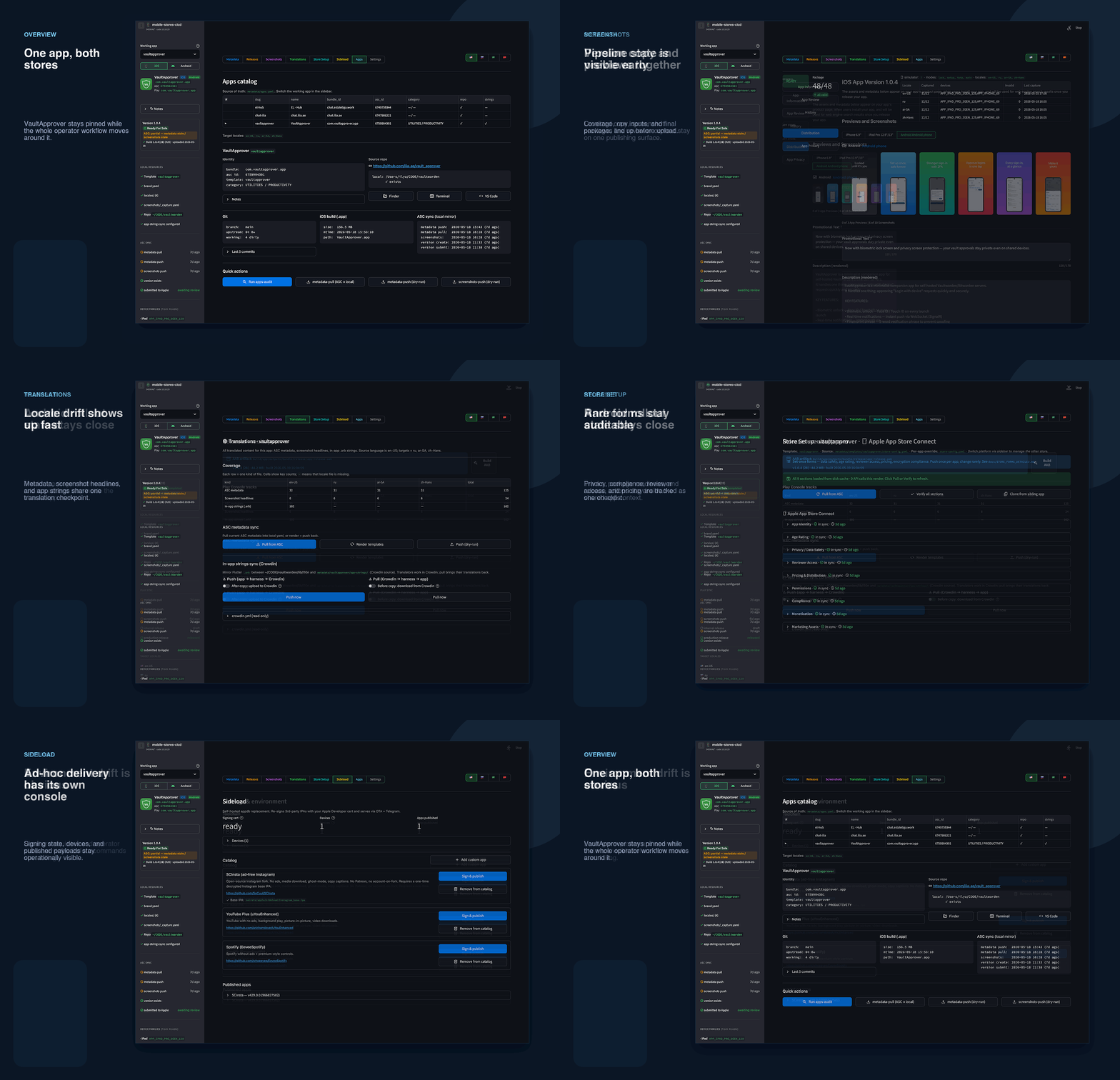
Running ./apple ui launches a Streamlit dashboard that wraps the CLI in a web interface. It follows the browser color scheme (light and dark modes), persists UI preferences locally, and keeps a shared app context where every tab operates on the same selected app and platform. It is not a replacement for the CLI. It wraps the same commands and adds visual feedback where that is actually useful.
Apps overview

The Apps tab shows the full catalog from metadata/apps.yaml alongside the currently selected app profile. It surfaces bundle ID, ASC app ID, template selection, repo mapping, git state, local build presence, and recent sync timestamps. Quick actions launch apps-audit, metadata pull/push, and screenshot push dry-runs directly from the interface. The left sidebar is the persistent operating context: working app, active platform (with green “Android” and blue “iOS” pills), notes, current version state, local resources, sync history, and device families.
Metadata editor

Day-to-day metadata editing happens here. You get device-aware screenshot preview (switch between iPhone, iPad, and Android outputs), review info, rendered text comparison, and locale switching. Stale sync warnings and version state stay visible at all times, so you know whether a metadata-push is needed.
Screenshots pipeline

The Screenshots tab shows coverage summary (device families x locales), package readiness state, and one-click pipeline actions: capture, generate, validate, push. Both raw captures and final composed screenshots are previewable in the same view, so you catch stale outputs before they get uploaded. The localized headline YAML is also editable directly.
Translations

The Translations tab aggregates translation coverage across three parallel surfaces: App Store Connect metadata (locale YAML values), screenshot headline text (_content/ YAML), and in-app strings (app-strings/ for apps wired with app-strings-sync). It provides direct metadata pull, template render, and push actions for store text, plus Crowdin-backed push and pull actions for in-app strings. If a locale is missing a field or lagging behind the English source, this is where you see it.
Releases: iOS and Android

On iOS, the Releases tab is the build-prep surface: TestFlight build lookup, upload status checks, build attachment to the editable App Store version, and submission controls.

The same tab pivots to Android release operations when the platform switch is toggled. It shows Play Console track state, coverage status, and the metadata/strings sync actions needed before a rollout. You stay in the same app context; only the platform-specific controls change.
Store setup

Store Setup covers the one-time or rarely changed configuration: identity, age rating, privacy declarations, reviewer access, pricing and availability, permissions, compliance, monetization, and marketing assets. It tracks cache freshness for each section and supports clone-from-sibling flows, which saves real time when onboarding a new app that shares most settings with an existing one.
Sideload console

The Sideload tab shows signing certificate status, registered devices, and the catalog of published sideload apps. Each catalog entry has grouped “Sign & publish” actions. Sideload is not tied to App Store Connect or Google Play, but having it in the same dashboard avoids context-switching when you are the only operator.
Settings and environment

The Settings tab is where you confirm that everything is wired up: sideload prerequisites, published app counts, credential availability, and local toolchain readiness. Useful when something fails and you want a quick diagnostic without dropping to the terminal.
The metadata templating system in depth
The metadata model drives both iOS and Android store listings. It works like CSS specificity: more specific values override less specific ones, and file-level overrides bypass everything.
Consider a concrete example. The common template provides a fallback description.txt.j2 that uses {{ description }}. The chat-shared template provides a richer version that interpolates {{ app_name }}, {{ chat_backend_url }}, and feature lists. Each app’s brand.yaml sets app_name and chat_backend_url. Each locale’s <locale>.yaml provides the translated feature list.
The output fields cover both App Info (name, subtitle, privacy policy URL, privacy policy text, privacy choices URL) and Version Localization (description, keywords, promotional text, what’s new, support URL, marketing URL). The metadata-push command compares the rendered output field-by-field against the current App Store Connect values and sends PATCH requests only for changed fields, or POST requests for new localizations.
For Android, the same YAML values are rendered through a parallel path in the ./droid metadata-push command. The Play Console API has a different field model (short description, full description, title), but the rendering pipeline maps from the same source YAML. This means a single edit to a locale file propagates to both stores.
Translation and localization: three parallel surfaces
The toolkit manages translations across three independent surfaces that all feed into Crowdin:
| Surface | Source path | Consumer |
|---|---|---|
| App Store metadata | metadata/<slug>/locales/<locale>.yaml | metadata-render → metadata-push |
| Screenshot headlines | metadata/<slug>/screenshots/_content/<locale>.yaml | screenshots-generate |
| In-app strings | metadata/<slug>/app-strings/<locale>.arb | app-strings-sync → app repo |
The Crowdin integration works through a GitHub Action (.github/workflows/crowdin-sync.yml) that supports four modes: upload (push sources only), download (pull completed translations), both (upload then download), and seed-translations (upload existing repo translations as approved seed content with --auto-approve-imported). The nightly schedule at 03:00 UTC downloads completed translations and opens a PR titled chore(l10n): sync translations from Crowdin.
For apps that define an app_strings: block in apps.yaml, the app-strings-sync command mirrors localization files between the app repository (e.g. ~/CODE/vaultwarden/lib/l10n/app_en.arb) and metadata/<slug>/app-strings/. The --direction push copies from the app repo into the metadata tree (for Crowdin upload), while --direction pull copies translated files back (after Crowdin download). The --upload and --download flags optionally trigger Crowdin CLI sync as part of the same command.
The AI-assisted translate-locale command provides a fast drafting path when Crowdin turnaround is too slow. It reads the English source from locales/en-US.yaml, sends it to the Anthropic API with locale-aware instructions, and writes draft translations into the target locale files. These drafts are meant for human review, not blind publishing, the --dry-run flag shows the proposed text without writing anything.
Environment credentials
The toolkit uses 17 environment variables configured through a .env file:
| Variable | Required | Purpose |
|---|---|---|
ASC_KEY_ID | iOS API | App Store Connect API key ID |
ASC_ISSUER_ID | iOS API | App Store Connect issuer UUID |
ASC_KEY_PATH | iOS API | Path to the .p8 key file |
APPLE_TEAM_ID | Recommended | Apple team identifier |
ASC_VENDOR_NUMBER | sales-report | Vendor number for financial reports |
GOOGLE_PLAY_SA_PATH | Android | Path to Google Play service account JSON |
CROWDIN_PROJECT_ID | Translations | Crowdin project ID |
CROWDIN_API_TOKEN | Translations | Crowdin personal access token |
ANTHROPIC_API_KEY | AI translate | Enables LLM-powered locale drafts |
R2_ACCOUNT_ID | Sideload | Cloudflare account for IPA hosting |
R2_ACCESS_KEY_ID | Sideload | R2 S3 access key |
R2_SECRET_ACCESS_KEY | Sideload | R2 S3 secret key |
R2_BUCKET | Sideload | R2 bucket name |
R2_PUBLIC_BASE_URL | Sideload | Public HTTPS URL for OTA downloads |
GITHUB_TOKEN | Optional | Raises GitHub API rate limits |
TELEGRAM_BOT_TOKEN | Optional | Sideload install link delivery |
SIDELOAD_DISABLE_TELEGRAM | Optional | Suppresses Telegram without removing state |
Credentials follow a strict locality model: .env, secrets/, .rendered/, .backups/, and .venv/ are all gitignored. The SECURITY.md file documents the credential handling policy and incident response procedure for leaked credentials.
Safety model and dry-run philosophy
Every command that modifies remote state (certificate revocation, metadata push, screenshot upload, version creation, build attachment, submission, phased release control, Play track promotion, sideload publishing) exposes a --dry-run flag that prints exactly what would happen without executing it. I run --dry-run first every time, even for operations I have done hundreds of times.
Additional safety measures:
cleanupbacks up stale provisioning profiles before removing them from the Xcode profile directorymetadata-pushskips overwriting non-empty ASC values with empty rendered valuesversion-deleterequires--forceto remove a draft that has a build attachedrelease-delete(Android) refuses to touch completed live releases, only drafts and in-progress releases can be cleared- sideload signing keys and imported
.p12bundles stay undersecrets/apple/sideload/and never leave the local machine - macOS
.provisionprofilefiles are detected by cleanup but intentionally left untouched - the
.cache/directory contains local-only state: UI preferences, ASC baselines, and sideload pipeline state
Testing and continuous integration
The test suite contains 28 pytest files covering non-network regression paths:
- Screenshot display-type definitions and Apple dimension rules
- Screenshot generation helpers, package-status calculations, and source extras
- Metadata pull device-family inference and locale YAML save/delete helpers
- Android catalog parsing, Play metadata rendering, and Play validator checks
- Release-note filtering, release helper utilities, and friendly Play error handling
- ASC metadata validation helpers and ASC baseline caching
- Streamlit favicon patching, UI command bootstrap, and preference persistence
- Sync-state persistence and device-family detection
- Version create auto-detection and version delete safety checks
- Browser-level Streamlit smoke test (opt-in via Playwright)
GitHub Actions runs the full pytest suite plus a separate browser-level Streamlit smoke job. The conftest.py builds isolated temporary repo layouts and monkeypatches catalog or state paths so tests never touch the real metadata tree. All tests are local and deterministic, no live App Store Connect or network dependencies in the default path.
Repository statistics
The repository in numbers:
| Metric | Value |
|---|---|
| Total CLI commands | 65 (48 iOS + 17 Android) |
| Primary language | Python (1.1M+ bytes) |
| Supporting languages | Shell (5.5KB), Jinja2 (1.6KB) |
| iOS UI code | ~300KB across 8 Streamlit view modules |
| Test files | 28 pytest files |
| Documentation files | 21 (README + 11 docs + API setup + Android + contributing + security + changelog + crowdin) |
| Managed apps | 3 (VaultApprover, chat.ilia.ae, EL·Hub) |
| Target locales | 4 (en-US, ru, ar-SA, zh-Hans) |
| Device families | 5 (iPhone 16 Pro Max, iPad Pro 12.9″, Pixel 8, Pixel Tablet, Apple Watch S10) |
| Screenshots per app | ~120 (6 screens × 4 locales × 5 devices) |
| Store-config sections | 9 (identity, age, privacy, reviewer, pricing, permissions, compliance, monetization, assets) |
| GitHub Actions workflows | 2 (tests + Crowdin sync) |
Typical workflows
Below are four workflows I run regularly. Each one is a sequence of CLI commands that you can copy and adapt to your own apps.
Full iOS release cycle
# 1. Audit current state
./apple apps-audit --app el-hub

# 2. Create draft version
./apple version-create --app el-hub --version 4.71.4

# 3. Refresh release notes from GitHub
./apple release-notes-fetch --app el-hub --store ios
./apple translate-locale --app el-hub --field release.notes

# 4. Push metadata and screenshots
./apple metadata-push --app el-hub
./apple screenshots-validate --app el-hub
./apple screenshots-push --app el-hub --replace

# 5. Upload IPA and attach build
./apple upload-ipa --app el-hub
./apple testflight-list --app el-hub
./apple build-attach --app el-hub --build-version 23

# 6. Distribute to testers
./apple testflight-distribute --app el-hub

# 7. Submit for review
./apple version-submit --app el-hub

# 8. Control phased rollout
./apple phased-release --app el-hub --action status
./apple phased-release --app el-hub --action complete
Full Android release cycle
# 1. Build the AAB
./droid build --app vaultapprover

# 2. Push metadata
./droid metadata-push --app vaultapprover

# 3. Capture and push screenshots
./droid screenshots-capture --app vaultapprover --build
./droid screenshots-push --app vaultapprover --replace

# 4. Create release on internal track
./droid release --app vaultapprover --track internal

# 5. Verify track state
./droid tracks-list --app vaultapprover

# 6. Promote to production
./droid promote --app vaultapprover --track production --status completed
Complete screenshot pipeline
# 1. Prepare device frames
./apple frames-render --app vaultapprover

# 2. Capture raw UI from Simulator
./apple screenshots-capture --app vaultapprover --build \
  --modes main,lock,setup,totp \
  --devices APP_IPHONE_69,APP_IPAD_PRO_3GEN_129

# 3. Compose final screenshots with frames and headlines
./apple screenshots-generate --app vaultapprover

# 4. Validate dimensions and coverage
./apple screenshots-validate --app vaultapprover

# 5. Upload to App Store Connect
./apple screenshots-push --app vaultapprover --replace

# 6. Android screenshots
./droid screenshots-capture --app vaultapprover --build
./droid screenshots-push --app vaultapprover --replace
Translation sync cycle
# 1. Push source strings to Crowdin (via GitHub Action or CLI)
./apple app-strings-sync --app vaultapprover --direction push --upload

# 2. Translators work in Crowdin...

# 3. Download completed translations
./apple app-strings-sync --app vaultapprover --direction pull --download

# 4. Re-render store metadata
./apple metadata-render --app vaultapprover
./apple metadata-push --app vaultapprover

# 5. Regenerate screenshots with new headlines
./apple screenshots-generate --app vaultapprover
./apple screenshots-push --app vaultapprover --replace
Sideload: from GitHub release to OTA install
# 1. One-time setup
./apple sideload-init --email you@example.com --type DISTRIBUTION
./apple sideload-register-device
./apple sideload-tg-init

# 2. Publish a third-party app
./apple sideload-install \
  --repo https://github.com/SoCuul/SCInsta \
  --refresh-altsource

# 3. Trigger a forked CI build
./apple sideload-build-gh \
  --upstream whoeevee/EeveeSpotify \
  --fork your-user/EeveeSpotify \
  --refresh-altsource

# 4. Manage published apps
./apple sideload-list
./apple sideload-remove --bundle-id com.example.app
./apple sideload-prune --dry-run
Getting started
The toolkit requires macOS (Keychain and Xcode integration), Python 3.10+, and access to the target App Store Connect team. Optional dependencies unlock additional capabilities: Xcode and Simulator for screenshot capture, maestro for automated capture flows, zsign for IPA re-signing, libimobiledevice for USB device detection, crowdin CLI for local translation sync, streamlit for the dashboard, and a Cloudflare R2 bucket for sideload hosting.
# 1. Create the environment
python3 -m venv .venv
source .venv/bin/activate
pip install -r requirements.txt
pip install -r requirements-dev.txt
cp .env.example .env

# 2. Configure credentials
# Edit .env with ASC_KEY_ID, ASC_ISSUER_ID, ASC_KEY_PATH
# See ios/API_KEY_SETUP.md for App Store Connect API key creation
# See android/SERVICE_ACCOUNT_SETUP.md for Google Play

# 3. Verify the setup
./apple apps-list --no-server    # catalog parses
./apple list-certs               # ASC auth works
./droid apps-list                # Android catalog
./launch                         # interactive menu

# 4. Optional: run the test suite
./.venv/bin/python -m pytest -q
The full bootstrap guide with every environment variable, first-run verification steps, and troubleshooting for common failures is available in docs/SETUP.md.
Documentation map
The repository includes 21 documentation files covering every aspect of the toolkit:
| Document | Scope |
|---|---|
| docs/SETUP.md | End-to-end environment bootstrap |
| docs/METADATA_WORKFLOW.md | Render/pull/push model and file precedence |
| docs/SCREENSHOTS_WORKFLOW.md | Capture, composition, validation, upload |
| docs/SIDELOAD_WORKFLOW.md | Cert bootstrap, re-signing, R2 publish, Telegram |
| docs/RELEASE_WORKFLOW.md | Draft creation, build attach, submission, phased rollout |
| docs/STORE_FORMS_DETAILED.md | Store-config YAML schema and form design |
| docs/UI_OVERVIEW.md | Full dashboard tab-by-tab walkthrough |
| docs/TESTING.md | Pytest setup, test areas, developer loop |
| docs/TROUBLESHOOTING.md | Common ASC, Keychain, template, and Crowdin failures |
| CROWDIN_SETUP.md | Crowdin project, GitHub Action, seed flow |
| android/README.md | Google Play catalog, CLI, and workflow overview |
FAQ
Does this toolkit replace Fastlane?
For a small app portfolio managed by one operator, yes. It covers certificate management, metadata templating, screenshot automation, release submission, and sideloading, all without Ruby dependencies. For large teams with dozens of apps and complex CI pipelines, Fastlane’s plugin ecosystem and community support still have advantages.
Can I use this on Linux or Windows?
The toolkit is macOS-first because it integrates with Keychain and Xcode provisioning profile directories. The Android CLI surface (./droid) and metadata templating work on any platform, but iOS commands require macOS for certificate and profile operations. Screenshot capture requires Xcode Simulator (macOS only).
How many apps can the toolkit manage?
There is no hard limit. The app catalog (metadata/apps.yaml) accepts any number of entries. The current deployment manages three apps across two platforms, four locales, and five device families. Adding a new app requires one YAML entry and the appropriate template, locale, and screenshot directories.
What happens if the App Store Connect API changes?
The ASC client (ios/client.py) talks directly to Apple’s REST API with explicit version paths. API changes are surfaced as HTTP errors, not silent failures. The troubleshooting guide covers common authentication and authorization failures.
Is the sideload pipeline safe to use with a paid Apple Developer account?
The sideload pipeline creates standard ASC bundle IDs and provisioning profiles, the same objects Xcode creates. Certificate type (Development vs Distribution) affects the profile type and installation experience. The signing material stays local, and the sideload-prune command cleans up orphaned cloud objects. Apple’s terms of service regarding sideloading are the user’s responsibility to evaluate.
Can I use this for React Native apps?
Two of the three managed apps (chat.ilia.ae and EL·Hub) are React Native builds. The screenshots-capture-rn command is specifically designed for RN white-label apps: it builds one demo APK once, then relaunches it with different mode or locale extras to capture all screenshots without rebuilding. The _capture.yaml contract supports RN-specific demo mode flags like -RCDemoMode.
How does the AI translation feature work?
The translate-locale command reads the English source field from locales/en-US.yaml, sends it to the Anthropic API with locale-specific formatting instructions, and writes draft translations into target locale files. It is designed as a drafting aid, not a replacement for professional translation. The --dry-run flag shows proposed text without writing. The Anthropic SDK is intentionally not bundled in requirements.txt, install it separately if you want this feature.
What comes next
The toolkit runs in production for three apps across two platforms. The iOS surface is deeper, but Google Play automation now covers the full release cycle through ./droid. What I am working on next: full Android feature parity with iOS (Play Developer Reporting API for installs, ratings, and crashes), lint and type-check CI workflows, and packaging as an installable Python distribution.
The source code is hosted at github.com/ilia-ae/mobile-stores-cicd. The repository is private, access is granted on request. If you want to explore the codebase or evaluate it for your own mobile CI/CD workflow, reach out and describe your use case.
For consulting on mobile CI/CD automation, App Store Connect integration, or building custom store management tooling for your app portfolio, get in touch.
Need a consultation?
If you need professional expertise, book your free 15-minute consultation.