I keep eleven devices between cold storage, daily signing, and exchange access. Not because I love collecting gadgets, because every device in this stack covers a different threat. A Ledger protects against firmware extraction. A Trezor lets me audit the code that guards my keys. A YubiKey stops phishing before it starts. None of them does everything, and that’s the point.
This is a walkthrough of every hardware wallet and security key I actually use, why each one is in the rotation, and where the weak spots are. No affiliate links, no “top 10 best wallets” filler, just what I carry, what I keep in the safe, and how the pieces fit together.
- Hardware Wallets: The Cold Storage Layer
- Trezor Model T, The Auditable One
- Ledger Stax, The Fortress
- Ledger Nano X, The Mobile Signer
- Ledger Nano S Plus, The Wired Workhorse
- SafePal X1, The Multi-Chain Swiss Knife
- CoolWallet Pro, The Card in Your Wallet
- Tangem, The Seedless Cards
- Bearer Instruments: Bitcoin as Physical Cash
- Opendime, The Disposable Bearer Stick
- Authentication Layer: YubiKeys
- YubiKey Bio, The Biometric Gate
- YubiKey 5C Nano, The Daily Driver
- YubiKey 5C, The Backup in the Safe
- How It All Fits Together
- Full Comparison
- Lessons from Running This Stack
- Frequently Asked Questions
- Why do you need multiple hardware wallets?
- Which is safer, Ledger or Trezor?
- How do you protect against Ledger data breaches?
- How many YubiKeys do you need for exchanges?
- What is multisig and why does it matter?
- Need a consultation?
Hardware Wallets: The Cold Storage Layer
Trezor Model T, The Auditable One
The Model T is discontinued as of January 2026, replaced by the Trezor Safe 5. I still use mine. The reason is simple: fully open-source firmware, bootloader, and hardware schematics. Every line of code that touches my private keys is published on GitHub with reproducible builds. I can compile the firmware myself and verify it matches what runs on the device.
The trade-off is real. The Model T runs on an STM32F427 microcontroller, a general-purpose ARM chip with no dedicated secure element. In May 2023, security firm Unciphered demonstrated physical seed extraction from this chip using specialized lab equipment. If someone gets your Trezor and has resources, your keys are extractable. That’s why Trezor sits in a location that requires physical breach to access, not in my pocket.
What makes it irreplaceable: Shamir’s Secret Sharing (SLIP-39). I split the recovery seed into multiple shares stored in different locations. Even if one location is compromised, the seed stays safe. On-device passphrase entry via the touchscreen means the host computer never sees the full passphrase, no keylogger risk.
| Spec | Detail |
|---|---|
| Connectivity | USB-C |
| Display | 240×240 color LCD touchscreen |
| Security chip | None (STM32F427, general-purpose MCU) |
| Supported assets | 9,000+ coins and tokens |
| Open source | Fully, firmware, bootloader, hardware |
| Backup method | BIP-39 + SLIP-39 (Shamir) |
| Status | Discontinued Jan 2026; firmware updates until 2031 |
Ledger Stax, The Fortress
The Stax is Ledger’s flagship and, hardware-wise, it deserves the title. The ST33K1M5 secure element carries CC EAL6+ certification, the same class used in national ID cards and passports. Private keys are generated, stored, and used exclusively inside this chip. Even if you had full control of the device’s general-purpose MCU, you could not extract key material from the secure element.
The 3.7-inch curved E Ink touchscreen (designed by Tony Fadell, the iPod creator) is the largest display on any hardware wallet. It’s not vanity, a bigger screen means you can actually read the full transaction details before signing. On a Nano’s 128×64 OLED, you’re scrolling through addresses character by character. On the Stax, the entire output is visible at once.
The elephant in the room: Ledger’s BOLOS operating system is closed-source. They argue this is required by NDA with the chip manufacturer for CC certification. Individual blockchain apps are open source, but the OS that manages key operations is not. You’re trusting Ledger’s implementation rather than verifying it yourself. The Ledger Recover controversy in May 2023 made this tangible, the firmware demonstrably can extract seed material from the secure element, even if the feature is opt-in.
| Spec | Detail |
|---|---|
| Connectivity | USB-C + Bluetooth 5.2 + Qi wireless charging |
| Display | 3.7″ curved E Ink touchscreen (400×672) |
| Security chip | ST33K1M5 (CC EAL6+) |
| Supported assets | 5,500+ across 50+ networks |
| Open source | Partial, apps open, OS closed |
| Price | $399 |
Ledger Nano X, The Mobile Signer
The Nano X exists in my setup for one reason: Bluetooth. When I need to sign a transaction from my phone, checking a DeFi position, approving a multisig, confirming a swap, the Nano X connects via encrypted BLE to Ledger Live on iOS. No cable, no adapter, no laptop required.
A detail that surprises people: the Nano X has a weaker security chip than the cheaper Nano S Plus. The Nano X uses the ST33J2M0 (EAL5+), while the S Plus and Stax use the ST33K1M5 (EAL6+). You’re paying more for Bluetooth convenience, not more security. The 100 mAh battery is the other weak point, it degrades over 2-3 years, and Bluetooth is the attack surface expansion you’re accepting.
| Spec | Detail |
|---|---|
| Connectivity | USB-C + Bluetooth BLE |
| Display | 128×64 OLED, 2 buttons |
| Security chip | ST33J2M0 (CC EAL5+) |
| Battery | 100 mAh (degrades over time) |
| Open source | Partial |
| Price | $149 |
Ledger Nano S Plus, The Wired Workhorse
The best security-to-price ratio in hardware wallets. The Nano S Plus carries the same EAL6+ secure element as the $399 Stax, at $79. No battery means no battery degradation and a longer device lifespan. No Bluetooth means a smaller attack surface. It’s the device I recommend to anyone who asks “which one should I get?”, unless they specifically need mobile signing.
The limitation: no iOS support. Apple requires Bluetooth for external accessories in Ledger Live, so the Nano S Plus only works with desktop and Android. If you’re iPhone-only, you need the Nano X or Stax.
| Spec | Detail |
|---|---|
| Connectivity | USB-C only |
| Display | 128×64 OLED, 2 buttons |
| Security chip | ST33K1M5 (CC EAL6+) |
| Weight | 21 grams |
| Open source | Partial |
| Price | $79 |
SafePal X1, The Multi-Chain Swiss Knife
The SafePal X1 covers the widest ecosystem at the lowest price: 200+ blockchains, 30,000+ tokens, built-in swap and staking, all for $70. The EAL5+ secure element handles key storage, and the firmware source code is on GitHub. That said, the chip vendor is undisclosed, and there are no reproducible builds, the published code cannot be verified against what ships on the device. It’s “open source” with an asterisk.
The self-destruct mechanism is worth noting: physical tamper sensors trigger automatic key wipe. It’s a feature you hope never activates, but it means a stolen X1 doesn’t give an attacker unlimited time to work on extraction.
| Spec | Detail |
|---|---|
| Connectivity | Bluetooth 5.0 + USB |
| Display | 1.8″ color LCD |
| Security chip | EAL5+ (vendor undisclosed) |
| Supported assets | 200+ chains, 30,000+ tokens |
| Open source | Partial, code published, builds not reproducible |
| Price | $70 |
CoolWallet Pro, The Card in Your Wallet
Credit-card sized, 0.8mm thin, waterproof. The CoolWallet Pro lives in my physical wallet alongside regular cards. The EAL6+ secure element puts it at the same certification tier as Ledger’s best chips. When I travel, this is the hardware wallet that doesn’t look like a hardware wallet, no one picks it out from between a credit card and a transit pass.
The trade-off is ecosystem lock-in. The CoolWallet only works with its own mobile app, no desktop support, no third-party wallet integration. The firmware is “source-available” under CoolBitX’s restrictive license: you can read the code but cannot compile, modify, or redistribute it. It’s not open source in any meaningful sense.
| Spec | Detail |
|---|---|
| Form factor | 86×54×0.8mm, 6g (credit card) |
| Connectivity | Bluetooth + NFC |
| Security chip | EAL6+ |
| Battery | 2-3 weeks active, 2-3 months standby |
| Open source | Source-available (restrictive license) |
| Price | $149 |
Tangem, The Seedless Cards
Tangem takes the most radical approach in this lineup: no seed phrase by default. The private key is generated inside a Samsung S3D232A secure element (EAL6+) and never leaves the chip. Backup works by having multiple cards in a set, each holds the same key, replicated during setup. Lose one card, the others cover you. Lose all cards, the funds are gone forever.
The firmware is immutable, it cannot be updated after manufacturing. This eliminates supply-chain firmware attacks but also means vulnerabilities can never be patched. Tangem bets on simplicity: with minimal firmware surface area, there’s less to go wrong. Two independent audits (Kudelski Security 2018, Riscure 2023) found no backdoors or key-exposure vulnerabilities.
The critical weakness: no screen. All transaction details display on your phone. A compromised phone could show different transaction details than what’s actually being signed on the card. Every other device in this list lets you verify on-device. Tangem does not.
| Spec | Detail |
|---|---|
| Form factor | NFC smart card, IP69K, no battery |
| Connectivity | NFC only (phone-powered) |
| Security chip | Samsung S3D232A (CC EAL6+) |
| Firmware | Immutable, no updates possible |
| Seed phrase | Optional (seedless by default) |
| Open source | App open, firmware closed |
| Price | $55-$70 (2-3 card set) |
Bearer Instruments: Bitcoin as Physical Cash
Opendime, The Disposable Bearer Stick
Opendime is not a wallet, it’s a bearer instrument. Plug it in, it generates a Bitcoin address internally. Load BTC to that address. Hand the USB stick to someone. They now own that Bitcoin, exactly like handing over a gold coin. To actually spend it, you push a pin through a hole on the back, physically breaking a resistor. The private key appears, the stick turns from sealed (green LED) to spent (red LED), and it’s done.
The security model is elegant: the private key is generated by a Microchip ATECC508A cryptographic coprocessor and never touches any computer until the stick is physically unsealed. Each unit ships with an x.509 certificate signed at the factory, you can cryptographically verify that the stick is genuine and hasn’t been tampered with. Fully open-source, all code on GitHub.
I keep a few loaded Opendimes in the safe. They’re the fastest way to transfer Bitcoin to someone in person without touching a phone, an exchange, or the internet. At ~$13 per stick, they’re disposable by design.
| Spec | Detail |
|---|---|
| Connectivity | USB 2.0 (shows as FAT12 drive) |
| Security chip | ATECC508A + SAMD21 Cortex M0 |
| Supported coins | Bitcoin only |
| Open source | Fully |
| Reusable | No, single use, physically destroyed to spend |
| Price | ~$13 per unit (3-pack ~$38) |
Authentication Layer: YubiKeys
Hardware wallets protect your keys. YubiKeys protect your access, exchange accounts, SSH sessions to nodes, GPG signing of commits and releases. A compromised exchange password with FIDO2 enabled is worthless. The attacker needs the physical key, and FIDO2 is origin-bound: a phishing site cannot intercept the credential even if you click the link.
YubiKey Bio, The Biometric Gate
FIDO2 with fingerprint verification in a single gesture. I use the YubiKey Bio exclusively for exchange access, Coinbase, Binance, Kraken. The fingerprint replaces PIN entry, and the biometric templates never leave the device. Even if someone steals the key, they can’t authenticate without my fingerprint (or the FIDO2 PIN fallback).
The limitation is hard: FIDO2 only. No OpenPGP, no PIV, no TOTP. It cannot store GPG keys or serve as an SSH smartcard via gpg-agent. It’s a single-purpose authentication device, and within that scope, it’s the strongest option available.
| Spec | Detail |
|---|---|
| Protocols | FIDO2/WebAuthn, U2F |
| Biometrics | Fingerprint (up to 5 enrolled) |
| OpenPGP / PIV | No |
| SSH | FIDO2 resident keys (ed25519-sk) with biometric |
| Price | $80-95 |
YubiKey 5C Nano, The Daily Driver
This one lives in my laptop’s USB-C port. Always plugged in, flush with the chassis. Every SSH session to my infrastructure, every Git commit signature, every GPG operation routes through this key. The private material never touches disk, after keytocard, the GPG subkeys exist only inside the YubiKey’s secure element.
The 5C Nano supports the full protocol stack: FIDO2, OpenPGP (including ed25519 and secp256k1, the Bitcoin curve), PIV smart card, OATH TOTP/HOTP, and static passwords. Three independent SSH pathways: FIDO2 resident keys, OpenPGP authentication subkey via gpg-agent, or PIV certificates via PKCS#11. It’s the Swiss army knife that I actually use daily, not the one that sits in a drawer. I’ve written about the scdaemon quirks on macOS, the setup works reliably once you solve the PC/SC race condition.
| Spec | Detail |
|---|---|
| Form factor | Nano, flush in USB-C port |
| Protocols | FIDO2, OpenPGP, PIV, OATH, OTP |
| SSH methods | FIDO2-sk, OpenPGP, PIV, three pathways |
| GPG signing | RSA 4096, ed25519, secp256k1 |
| Price | $68 |
YubiKey 5C, The Backup in the Safe
Identical protocol support to the 5C Nano but in standard keychain form factor. This key is registered as a second factor on every exchange and every critical service alongside the Bio and the Nano. It lives in a fireproof safe. If my laptop is stolen (along with the Nano), the 5C lets me recover access to everything without calling support.
The NFC variant adds mobile authentication, tap to the phone for exchange app login. I keep the non-NFC version because the backup key doesn’t need wireless interfaces. Fewer radios, fewer attack surfaces.
| Spec | Detail |
|---|---|
| Form factor | Standard keychain, USB-C |
| Protocols | FIDO2, OpenPGP, PIV, OATH, OTP |
| NFC | Available in NFC variant |
| Role | Backup, registered on all services |
| Price | $55-65 |
How It All Fits Together
No single device covers every scenario. The stack is layered by threat model:
| Layer | Threat | Device |
|---|---|---|
| Cold storage (auditable) | Firmware backdoor, supply chain | Trezor Model T |
| Cold storage (tamper-resistant) | Physical extraction, lab attacks | Ledger Stax, Nano S Plus |
| Mobile signing | Need to sign from phone | Ledger Nano X, CoolWallet Pro |
| Multi-chain daily use | Wide ecosystem coverage | SafePal X1 |
| Seedless backup | Seed phrase theft/phishing | Tangem |
| Bearer transfer | In-person BTC transfer without internet | Opendime |
| Exchange access | Phishing, SIM-swap, credential theft | YubiKey Bio |
| SSH / GPG / daily auth | Key theft, keyloggers | YubiKey 5C Nano |
| Backup authentication | Primary key loss or theft | YubiKey 5C |
| Multisig coordination | Single-device compromise | Trezor + Ledger + SafePal (2-of-3) |
The philosophy is simple: open-source where you need auditability (Trezor, Opendime), secure elements where you need physical tamper resistance (Ledger, Tangem), and hardware-bound authentication where you need phishing immunity (YubiKey). The overlap is intentional, if any single manufacturer is compromised, the others hold the line.
The same layered, zero-trust thinking scales from one person’s keys to a whole company; that is the approach behind my information security service.
Full Comparison
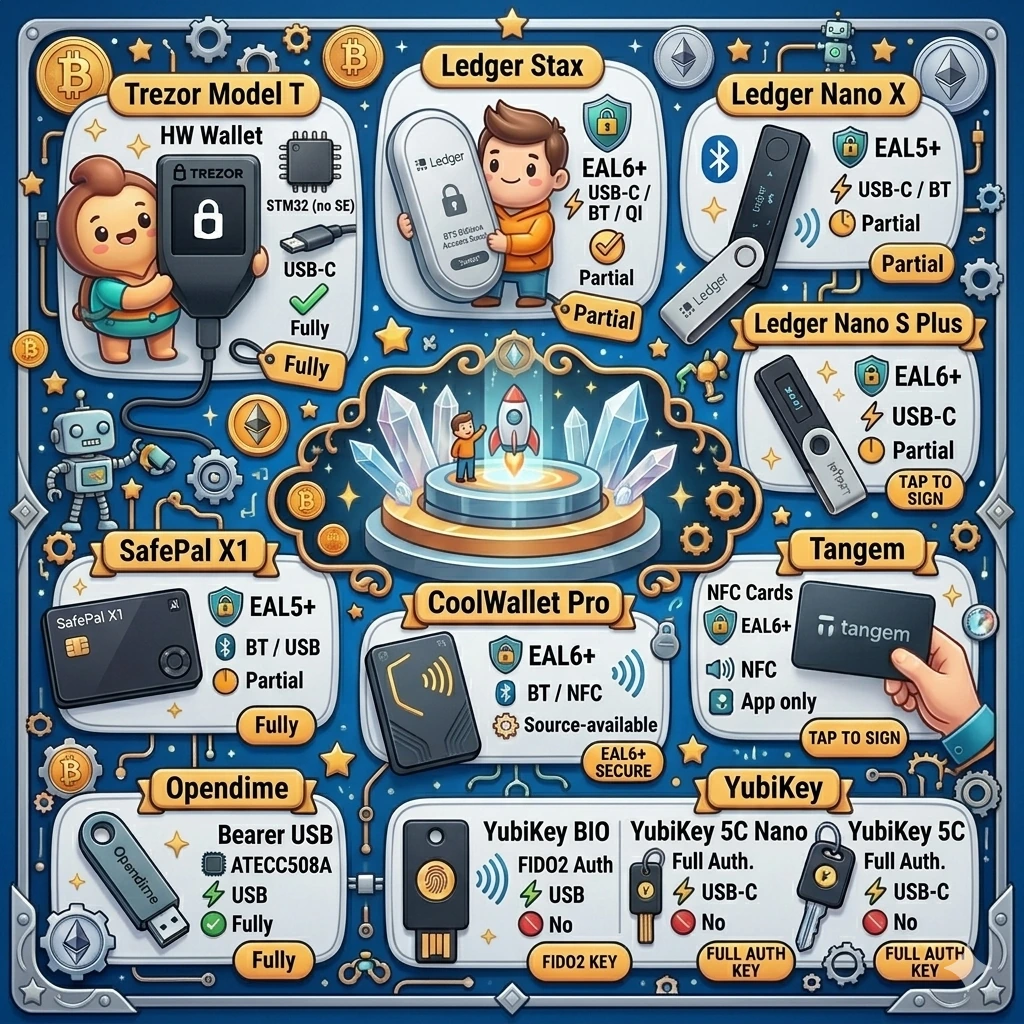
| Device | Type | Chip | Connectivity | Open Source | Price |
|---|---|---|---|---|---|
| Trezor Model T | HW Wallet | STM32 (no SE) | USB-C | Fully | $219 |
| Ledger Stax | HW Wallet | EAL6+ | USB-C / BT / Qi | Partial | $399 |
| Ledger Nano X | HW Wallet | EAL5+ | USB-C / BT | Partial | $149 |
| Ledger Nano S Plus | HW Wallet | EAL6+ | USB-C | Partial | $79 |
| SafePal X1 | HW Wallet | EAL5+ | BT / USB | Partial | $70 |
| CoolWallet Pro | HW Wallet | EAL6+ | BT / NFC | Source-available | $149 |
| Tangem | NFC Cards | EAL6+ | NFC | App only | $55-70 |
| Opendime | Bearer USB | ATECC508A | USB | Fully | ~$13 |
| YubiKey Bio | FIDO2 Auth | – | USB | No | $80-95 |
| YubiKey 5C Nano | Full Auth | – | USB-C | No | $68 |
| YubiKey 5C | Full Auth | – | USB-C | No | $55-65 |
Lessons from Running This Stack
The biggest risk is not the hardware, it’s Ledger’s data breaches. Three separate incidents (2020, 2023, 2026) exposed customer names, physical addresses, and order details. Your device might be impenetrable, but if attackers know your home address and that you own crypto hardware, the threat model shifts from digital to physical. I use a PO box for all hardware wallet orders.
Register at least two YubiKeys on every exchange. The “I lost my only 2FA device” recovery process at most exchanges takes weeks and involves identity verification that you don’t want to deal with during a market event.
Multisig across different manufacturers is the closest thing to trust minimization. A 2-of-3 setup using devices from Trezor, Ledger, and SafePal means a firmware backdoor in any single vendor’s code cannot move your funds. The coordination overhead is worth it for significant holdings.
Test your backup. Every six months, I verify that recovery seeds restore correctly on a clean device, that Shamir shares reconstruct properly, and that backup YubiKeys still authenticate. Untested backups are not backups. The offline tools I lean on for that, validating a BIP39 seed, recreating a device-derived password without the device, are the personal crypto tools I wrote up separately.
Frequently Asked Questions
Why do you need multiple hardware wallets?
Each device covers a different threat model. Trezor lets you audit the code (open-source firmware), Ledger protects against physical key extraction (EAL6+ secure element), YubiKey blocks phishing on exchanges. No single device covers all scenarios.
Which is safer, Ledger or Trezor?
The question is misframed: they have different security models. Trezor is fully open-source, you can audit the code, but the chip is vulnerable to lab attacks. Ledger uses a certified secure element, but the firmware is closed-source. The optimal setup uses both in a 2-of-3 multisig scheme.
How do you protect against Ledger data breaches?
Order to a PO box, not your home address. Use a separate email for orders. Three Ledger data breaches (2020, 2023, 2026) exposed buyer names and physical addresses, shifting the threat from digital to physical.
How many YubiKeys do you need for exchanges?
At least two per exchange, primary and backup. The recovery process when you lose your only 2FA device takes weeks and requires identity verification, which can be critical during market events.
What is multisig and why does it matter?
Multisig (2-of-3) requires signatures from two out of three devices from different manufacturers to move funds. A firmware backdoor in any single vendor’s code cannot compromise your keys. Basic operational security for holdings above $50-100K.
Need a consultation?
If you need professional expertise, book your free 15-minute consultation.