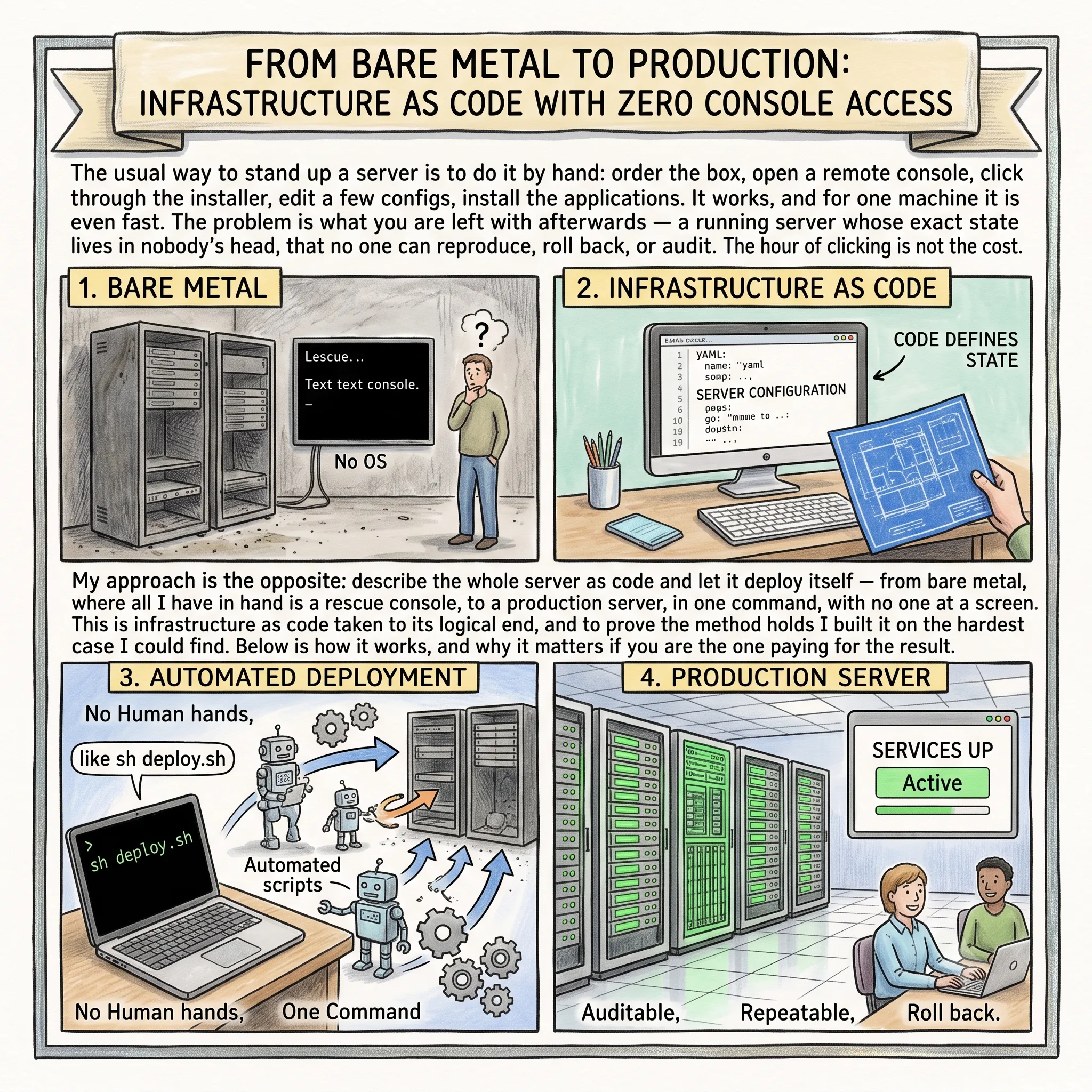
The usual way to stand up a server is to do it by hand: order the box, open a remote console, click through the installer, edit a few configs, install the applications. It works, and for one machine it is even fast. The problem is what you are left with afterwards, a running server whose exact state lives in nobody’s head, that no one can reproduce, roll back, or audit. The hour of clicking is not the cost. The cost is that nothing about it is repeatable, none of it is infrastructure as code.
My approach is the opposite: describe the whole server as code and let it deploy itself, from bare metal, where all I have in hand is a rescue console, to a production server, in one command, with no one at a screen. This is infrastructure as code taken to its logical end, and to prove the method holds I built it on the hardest case I could find. Below is how it works, and why it matters if you are the one paying for the result.
- The Method Matters More Than the Platform
- “Manual or Terraform” Is the Wrong Question
- The Install Pipeline Is Infrastructure as Code
- How It Works, With No Screen Access
- Reliability, Tests, and Fleet Operations
- No Black Box: Verifiability and Transparency
- The Stack
- Why This Matters If You Are the One Paying for It
- Frequently Asked Questions
- Sources & Tools
- Need a Consultation?
The Method Matters More Than the Platform
I did not build a bet on one product. I built a repeatable method for fully automated setup under hard, hostile conditions, and the principle behind it is simple: automate the hardest case, and everything else follows the same pattern. Pick the worst environment on every axis, make it work there, and the easy cases become trivial by comparison.
- Hardest conditions, bare metal. My running example is Hetzner: all you get is a physical server and a rescue console (the Robot panel plus a Rescue System). No friendly cloud console, no one-click install, no pre-baked images, no instance-metadata service, the exact opposite of AWS EC2, where a ready machine is handed to you on a plate. I reach a production server automatically anyway. The provider does not matter: the same method works on any bare metal, Hetzner is just a convenient example.
- Hardest platform, VMware ESXi. I chose ESXi deliberately as the least convenient OS to install unattended: proprietary, UEFI-only, genuinely awkward without a human at the keyboard. If I can land even that on bare metal with no console, then Proxmox VE or any other hypervisor and any open-source OS drop in the same way, trivially.
- Hardest application, Veeam on Windows. A backup appliance on Windows is just an example of fully automated install-and-configure of an application in the least convenient environment for it. On Linux the same approach installs and configures anything, and there it is easy.
“Manual or Terraform” Is the Wrong Question
People argue about infrastructure automation as if there were only two options, do it by hand, or put everything in Terraform. But that is the wrong way to look at it. Installing a bare-metal hypervisor and managing virtual machines are different layers, and each is automated by a different tool. Lump them together and you will either over-engineer the part that should be simple or leave the part that should be code sitting in someone’s memory.
- L0, the OS onto bare metal. This lives below the API, at the rescue-console level, so Terraform cannot touch it. It is driven headless by the provider’s Robot API and a throwaway virtual machine with an unattended answer file.
- L1, base host configuration (management network, NTP, SSH, syslog, datastores, virtual switches, security): the job of Ansible, idempotently, straight against a standalone host.
- L2, the network (the router VM, additional IPs, the firewall): configuration as versioned code that lives inside the router itself.
- L3, the virtual machines (create, clone, disks, NICs): this is exactly where Terraform earns its keep.
So the real question was never “hands or Terraform”, it is “how deep do I push each layer into code.” Each layer gets the tool that fits it, and the layers are then assembled into one coherent pipeline. That is the difference between a pile of scripts and a method.
The Install Pipeline Is Infrastructure as Code
The whole path is described as code and assembled into one pipeline: Terraform declares the virtual machines, Ansible rolls out configuration and applications, idempotent scripts (safe to re-run any number of times) prepare the server itself, and the firewall lives as versioned code. One command, from the rescue console to a running server. And this is not dumb macros blindly replaying keystrokes: every step is verified against checklists and tests, and the server does not move on until the current stage is confirmed.
How It Works, With No Screen Access
- The OS installs with no monitor and no keyboard. The Robot API drops the box into rescue, and the install runs from a throwaway qemu VM straight onto the physical disk, a kickstart answer file for ESXi, autounattend for Windows.
- Routers and VMs deploy through govc over the vSphere API, no screen involved. The OPNsense installer is driven automatically over a serial link through a proxy host, and its configuration is injected without a password.
- The whole network in one pass. Because I am working at the rescue-console and hypervisor level, I bring up the entire network in a single run: the internal side (an intranet between the virtual machines) and the external side, routing, outbound access, and the firewall on the OPNsense router. That includes VLANs, VPNs, isolated segments, and secure links between sites.
- Applications are configured inside the guest via
govc guest.run, even when SSH and WinRM are firewalled shut. Readiness is detected by the VMware Tools heartbeat and the machine’s IP, so the pipeline never guesses whether the guest is up.
Reliability, Tests, and Fleet Operations
- Idempotency, in plain terms. The same script can run any number of times with no harm: it does not break what is already configured, it brings the server to the desired state regardless of where it started. If config has drifted or the script itself was updated, I just run it again and everything converges to the correct result. No “install once and pray.”
- Tests at every step. The scripts check for known problems themselves, and the set of checks keeps growing, every incident postmortem adds a new check right in the code, so that failure does not slip through again. And every finished server passes an automated benchmark (network, disk, CPU, latency) with a report.
- Fleet-wide fixes. Fix once, then re-run it idempotently across every server, or push the update to the whole fleet in one wave.
- Controlled rollback. Any change can be undone: return to the previous known-good revision in git and re-apply it idempotently, roll a VM back to the snapshot taken before the update, or rebuild the server from code from scratch. Data is rolled back separately, via snapshots and backups, not by the code itself.
- Domains and certificates, right from day one. All domains are managed correctly from the start, with real Let’s Encrypt TLS certificates issued and auto-renewed, sites and panels come up over HTTPS with no warnings. It works on any network, including behind a locked-down firewall, via the ACME DNS-01 challenge.
- Security-first. Secrets are GPG-encrypted on a YubiKey hardware key; plaintext never reaches the repository.
No Black Box: Verifiability and Transparency
The biggest advantage of this approach is not speed, it is that the customer gets a fully verifiable, transparent installation instead of a black box you have to take on trust.
- Everything lives in git. Configuration, scripts, and the infrastructure description are all under version control: every change shows who changed what and when; you can return to any past revision, diff any two, and review the code before it is applied. Git is the single source of truth and the basis for both audit and rollback.
- I verify the whole deployment myself. Not “ship it and forget”, every server is taken all the way and checked end to end, and anyone can re-check my work from the code.
- The code is reviewed by outside experts. I bring in outside senior engineers to review it, so it passes more than one pair of eyes.
- No human factor. The machine runs the same path the same way every time, no fatigue, no forgotten checkboxes, no “I did it my own way.” People do the reviewing and analysis, not the manual data entry where mistakes are born.
- Improvements ship as discrete updates. Every enhancement or fix goes out as its own update and is rolled out idempotently across the fleet, you can see exactly what it changes.
- Double testing. First the configuration itself is checked, then the whole deployment is exercised on a test environment, and only then does it reach production.
- Documentation you can actually read. The primary language is English, with the essentials for administrators also in Russian, and it can be adapted to any language on request.
- Everything is auditable. Both the first install and every later update are captured in code and logs, any step can be pulled up and re-checked. You see the full picture: what is installed, how it was verified, and what each update changes.
The Stack
The whole point is to describe infrastructure as code, instead of clicking through a manual step by step, I write what the result should be, and the tools bring the system to it. The set can be pure open-source end to end if you want it to be.
| Tool | What it is / what it gives |
|---|---|
| git | Version control, all code and configuration lives here. Full history (who, what, when), return to any revision, code review. The single source of truth. |
| Terraform | Describes the infrastructure itself as code, which virtual machines and resources are needed, and creates them from that description. |
| Ansible | Describes the desired state of servers and applications (settings, installed software) and brings the system to it. |
| VMware ESXi / Proxmox VE | The hypervisor. ESXi is the hardest example; Proxmox and any open-source one install the same way. |
| OPNsense | Router and firewall as its own virtual machine, where the complex traffic-routing, proxying, and VPN scenarios live. |
| govc | Manages virtual machines over the vSphere API, with no console. |
| qemu (in rescue) | A throwaway VM inside the recovery environment, used to install the OS onto bare metal. |
| kickstart / autounattend | Unattended OS-install answer files, no human needed (Linux · ESXi · Windows). |
| Let’s Encrypt | Free TLS certificates via ACME DNS-01 with automatic renewal. |
| GPG + YubiKey | Secrets are encrypted on a hardware key, plaintext never reaches the repository. |
| Veeam | An example application installed and configured fully automatically (Windows). |
Why This Matters If You Are the One Paying for It
This is not a lab demo, the reference servers run in production today, each carrying an OPNsense router on a real Let’s Encrypt certificate, with a backup repository where needed. And all of this rolls up into three things a business actually cares about. First, no black box: you receive an installation any competent engineer can read, verify, and continue, not an artefact only its author understands. Second, no key-person risk: the knowledge lives in code and git history, not in one administrator’s head, so no single person can hold your infrastructure hostage or take it with them. Third, the routine leaves your team: the busywork moves into automation, and people are freed to focus on architecture, checks, and improvement, the work you actually hired them for.
This is how I run infrastructure as a fractional CTO, the same first-principles approach I bring to assessing an IT department’s maturity: not as a service you cannot inspect, but as a transparent, auditable asset you own. If you would like to apply this to your own servers, get in touch here.
Frequently Asked Questions
Isn’t fully automating a two-server setup overkill?
The payoff is not the first install, for one box, clicking is faster. The payoff is everything after: repeatability, audit, rollback, and fleet-wide updates. The method scales from two servers to two hundred unchanged, and a rebuild from scratch costs one command instead of a lost afternoon.
Why VMware ESXi if it is the hardest case?
Precisely because it is the hardest. Prove the method on the worst OS to install unattended and everything else becomes easy. The method is not tied to VMware, Proxmox VE or any other hypervisor drops into the same pipeline, and the whole stack can be pure open-source.
Does this lock me into Hetzner or VMware?
No. Hetzner and ESXi are deliberately chosen hard examples, not requirements. The same principle works on any bare metal at any provider, and every proprietary piece has an open-source substitute in the same pipeline.
How do you install an OS with no console access?
The Robot API drops the server into rescue, and the install runs from a throwaway qemu VM straight onto the physical disk, driven by an unattended answer file (kickstart for ESXi, autounattend for Windows). From there govc takes over the machines over the vSphere API, still no screen.
Sources & Tools
- Terraform and Ansible: infrastructure and configuration as code.
- VMware vSphere / ESXi and Proxmox VE: the hypervisor layer; unattended Proxmox on bare metal.
- govc (govmomi), vSphere control over the API, no console.
- OPNsense: the router and firewall VM.
- Hetzner dedicated and the Rescue System: bare metal at any provider (the example here).
- kickstart / autounattend: unattended OS-install answer files.
- Let’s Encrypt (ACME DNS-01), GnuPG, and YubiKey: certificates and secrets.
Need a Consultation?
If you want your servers described as code, reproducible, auditable, and free of key-person risk, instead of hand-built black boxes, book a free 15-minute call.