The usual way to stand up a virtualization cluster is to do it by hand: install each node from a USB stick, click through the wizard, wire the network in the web UI, tweak configs until it works. For a demo it is fine. The problem is what you are left with afterwards: a running cluster whose exact state lives in nobody’s head, one that no one can reproduce, roll back, or audit. When a node dies at three in the morning, “I think I set it up like this” is not a recovery plan.
My three-node Proxmox cluster is the opposite: it is described as code from the metal up. A git clone and a set of Ansible playbooks reproduce the whole thing, including the parts most people leave as manual footnotes: the high-speed interconnect, the failover, the backups, the remote access. This is not a toy. It runs real workloads, it survives a node dying without me touching a keyboard, and every piece of it is written down. Below is how each layer actually works: not just what it is, but how it is built and why it is built that way, and why that matters if you are the one paying for the result.
- A Proxmox cluster you can rebuild from a git clone
- Everything is a role: the Ansible layer
- Why three nodes, not two
- A Thunderbolt mesh instead of a 10-gig switch
- Failover that actually works
- Backups that sleep between runs
- Remote access with zero open ports
- One registry describes every service
- Certificates that renew themselves
- A single pane, and an alert when it matters
- What broke, and what it taught me
- The stack
- Why this matters if you are the one paying for it
- References
- Frequently Asked Questions
- Sources & Tools
- Need a Consultation?
A Proxmox cluster you can rebuild from a git clone
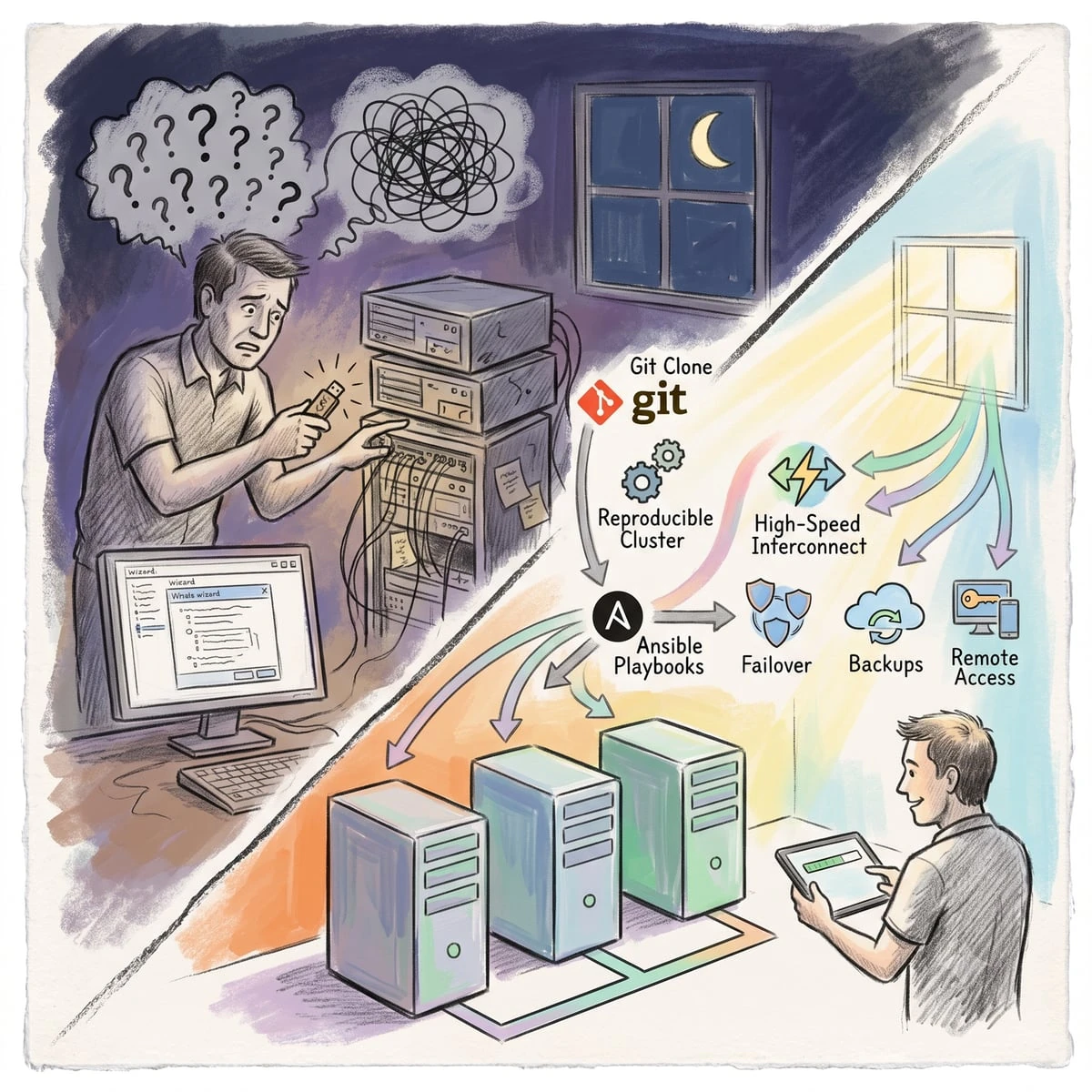
The point of this project is not the hypervisor. It is that every decision is written down as code, and every manual fix becomes a playbook. The state of the cluster lives in a repository, not in someone’s memory. If a node fails, I reinstall the base OS and re-run the automation; the machine reconverges to exactly the documented state: same network, same storage, same services, same security settings. That single property, reproducibility, is what separates infrastructure you own from infrastructure that owns you, and everything below is in service of it.
Everything is a role: the Ansible layer
The heart of the whole thing is a single Ansible repository, and its structure is the architecture. Nothing about the cluster is configured by logging in and typing commands; it is configured by describing the desired end state as code and letting Ansible make reality match it. Three ideas do the heavy lifting.
Inventory and variables separate the “what” from the “where.” An inventory lists the nodes; cluster-wide settings live in group variables; anything specific to one node lives in that node’s own variables. The same role behaves correctly on every node because the facts that differ are data, not code. Add a node, describe it in inventory, run the playbook, and it converges to a peer of the others with nothing hand-typed.
Each responsibility is its own role. The cluster is not one giant script; it is a set of small, focused, reusable roles, each owning one job:
- Host hardening: SSH policy, firewall, users, the security baseline every node must meet.
- Repositories and packages: the exact software sources and versions, so every node runs an identical, known stack instead of “whatever was current the day it was installed.”
- Certificate distribution: real TLS certificates pushed to every internal service, renewed and re-deployed as code, so nothing serves a browser-warning self-signed cert.
- Monitoring: health checks and metrics wired up the same way on each node, so the cluster reports on itself.
- The Thunderbolt mesh: the interconnect described below, built entirely by its own role.
Playbooks compose roles by intent, and tags make runs surgical. The playbooks are grouped the way you actually think about the system: infrastructure (cluster, network, storage), maintenance (certificate deployment, cleanup), monitoring, and services. Tags let me run exactly one slice (“reconfigure only the storage node’s failover,” say) without touching anything else. And because every role is idempotent, running a playbook twice is safe: the second run reports zero changes, because reality already matches the code. That property is what makes “re-run the automation” a trustworthy recovery step rather than a gamble.
Underneath the tooling is a rule that turns a pile of playbooks into a discipline: every manual fix must become code before the task is considered done. The loop is always the same: form a hypothesis, verify it against documentation and reality, apply it, check the actual effect, and then fold the working solution back into a role. A concrete example: I once assumed a proxy had applied a real certificate because its API reported one. Verifying with a raw TLS handshake showed it was still serving a self-signed cert; the API had lied. The fix (re-issue through the right path and reload) then went straight into a playbook, so that class of mistake can never silently recur. A fix that only lives in my shell history is not finished; a fix in a role is.
Why three nodes, not two
High availability needs a majority to make decisions safely. Two nodes cannot: when the link between them breaks, each one thinks the other is dead and both try to take charge. That is split-brain, and it corrupts data. A third node is the tie-breaker: the cluster only acts when a majority agrees, so there is always a clear winner.
In my build the third node is a lightweight witness that does double duty as the backup server. It holds a vote and it holds the backups, without needing to be a full compute peer. An odd number of nodes, a clear majority, no split-brain, and no wasted hardware pretending to be a third workhorse. It is a small design decision that buys real resilience for almost nothing.
A Thunderbolt mesh instead of a 10-gig switch
Cluster nodes have to talk to each other quickly and with low latency: for coordination, for live-migrating a virtual machine off a node before maintenance, for replicated storage. The textbook answer is a 10- or 25-gigabit switch: expensive, power-hungry, and one more box that can fail. Instead I wired the nodes directly to each other over Thunderbolt (the same port you would plug a monitor into) as a point-to-point mesh. Thunderbolt 4 gives roughly 20 Gbit/s per link, Thunderbolt 5 about double, for the price of a cable.
Making a video port behave like a reliable cluster network is where most write-ups stop and mine keeps going. It took real work, and all of it lives in one Ansible role:
- Stable interface names. Thunderbolt ports do not come up with predictable names, so the role pins them with systemd link files. A cluster network whose interfaces rename themselves on reboot is not a network you can trust; this makes them deterministic.
- Dynamic routing over the mesh. The links run a real routing protocol: OpenFabric, a member of the IS-IS family, carried by FRRouting. Because the mesh is routed rather than bridged, traffic reroutes automatically around a failed path instead of the cluster losing a limb. It is the same class of protocol that runs inside carrier networks, scaled down to three machines.
- The kernel is tuned for the speed. Defaults are written for a 1-gigabit office LAN and will choke a 20-gig link. The role raises the socket buffers into the hundreds of megabytes, switches congestion control to BBR and the queue discipline to fair-queuing, and enlarges the backlog, so the link actually delivers its bandwidth instead of stalling on tuning meant for another era.
- A deliberate 5 Gbit/s ceiling. Pushed to full saturation the Thunderbolt link would occasionally reset, and a rock-steady 5 Gbit/s beats a flaky 20. Traffic shaping caps each interface on purpose. That trade-off is invisible on a spec sheet; you only find it by running the thing under sustained load and watching what actually happens.
There is also a modern-platform quirk worth the mention, because it is exactly the kind of thing that eats an evening if you do not know it. The cluster’s heartbeat layer expects every node to advertise the same number of network rings. The witness node has no Thunderbolt, so it gets a harmless placeholder address to keep the counts equal. One line of config, encoded as a role, and hours of confusing quorum errors simply never happen again, for me or for anyone who inherits the repo.
The result is a two-link fabric: the ordinary network as the primary path, and the Thunderbolt mesh as a fast, independent second path for cluster traffic. On top of it, across the hosts and the machines that move real data, I run jumbo frames (a 9000-byte packet size instead of the default 1500) for measurably higher throughput on file shares and migrations, aggregated over a bonded pair of network cards so a single dead cable never takes a host offline. Jumbo frames only pay off if every device on the path agrees on the larger size, so the setup is verified end to end with a maximum-size, do-not-fragment probe rather than trusted to have “just worked.” Verification over assumption, again.
Failover that actually works
Shared file storage is the classic single point of failure, so it is built to survive one node vanishing. The storage service runs inside lightweight containers, one on each of the two main nodes, and clients never talk to either directly. They talk to a single floating IP address that lives on whichever node is currently healthy.
The mechanism is the standard router-redundancy protocol (VRRP), run by keepalived. One container is configured with a higher priority and normally owns the address; the other stands by at a lower priority. The owner announces “I am alive” roughly once a second. Here is what happens when it stops:
- Seconds 0–3: the primary goes dark from a lost power feed, a network drop, or a crash. The standby misses a few heartbeats and waits out the timeout rather than reacting to a single blip.
- Around second 3: the timeout expires, the standby promotes itself, brings the floating address up on its own interface, and broadcasts a gratuitous ARP, effectively shouting to the network “that address is over here now” so switches update their tables instantly.
- Seconds 5–8: client sessions reconnect to the same address, now served by the surviving node, and carry on.
Total outage is on the order of five to eight seconds, with no human involved. The detail that makes it real rather than theatrical: the standby is not just holding an address, it is holding current data. The storage dataset is continuously replicated between the two nodes, so when the address moves, the files are already there and current. A floating IP with stale or missing data behind it is a demo; this one is a safety net.
Backups that sleep between runs
Backups are only worth anything if they run without you, restore reliably, and do not cost a fortune to keep. This is the subsystem I am most quietly proud of, because it solves a real tension: bulk cold storage is cheap to buy but hungry if it spins twenty-four hours a day for a job that runs for ninety seconds. So the backup disks (a USB-attached enclosure on the witness node) stay physically powered down between windows, idling near 4 watts instead of the ~27 watts they draw spinning. Over a year, around the clock, that gap is real money and materially longer disk life.
The trick is that “powered down” has to be completely automatic and completely safe, in both directions. When the schedule fires, a purpose-built manager walks the whole lifecycle:
- Wake. Power the enclosure on at the USB level, import the storage pools by their stable hardware IDs, and bring the backup datastore online.
- Back up. Discover every virtual machine and container across the cluster, snapshot and stream each into the deduplicating backup server, and verify the result. The whole estate, around eighteen machines, completes in roughly ninety seconds, because deduplication means only changed blocks actually move.
- Prune. Apply a grandfather-father-son retention policy (a rolling window of recent, daily, weekly and monthly copies), so history is deep without growing without bound.
- Sleep. Reverse every step exactly: datastore offline, pools exported cleanly, USB power off. The disks spin down and go back to ~4 watts.
- Report. Push a summary to a chat channel, so silence is never mistaken for success; a backup you are not told about is a backup you do not have.
Two design choices make this robust rather than fragile. First, the manager is modular: power control, pool import/export, datastore state, and lock cleanup are separate components with single responsibilities, each testable on its own. When something misbehaves, there is exactly one place to look. Second, every step waits on a real condition rather than a fixed timer: it proceeds only when the pool is actually imported and the datastore is actually online, not after an optimistic ten-second sleep. Fixed timeouts are how backup scripts quietly fail at 3am; dynamic checks are how they keep working when a disk is slow to wake.
Remote access with zero open ports
Nothing in the cluster is exposed to the internet directly. There is no port forwarded on the router, so the inbound attack surface that most home and small-office setups quietly leave open simply does not exist here. And yet every service is reachable from anywhere, securely. That combination comes from stacking four Cloudflare Zero Trust pieces:
- An outbound tunnel. A lightweight agent inside the network dials out to the edge and holds the connection open. Because the connection originates from inside, there is nothing inbound to scan, port-knock, or brute-force. Public hostnames map to internal services through ingress rules, and where a service speaks HTTPS with its own internal certificate, the tunnel is told to trust it, so encryption is preserved end to end without a browser warning.
- Identity in front of everything. Each service sits behind an access policy: you authenticate against a real identity provider before you ever reach the service’s own login page. An unauthenticated visitor does not get a password prompt to guess at; they get nothing.
- A private-network client for the rest. Things that are not websites are reachable over an encrypted client (WARP) that puts an authorized device onto the private network, without exposing those services publicly at all.
- Split-horizon DNS. The same hostname resolves to the fast local path when you are at home and to the tunnel when you are outside, via DNS rewrites. One bookmark works everywhere, and inside the network you are never bounced out to the internet and back to reach a box two feet away.
Which services are published, and how, is itself data: each one carries a flag in a small registry that says whether it is local-only or reachable through the tunnel, and that flag drives both the dashboard and the access configuration. The net effect is “reach it from anywhere” without “anyone can reach it”: convenience and exposure decoupled, which is exactly the trade most setups get wrong in the direction of exposure.
The same zero-open-ports, identity-first access model is the perimeter block of the information security service I deliver for client infrastructure.
One registry describes every service
The thread that ties the services together is a single file: a registry that lists every service the cluster runs: its name, where it lives, the group it belongs to, and whether it should be reachable only on the local network or published through the tunnel. That one description is the single source of truth, and Ansible fans it out to everything downstream that needs to know:
- the reverse proxy gets its routing and TLS configuration;
- the dashboard gets its tiles, grouped and iconed;
- the zero-trust layer gets its ingress rules and access policies;
- monitoring gets the list of things to watch.
Add a service in one place, run one playbook, and it appears everywhere at once, proxied, encrypted, on the dashboard, monitored, and (if you asked for it) reachable from outside, with no step done twice and no chance of the proxy and the dashboard disagreeing about what exists. Configuration drift, the slow rot where reality and documentation quietly diverge, cannot even start here, because there is exactly one description and everything else is generated from it.
Certificates that renew themselves
Nothing in the cluster serves a browser-warning self-signed certificate, and no certificate is ever renewed by hand. A reverse proxy terminates TLS for every published service with real certificates from Let’s Encrypt, issued and renewed automatically over the ACME protocol well before they expire. The yearly “the certificate lapsed and the whole thing is down” fire drill simply does not exist.
Encryption does not stop at the front door, either. A dedicated Ansible role distributes real certificates to the services behind the proxy, so even service-to-service traffic inside the cluster is properly encrypted rather than trusting a self-signed cert and hoping nobody notices the warning. All of it is described as code and driven from the same registry, so a new service is HTTPS-correct the moment it is added, not after someone remembers to fix the padlock.
A single pane, and an alert when it matters
A cluster you cannot see is a cluster you cannot trust, so it is built to report on itself. Three layers do that, and, like everything else, they are generated rather than hand-maintained:
- One dashboard. A single self-hosted homepage shows every service at a glance, grouped by function, each tile generated from the registry, so the dashboard is always complete and never lists something that no longer exists or misses something that does. It is the one bookmark that answers “what is running, and is it up?”
- Uptime monitoring. A dedicated monitor probes each service continuously and keeps the history: not just “is it up right now,” but “how often has it not been,” which is the number that actually tells you whether something needs attention.
- Alerts that reach you. The system pushes to Telegram: every backup run reports its result, and monitoring speaks up the moment a service stops answering. You learn that a disk enclosure did not wake, or a service fell over, from a message on your phone, not from a user complaining a week later. Silence is engineered to mean “healthy,” and anything else reaches you immediately.
What broke, and what it taught me
The honest part of any real system is what went wrong, and the mature part is that each failure became a permanent fix and a written lesson, not a repeated surprise. Three that earned their own post-mortems:
- The night the disks would not sleep. A backup run failed halfway and left the enclosure awake for an hour (27 watts for nothing) because the “put the disks to sleep” step never ran: the script died before reaching it. The fix was a guaranteed cleanup handler that fires no matter how the script exits, success or failure. A failure is now safe, not expensive: the disks always end up asleep.
- Silent half-imports. The backup pools imported unreliably until they were referenced by their stable hardware IDs instead of whatever device name the kernel happened to assign that boot. Before the fix, a run could quietly proceed against half the disk set; after it, imports are deterministic. The difference between a backup and a false sense of one is often this small.
- Death by encoding. A maintenance script broke when copied between machines because of invisible character-encoding and line-ending differences, the kind of bug that eats an afternoon and teaches nothing until you name it. Deployment now streams files in a way that cannot be corrupted in transit, and every file is validated on arrival.
None of these are glamorous. All of them are why the system runs unattended today, and each one lives as a lesson in the repository so it is never re-learned the hard way, by me or by whoever comes next.
The stack
- Proxmox VE: the hypervisor and clustering layer.
- Ansible: every host, service and setting as idempotent, versioned code.
- FRRouting with OpenFabric: dynamic routing over the Thunderbolt mesh.
- keepalived (VRRP): the floating IP and automatic failover.
- ZFS and Syncthing: storage integrity and live dataset replication.
- Proxmox Backup Server: deduplicated, verifiable backups.
- Cloudflare Zero Trust (Tunnel + Access + WARP): remote access with no open ports.
- Nginx Proxy Manager and Let’s Encrypt: reverse proxy and automatically renewed TLS.
- Homepage, Uptime Kuma and Telegram: the dashboard, uptime monitoring and alerts.
Off-the-shelf, open where it counts, nothing proprietary you cannot swap out. The same pattern scales from three mini-PCs on a shelf to a rack of servers without changing shape, because it is the pattern, not the parts, that does the work.
Why this matters if you are the one paying for it
A cluster is judged on three questions. Can it survive a node dying unattended? Can someone other than the person who built it operate it? And does it cost what it should to run? A Proxmox cluster built as code answers all three, and each answer is a business answer, not a technical one.
- No key-person risk. The knowledge lives in the repository, not in one engineer’s head. That is the difference between a system a company owns and a hostage situation, the same problem I write about in taking a server from bare metal to production as code.
- Auditability. You can read exactly what is running and why, roll any change back, and prove what changed and when. Nothing is a black box, and nothing depends on a memory that will eventually be wrong.
- Predictable cost. Reproducible infrastructure is cheap to rebuild, cheap to hand over, and, as the sleeping backup disks show, cheap to run. The savings are designed in, not hoped for.
Whether it is three small boxes at the edge or a production estate in a data centre, the method is identical: describe the system as code, verify every layer, automate every fix. And it is the method, not the hardware, that you are actually paying for.
References
Frequently Asked Questions
Sources & Tools
- Proxmox VE and Proxmox Backup Server: hypervisor, clustering and backups.
- Ansible: configuration as code.
- FRRouting and its OpenFabric routing for the Thunderbolt mesh.
- keepalived: VRRP floating-IP high availability.
- OpenZFS and Syncthing: storage and replication.
- Cloudflare Zero Trust: Tunnel, Access and WARP for zero-port remote reach.
- Nginx Proxy Manager and Let’s Encrypt: reverse proxy and automatic TLS.
- Homepage and Uptime Kuma: dashboard and uptime monitoring.
Need a Consultation?
If you want your infrastructure described as code: reproducible, auditable, and free of key-person risk, rather than hand-built black boxes nobody dares touch, book a free 15-minute call.