The moment a cluster gets its third node, the question of distributed storage comes up almost immediately, and it usually sounds like Ceph or ZFS. In the Proxmox interface Ceph installs in a few clicks, and the temptation is obvious: one shared disk across all machines, live migration with no waiting, no sync intervals. My three-node cluster has no Ceph. Data moves between nodes by ZFS replication, and backups go to a separate backup server.
Below is why the choice is this one, what it costs, and at what fleet size I would be wrong. A word up front on what this article will not contain: I do not quote recovery times, because I have no timed recovery runs, and numbers like that must not be invented. Vendor recommendations were checked against the Ceph and Proxmox documentation as of 24 September 2026.
- The short answer: on three nodes I choose ZFS replication
- Ceph costs more in network than in disks
- Two quorums on the same three machines
- What ZFS replication gives you and what it does not
- Data loss is measured by the replication interval
- Files need their own replication
- The copy that sleeps between windows
- Two incidents that taught more than the documentation
- Fifteen hundred lines of bash is already a program
- A backup is checked after every run, not when it is needed
- The image I do not build
- At what fleet size I would be wrong
- What I deliberately do not do
- The stack
- Why this matters if you are paying
- Frequently asked questions
- Ceph or ZFS for a three-node Proxmox cluster?
- How much data is lost with ZFS replication?
- Can a replica be used instead of a backup?
- Is a Thunderbolt full mesh enough for Ceph?
- At what cluster size is it worth moving to Ceph?
- Does a small cluster need Packer?
- Sources
- Need a consultation?
The short answer: on three nodes I choose ZFS replication
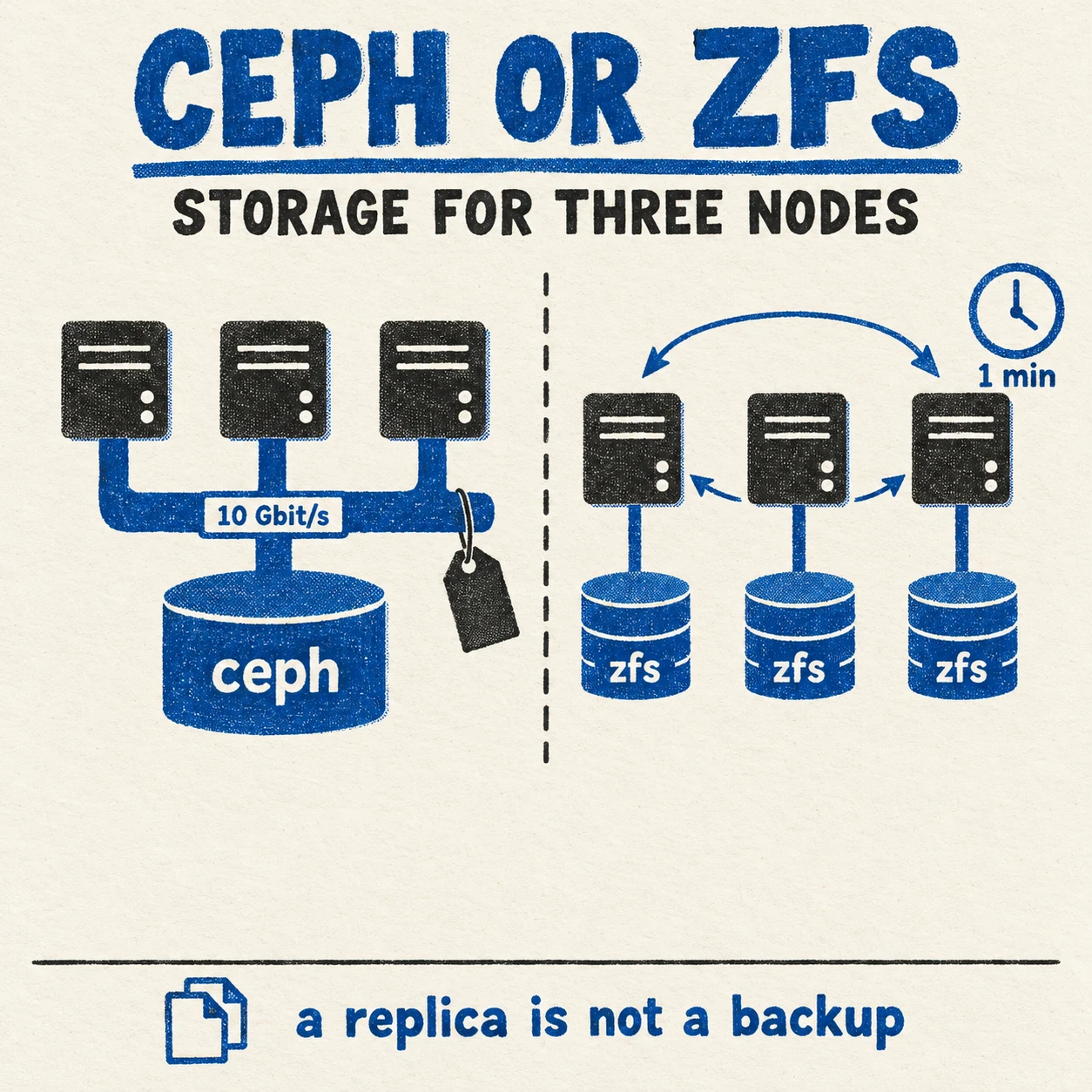
Each node has its own local disks under ZFS. Virtual machines and containers are replicated to neighbouring nodes on a schedule, and if a node goes down, the machine comes up on another one from the latest replica. Backups to a dedicated server run separately from that, and file shares are synchronised separately again.
There is one price for this choice, and it should be named straight away: replication is asynchronous. Anything that changed after the last sync is lost when a node fails. The Proxmox documentation says so plainly: high availability together with storage replication is allowed, but there may be data loss between the last synced time and the time a node failed. Ceph does not allow that loss, because it writes to several nodes at once. The rest of this discussion is about whether that property is worth what it costs.
Ceph costs more in network than in disks
The Ceph documentation asks for networking of at least 10 Gb/s, both among storage hosts and between them and clients. For substantial workloads it suggests 25 Gb/s. Proxmox puts it more strictly: at least 10 Gbps, used exclusively for Ceph traffic. By their own estimate, a single NVMe drive can saturate a 10 Gbps link on its own.
So the main cost of distributed storage is not disks at all. It is a dedicated fast network, separate from the one carrying users and management, and in a small office a switch for it as well, which is one more thing that can fail.
For three to five nodes without such a switch, Proxmox suggests a full mesh network: the nodes are wired directly to each other. That is exactly what I did, connecting the nodes with Thunderbolt cables. And here is what the measurement showed. The link negotiated 20 Gb/s, but on only one lane of two: the nodes have controllers of different generations. In the first second of the test, after buffer tuning, it ran at 6.6 Gbit/s, and then dropped to 0.94 Gbit/s sustained, with almost a million retransmissions. That is enough for scheduled ZFS replication. For storage that writes every operation to three nodes at once, it is a tenth of the recommended minimum.
The decision is recorded in configuration too: the Ceph package repository is explicitly switched off in the cluster deployment role. That is not a forgotten setting but a documented refusal.
Two quorums on the same three machines
I have written twice already about why there are three nodes and not two: in the Kubernetes piece and in the Proxmox piece. Here the same argument turns another side towards us.
A Proxmox cluster has its own quorum: a majority of nodes must see each other for the cluster to make decisions. Ceph has its own: its monitors also agree by majority. Put both on the same three machines and you get two quorums that fail together. Lose one machine and each loses a vote. Both survive losing one node, but their margins do not add up, they coincide. A second failure takes down the cluster and the storage at the same moment, and you have to recover both at once.
ZFS replication adds no such second quorum. Each node has its own data, and the replicas simply sit on the neighbours. If the cluster loses quorum, the data has not gone anywhere: it is on each node’s disks, and it can be brought up by hand.
What ZFS replication gives you and what it does not
Replication in Proxmox runs on top of ZFS snapshots: only the difference since last time goes to the neighbouring node, so the transfer is cheap and can run often. The minimum interval is one minute, the maximum once a week. The schedule uses the systemd calendar event format.
- It gives you: fast recovery of a machine on a neighbouring node after a failure, live migration that copies only the fresh difference, and independence from the network at write time. The machine writes to its local disk at disk speed.
- It does not give you: synchronous writes. Data loss on node failure is bounded by the interval, but it is not zero.
- It does not give you: protection from logical errors. A deleted file or a corrupted database is faithfully replicated to the neighbour on the next run. That is what backups are for, not replicas.
The last point is the one people confuse most often. A replica is a second copy of the current state, errors included. A backup is the state at an earlier moment. A replica protects against hardware dying, a backup protects against data dying, and neither replaces the other.
Data loss is measured by the replication interval
The replication interval is not a technical setting. It is the answer to “how many of the last minutes of work are we prepared to lose when hardware fails”. That question goes to the business, not to a default value.
For an internal service where a couple of records changed in the last fifteen minutes, fifteen minutes is fine. For a database of payments even a minute is unacceptable, and then the question is not the interval but the fact that such a database needs replication at the database level, not at the disk level. Distributed storage solves that too, but at the price described above.
And an honest caveat about the other half of this discussion. Recovery time, meaning how long it takes to come back after a failure, I have never measured with a stopwatch. So it is not here. Anyone quoting a recovery time without a run is quoting a hope.
Files need their own replication
Virtual machines and file shares live by different rules. A machine is replicated whole, as a disk snapshot. Files people work with are easier to synchronise at the file level: then every node sees the same thing and can serve the shares itself.
Syncthing does this: changes reach the neighbouring nodes in two to five seconds, and the sync keeps its own version history. Share users are described in a single file that syncs along with the data, and a change watcher applies the configuration on each node by itself. An edit on any node becomes an edit everywhere, and there is no state in which a user exists on one node but not on another.
This layer has the same nature as machine replicas: version history rescues you from an accidental edit, but not from a corrupted file that has already spread to every node. Only a backup protects against that. How Time Machine backups are served from storage like this I covered separately.
The copy that sleeps between windows
Backups go to a separate server, and its storage sleeps for most of the day: the disks wake up for the backup window and go back to sleep afterwards. How that works and what it saves is covered in detail in the backups chapter of the Proxmox cluster piece, so I will not retell it. What matters more here is what did not make it in there: two incidents that happened precisely because of this sleep and wake cycle.
Two incidents that taught more than the documentation
January 2026: machines left locked. During a backup, the backup system places locks on machines and containers and releases them when the copy is done. The problem appeared at the seam: the backup finished, and immediately afterwards the backup storage disks went to sleep. On some machines the locks had not been released in time. The consequences were nastier than they sound: such a machine cannot be started, stopped, migrated or snapshotted, and the interface simply shows “locked”. The conclusion: before the backup storage sleeps, locks are released explicitly, rather than relying on a process that has already finished to release them.
February 2026: pools visible but not attached. After waking, the disk enclosure came up, the disks spun up, ZFS could see them, and the backup failed immediately with an error that the pool was not imported. The answer lay in the states. The wake code knew how to recover pools in the “suspended” state, meaning pools that had been attached and lost their devices. But after sleep the pools ended up “available”: the system had detected them but not attached them. To the code that was the same thing; to ZFS these are different things. Now pools are imported explicitly after wake, by unique identifier rather than by name.
Both incidents share one lesson: “the disks woke up” and “the storage is ready” are different claims. Between them lie states that were not in the script author’s head. What you check is not that a step ran, but that the system reached the state you need.
Fifteen hundred lines of bash is already a program
Managing the backup cycle started as a script and grew into fifteen hundred lines of bash in a single file. At that size bash starts to have problems that never show up in short scripts.
The most treacherous one I stepped on: under set -euo pipefail, which everyone recommends for reliability, the expression ((count++)) with a zero counter terminates the script. A post-increment returns the old value, zero means “false” in bash arithmetic, the exit status becomes one, and strict mode dutifully exits. The mode switched on for reliability kills the script on the very first increment from zero. No error, no message, just the end.
Add corrupted characters in logs and no validation of configuration before a run. That is why a Python version exists: about twelve hundred lines in nine modules, with configuration validation, structured logs and tests, including runs of the full sleep and wake cycle. It is still a prototype, and the bash version is what runs. I say so plainly, because rewritten and deployed are not the same thing.
A backup is checked after every run, not when it is needed
Backups have an unpleasant property: their failures surface at the moment you need the copy. So each run is followed by a separate checklist: no locks left behind, the state of the backup storage, and what exactly went into the copy.
The last item matters more than it seems. A copy of the machines is not yet a copy of the cluster. The cluster’s own configuration, networking, services and scripts are saved separately, and along with them a restore script and an inventory of what is in the copy are generated. The earlier script, which made a copy from a single node, was judged unfit when reviewed: it gave the impression that the cluster was saved while saving one machine.
The image I do not build
Next to storage a second question always comes up: whether to build golden machine images, for example with HashiCorp Packer, so a new node or machine appears from a ready template. My decision is recorded on 23 June 2026: for two or three hosts, I do not.
The logic is simple. An image template pays off when there are many machines and they are identical. With two or three hosts, installing them by hand takes about twenty minutes each, and automating that installation costs more than it saves. So the unattended install file lives in the repository for reproducibility and emergency reinstallation, host configuration goes through Ansible, and virtual machines are created through Terraform. There is code where it pays for itself and none where doing it by hand is faster. That fork in the road is covered in detail in from bare metal to production.
A small thing worth knowing before you choose: Packer, like Vault, is distributed under the Business Source License, and the licensor is now listed as IBM. That does not stop you building your own images, but a dependency on somebody else’s licence terms is worth keeping in mind.
At what fleet size I would be wrong
Turning Ceph down is not a principle but the arithmetic of a specific cluster. The answer flips when several conditions come together:
- there is a dedicated network of 10 Gbit/s or more that holds that speed steadily, not just in the first second of a test;
- there are five nodes or more, so losing one does not eat the storage’s whole margin;
- acceptable data loss is zero at the disk level, not just for individual databases;
- machines move between nodes all the time, and waiting for replication gets in the way of work;
- there is someone who will run Ceph: handle recovery after a disk failure, watch capacity, do upgrades.
The last condition decides more often than the others. The Ceph documentation warns about it itself: if a large host fails, recovery can push the remaining disks past their full ratio, and the cluster halts operations to prevent data loss. Somebody has to know how to deal with that before it happens.
What I deliberately do not do
- I do not put Ceph on a network slower than 10 Gbit/s. The vendor recommendation here is not caution, it is the minimum.
- I do not treat a replica as a backup. A replica copies the error along with the data.
- I do not leave the replication interval at its default. It answers the question of acceptable loss, and that question goes to whoever is responsible for the data.
- I do not quote a recovery time I have not measured. Without a timed run it is a hope, not a number.
- I do not build golden images for two or three hosts. Install automation has to pay for itself.
- I do not pass a single node’s copy off as a cluster copy. Cluster, network and service configuration are saved separately.
- I do not pass a prototype off as a working system. Rewritten and deployed are different things.
The stack
- Proxmox VE: a three-node cluster with scheduled machine replication.
- OpenZFS: each node’s local disks, snapshots, and sending the difference between snapshots.
- Proxmox Backup Server: backups to a separate server.
- Syncthing: file share synchronisation between nodes.
- Ansible: node configuration and deployment of everything above.
- Ceph and Packer: considered and deliberately not used.
Why this matters if you are paying
Distributed storage looks free: it installs in the same interface as everything else, and the disks are already bought. The real price arrives later and under other headings: a dedicated network of 10 Gbit/s or more with its switch, a second quorum that falls over along with the first, and a person who knows how to recover Ceph after a disk failure. For a three-node cluster that price is usually higher than the benefit.
The second conclusion is about decisions, not hardware. The replication interval is the number that determines how much work the company loses when a server fails. It should be named by whoever is responsible for that data, not by whoever configured the storage. And the third: do not ask “do we have backups”, ask “when did we last restore from them”. If the answer is “never”, you may not have backups.
Frequently asked questions
Ceph or ZFS for a three-node Proxmox cluster?
If there is no dedicated network of 10 Gbit/s or more between the nodes, choose ZFS replication. Ceph and Proxmox both require such a network as a minimum, and on three nodes Ceph has no margin for a second failure. The price of ZFS is that replication is asynchronous and changes after the last sync are lost when a node fails.
How much data is lost with ZFS replication?
Everything that changed after the last sync. The minimum replication interval in Proxmox is one minute, the maximum once a week. The interval should be chosen to match acceptable data loss, not left at the default.
Can a replica be used instead of a backup?
No. A replica copies the current state along with its errors: a deleted file or a corrupted database goes to the neighbouring node on the next run. A replica protects against hardware failure, a backup protects against data loss.
Is a Thunderbolt full mesh enough for Ceph?
In my case, no. The link negotiated 20 Gb/s on one lane of two, but held 0.94 Gbit/s sustained after 6.6 in the first second. That is enough for scheduled ZFS replication; for Ceph it is a tenth of the recommended minimum.
At what cluster size is it worth moving to Ceph?
When there is a dedicated network of 10 Gbit/s or more, five nodes or more, zero acceptable data loss at the disk level, and someone who will run Ceph. The last condition decides more often than the others.
Does a small cluster need Packer?
For two or three hosts, usually not. An image template pays off when there are many identical machines. On a small fleet, an unattended install file in the repository, configuration through Ansible and machine creation through Terraform are enough.
Sources
- Ceph hardware recommendations: networking of at least 10 Gb/s, recovery after a large host fails.
- Proxmox: deploying a hyper-converged Ceph cluster: at least three servers and a dedicated network of 10 Gbps or more.
- Proxmox: full mesh network for Ceph on three to five node clusters.
- Proxmox: storage replication: intervals and data loss on failure.
- The Packer licence: Business Source License.
Need a consultation?
If you are choosing storage for your cluster, or want to know what your replicas and backups actually protect, book a conversation. We will go through the network, acceptable data loss, and when you last restored from a backup. Related reading: a Kubernetes cluster on your own hardware, an OpenBao secrets store.