An employee left a laptop in a taxi on Friday evening. The machine goes into lockdown from the panel, which also shows whether disk encryption is on and where the device was last seen, and the decision to wipe it can wait calmly until Monday. The panel is Go Guard, the fleet management system I build; in its own interface it calls itself MDM Platform.
Why build one instead of buying Intune or Jamf is covered separately in a self-hosted MDM instead of Intune and Jamf. This piece is about how it works inside.
- What it is and three ways to drive it
- The path of one command
- Four layers, and why each was chosen
- Six barriers and the second-factor priority
- What works today: Windows, Android, Linux
- Honest limits
- Frequently Asked Questions
- Why does the agent poll the server instead of receiving commands?
- What already works on Android?
- Can you sign in with a weaker second factor?
- Does the server need Docker?
- Need a Consultation?
What it is and three ways to drive it
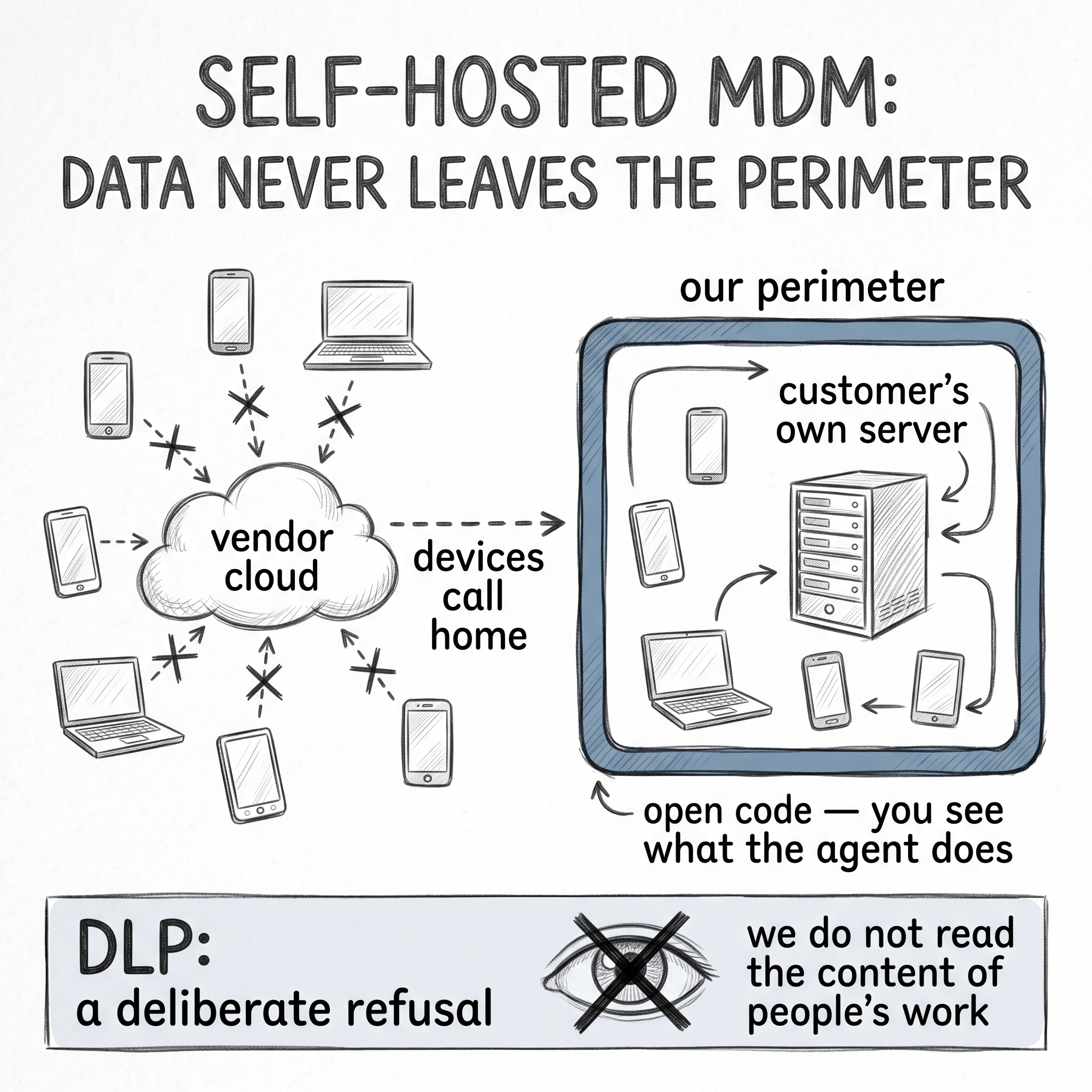
Every machine runs an agent that listens for jobs and quietly executes them; everything else lives on the server: the panel, the command queue, storage and the bot. The overview sits on the project site, and the live workflow is in a short demo video. There are three control channels:
- Web panel. Devices and their state, map, reports, roles: more than 130 functions.
- Telegram bot. The same actions as chat buttons: lock, reboot, screenshot, geolocation, approval of new devices.
- Mass commands. One action across a group: push software to a department, or check encryption across the whole fleet.
There are more than thirty-five commands, and lockdown is the special one: a full block that survives a reboot. It is exactly what separates “I locked the screen” from “I locked the device”.
The path of one command
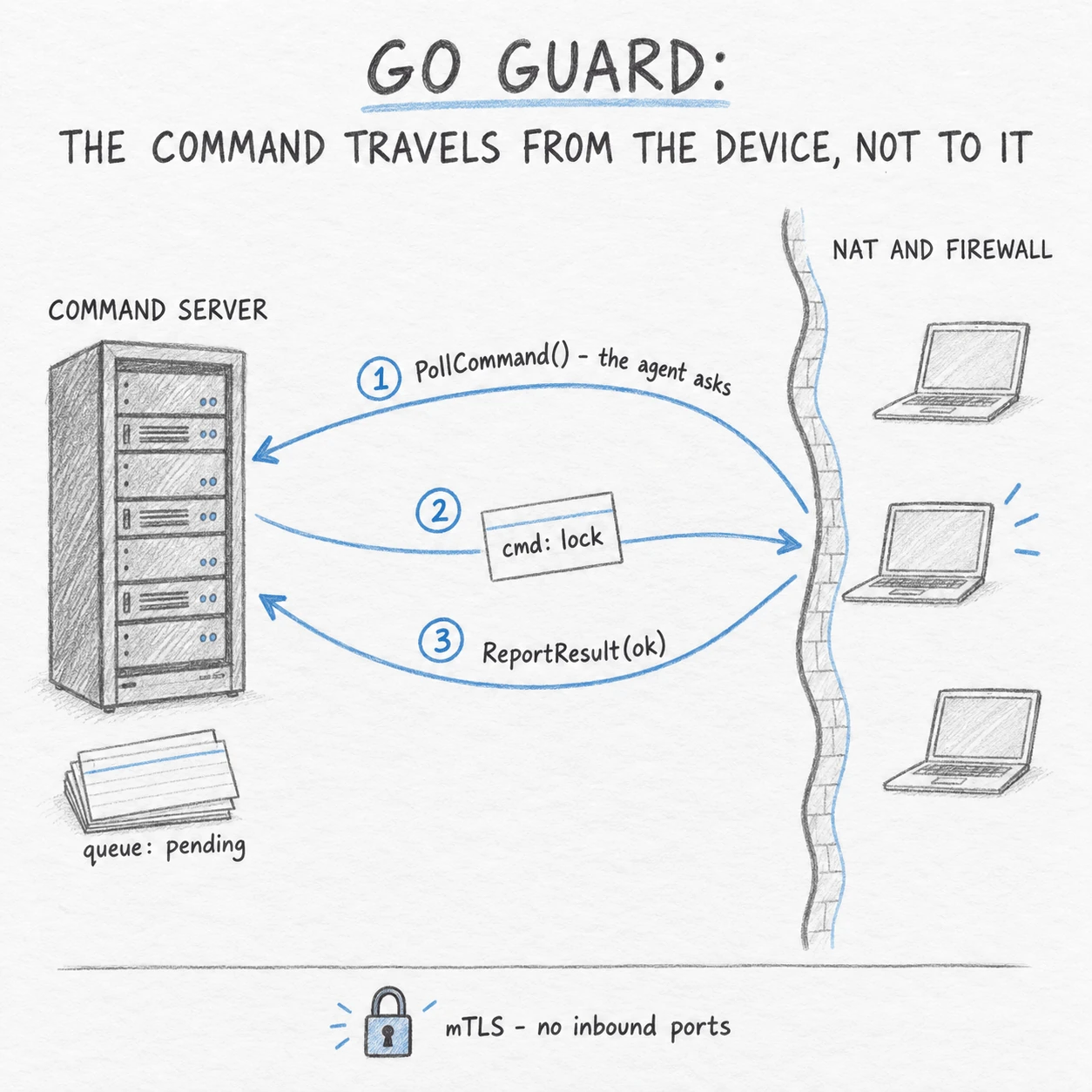
People expect an MDM server to reach out and touch the machine. Here it is the other way round, and “lock the screen” goes like this:
- The panel calls
SendCommand(cmd=lock)and the job enters the queue with statuspending. - The agent contacts the server itself:
PollCommand(), its normal cycle, whether or not jobs exist. - The server hands over
cmd: lock, the agent runsexecuteCommand(), the screen is locked. - The agent reports back:
ReportResult(status=ok). - Panel and bot pick the result up through
SubscribeNotifications, and a push lands in Telegram.
The device always initiates the connection, so no inbound port has to be opened on it: management works in the office, at home and on hotel Wi-Fi alike, meaning behind NAT and a firewall where a push from the server would never arrive. Android is the exception: there delivery is handled by Firebase.
Four layers, and why each was chosen
- Interface: AdminLTE 3.2 on Bootstrap 4, Leaflet maps, ApexCharts graphs, live updates over HTMX and WebSocket.
- Logic: Django 5.2 on Python 3.10 holds the panel and the roles (Daphne, :8000); the command server (:2053) and the bot (:8081) are Go 1.23, speaking gRPC with Protobuf v3.
- Data: PostgreSQL 14 (:5432) as the panel database, Redis 7 (:6379) as cache, agent data in JSON, geolocation through GeoIP2.
- Foundation: Nginx with TLS 1.2+ and Let’s Encrypt, Ubuntu Linux, systemd. Reachable from outside are Nginx (:80 and :443) and the agent port :2053; the other services listen on localhost.
Go compiles to a single self-contained binary: the agent is about 12 MB and drags along neither a runtime nor an installer, which is decisive for a program that has to be rolled out to hundreds of machines. gRPC with Protobuf is more compact than JSON over HTTP, and systemd without Docker means fewer layers in which something breaks at night.
Six barriers and the second-factor priority
Whoever gets the panel gets every machine at once, so a request passes six checks.
- TLS and mTLS. With agents it is a mutual x509 certificate check: only a trusted server can issue a command, not anyone who learned the address.
- Address filter. ACL by IP and CIDR ranges, applied before the login form.
- Login and second factor. Five methods: PIV, FIDO2, TOTP, Email, Telegram, plus backup codes.
- Roles. RBAC with organisations, departments and tags: a manager sees a department, an employee only their own machines.
- Encryption. Passwords and BitLocker recovery keys are stored encrypted (AES, PBKDF2).
- Audit log.
AuditLog,CommandHistory,ACLLog,LoginAttempt: who, from where, when and with what result.
The second factor follows a strict priority: YubiKey (PIV or FIDO2) first, then TOTP, Email, Telegram. With a hardware key active the system refuses to fall back to a weaker method, because otherwise it is enough to click “sign in another way” and pull the code out of a mailbox. Backup codes cover the loss of a key.
What works today: Windows, Android, Linux
This is a place not to overstate anything, and the matrix shows it:
| Capability | Windows | Android | Linux |
|---|---|---|---|
| Status | Production | Basic module | Planned |
| Agent and delivery | mdm-agent.exe, about 12 MB, v3.7; gRPC + mTLS, polling :2053 | APK, push over Firebase | no |
| Monitoring | CPU, memory, disk, software, IP | Model, Android version, battery, Wi-Fi, IP | no |
| Power and session | 7 commands: ping, lock, unlock, reboot, shutdown, notify, rename | Screen lock | no |
| Wipe and lockdown | lockdown on/off, wipe, TOTP unlock | wipe | no |
| Software and remote access | install_software, run_script, signed script library, RustDesk, HelpDesk | no | no |
| Disks and backup | 15 commands: BitLocker x10, Veeam x5, licences | no | no |
| Reports and geolocation | Screenshot, geo by GPS/Wi-Fi/IP, map, PDF | no | no |
Next comes the Android agent rising to the Windows level, then Linux, then a Telegram Mini App and scaling to 10,000+ devices. I deliberately name no dates.
Honest limits
- Polling is not instant. A command waits until the agent checks in again: that is the price of working behind NAT, and the trade is worth it.
- Android means monitoring, lock and wipe. No scripts, no software installation, no reports, so building a mobile fleet on it is premature. Linux waits its turn after Android.
- Rights on the machine. The agent enables BitLocker, installs software and wipes disks: operations that need elevated rights on the device. Hence the script signature the system verifies before execution; and still, whoever owns the server owns the fleet.
How this fits together with the perimeter, the SIEM and encryption is shown on my information security services page.
Frequently Asked Questions
Why does the agent poll the server instead of receiving commands?
The agent pulls a job from the queue with PollCommand and returns the result. No inbound port has to be opened on the device, so management works behind NAT and a firewall.
What already works on Android?
Monitoring (model, Android version, battery, Wi-Fi, IP), screen lock and wipe. Commands are delivered through Firebase and the agent is installed from an APK.
Can you sign in with a weaker second factor?
No. The priority is YubiKey (PIV or FIDO2), then TOTP, Email, Telegram. With a hardware key active, falling back to a weaker method is refused; backup codes cover its loss.
Does the server need Docker?
No, the server runs natively on Ubuntu under systemd: Nginx and the agent port :2053 face outward, everything else listens on localhost.
Need a Consultation?
If you are choosing how to manage a fleet of workstations, or want to know whether Go Guard fits your infrastructure, book a free call.