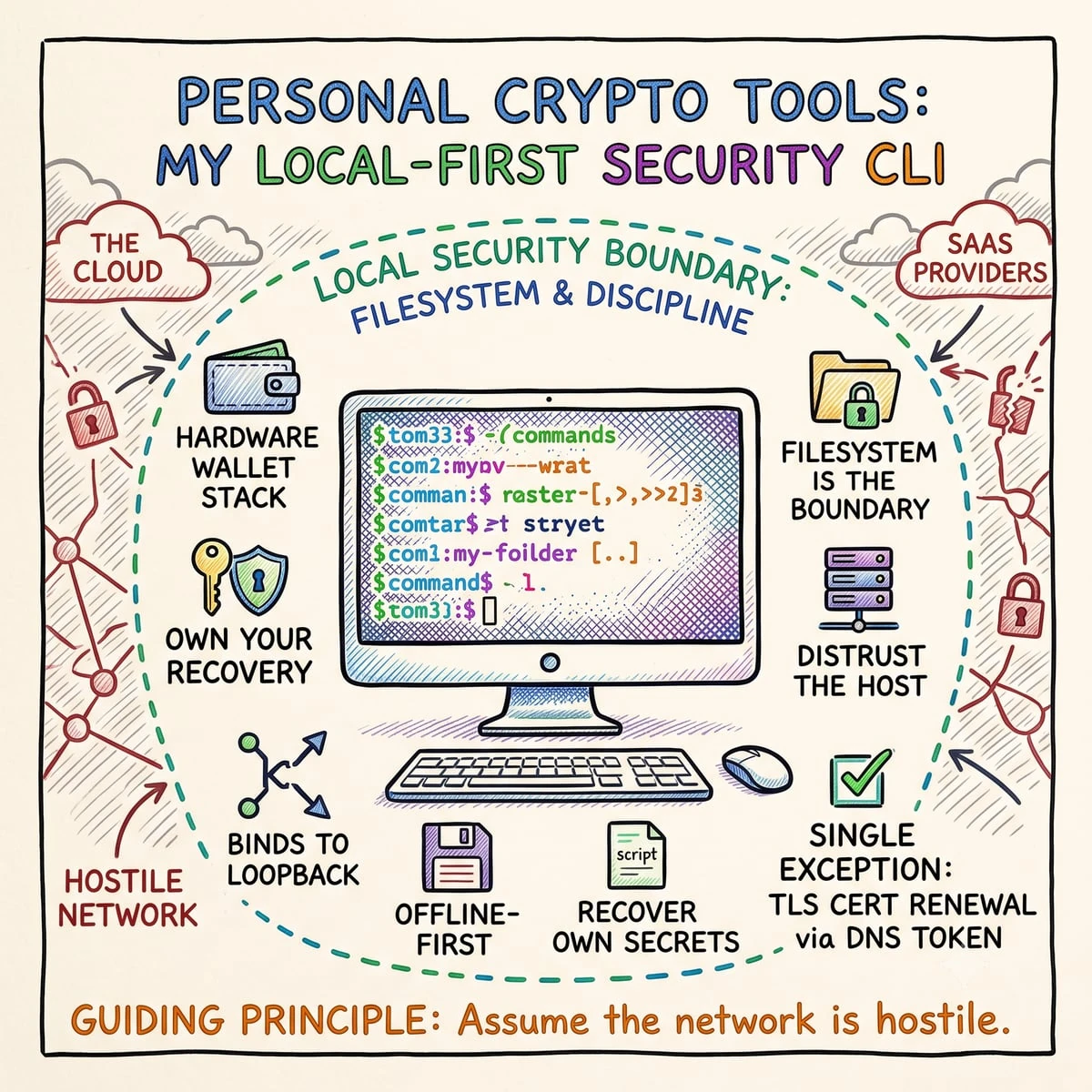
I keep the recovery story of my own crypto security in my own hands. Every tool I’m about to describe runs local-first and offline: it binds to loopback, sends nothing to the cloud, and is built so that I can recover my own secrets without trusting a vendor dashboard, a browser extension, or a SaaS provider that might be breached, sunset, or subpoenaed next year. The single deliberate exception is renewing TLS certificates, and even that runs through a DNS token I issued and scoped myself.
The guiding principle is own your recovery, distrust the host. Assume the network is hostile and the convenient tools are not on your side, so the security boundary becomes your filesystem and your discipline, not somebody else’s server. This is a walkthrough of the eight personal crypto tools I actually use, what threat each one answers, and, just as importantly, what each one deliberately does not protect against. If you run a hardware-wallet stack and want the software around it to be as honest as the silicon, this is how I think about it.
- Why Build Personal Crypto Tools at All?
- PIN Tools: Memory Aids, Not Ciphers
- pin-shift, a positional digit shift
- pin-24, offline recovery of a device-derived PIN
- Seeds, Keys, and Codes
- seed-generate / seed-validate, BIP39 done by the book
- wg-peer, a WireGuard config you can trust
- qr, turning text into a scannable square (and nothing more)
- Ledger Passwords: Backing Up Metadata, Never Secrets
- Certificates: Availability and Integrity
- The SSL / Let’s Encrypt manager, keeping local HTTPS alive
- smime-verify, checking an S/MIME bundle before you trust it
- The Whole Kit, by Threat Model
- Principles I Won’t Compromise On
- Frequently Asked Questions
- Is pin-shift encryption?
- If someone steals pin-24, can they recreate my passwords?
- Are my Ledger passwords stored in the backup files?
- Why DNS-01 over Cloudflare instead of normal HTTP validation?
- Why restart the whole app just to clear a secret?
- Does smime-verify make my email secure?
- Need a consultation?
Why Build Personal Crypto Tools at All?
What is now a tidy toolkit started as a folder of scattered, one-off scripts, a PIN helper here, a seed checker there, notes I’d forget the syntax of by next month. The mess worked, but it was unauditable and easy to misuse under pressure. So I consolidated the drift into one unified crypto-tools command-line interface: a single entry point with consistent arguments, predictable exit codes, and one place to read the source. The legacy scripts still ship, openly marked as “not part of the supported CLI,” because deleting history is its own kind of dishonesty.
On top of the CLI sits a local Streamlit “multitool.” Each visual page is a thin shim that imports the same logic the command line calls, so the browser UI and the terminal can never quietly disagree about what a tool does. The stack is plain Python (3.10+) leaning on well-reviewed libraries, cryptography for key operations, mnemonic for BIP39, qrcode for QR, rather than anything I rolled myself where a vetted primitive exists.
Two design choices set the security posture before any single tool runs. First, network containment: the launcher binds the UI to 127.0.0.1 only, runs headless, and turns telemetry off, nothing is reachable from the LAN, and nothing phones home. Second, restart with RAM cleanup: after a genuinely sensitive value (like a seed phrase) has passed through memory, the cleanest way to drop it is to kill the entire process and relaunch a fresh one with an empty heap. The app does exactly that, it exits with a dedicated code and a supervising launcher loop starts it again. Python can’t reliably zero out an immutable string, and a UI framework keeps several copies of every value you type across its internal buffers; ending the process is the only honest “forget.” It does not defend against live memory inspection while a secret is in use, nor against swap files or crash dumps, limitations I’d rather state than paper over.
PIN Tools: Memory Aids, Not Ciphers
Two of the tools deal with PINs, and the most important thing I can say about the first one is what it is not. Calling a digit trick “encryption” is how people end up over-trusting it, so I’m deliberate about the words.
pin-shift, a positional digit shift
pin-shift takes a PIN I have memorized and a secret per-position shift vector, then produces the PIN I actually type. The math is one line: for each position, typed[i] = (base[i] + vector[i]) mod 10, with no carry between columns, so I can do it in my head at the keypad. Add to encode, subtract to decode. Base and vector are equal-length digit strings, and crucially the vector is never cycled to cover a longer PIN, because reusing it would shrink the keyspace. Nothing is stored, nothing touches the network, and the on-screen reveal is off by default.
The threat it answers is narrow and real: it lets me stop carrying a written record of a real PIN, and it breaks the link to a base PIN that might leak (a reused one, an old shoulder-surfed one, a birthday). If an attacker knows the base but not the vector, they still face the full 10N candidates, the same odds as a random PIN. What it absolutely does not do is provide cryptographic secrecy. A single leaked (base, typed) pair recovers the entire vector with one subtraction. The algorithm is public; security rests solely on the vector staying secret, and it’s only sensible on attempt-limited, low-to-medium-sensitivity targets, a door lock, a card, a local app, never a bank password, a seed phrase, or anything an attacker can brute-force at machine speed. It’s a mnemonic, full stop.
pin-24, offline recovery of a device-derived PIN
The second PIN tool is the one I hope to never need. pin-24 is a bit-for-bit, fully offline reimplementation of the open-source Ledger Passwords derivation. Hand it a 24-word (or 12/15/18/21-word) BIP39 seed and a service nickname, and it reproduces the exact password or PIN the Ledger device itself would have typed, for the day the device is lost, wiped, or destroyed but I still hold the seed on a metal plate.
This is a deterministic derivation, not encryption and not random generation: the same seed and nickname always yield the same result. Under the hood it follows the device’s pipeline faithfully, the BIP39 phrase becomes a seed via PBKDF2-HMAC-SHA512 (2048 iterations, with optional passphrase), the nickname is hashed into a hardened BIP32 derivation path on the secp256k1 curve, the resulting node seeds a deterministic random generator (a NIST SP 800-90A CTR_DRBG over AES-256), and that stream is consumed with rejection sampling and a Fisher-Yates shuffle to assemble the password. The point of getting every detail right is that a recovery tool that produces a nearly correct password is worse than none at all. It’s validated against the canonical BIP39/BIP32 vectors and the project’s official functional vectors on a public test seed, though I’m honest that the suite checks math, not a physical device, so the last mile is mine to verify by hand.
Here’s the uncomfortable part, stated plainly: the tool’s biggest risk is the thing it requires you to do, type a BIP39 seed, the root of all your crypto security, into a computer at all. That exposes it to the OS, keyloggers, screen recorders, clipboard managers, and swap. So pin-24 is recovery-only by design: the real device is always safer, the UI leads with a banner that says so, and after use I clear the field and trigger the RAM-wiping restart. Use the hardware while the hardware still works.
Seeds, Keys, and Codes
seed-generate / seed-validate, BIP39 done by the book
These two are thin, intentional wrappers over a well-reviewed BIP39 library. seed-generate produces a standards-compliant English mnemonic at a requested length, 12/15/18/21/24 words, which map to 128/160/192/224/256 bits of entropy, drawing randomness from the operating system’s CSPRNG rather than anything clever of my own. seed-validate strips whitespace and tells me whether a phrase is a real BIP39 mnemonic: correct wordlist, correct length, correct checksum.
The genuinely useful one is seed-validate. A BIP39 mnemonic is an encoding of entropy plus a checksum into words, the words are the secret in human-readable form, not ciphertext, and that checksum is a gift: it catches a transposed word, a missing word, or a wrong word count before I rely on a backup. What validation does not tell me is anything about secrecy: a phrase can be perfectly valid and completely compromised. A “valid” result means well-formed, not safe, fresh, or unused. And a generated phrase is plaintext secret material the moment it exists, this code applies no passphrase and no encryption of its own; protecting it at rest is a separate, human responsibility.
wg-peer, a WireGuard config you can trust
wg-peer generates a fresh X25519 (Curve25519) keypair and renders a complete WireGuard client configuration, the [Interface] and [Peer] sections, with sensible defaults like PersistentKeepalive = 25. The design point is simple and important: the long-term private key is generated locally and never leaves the machine; only the public key is meant to be shared with the server. No key is ever typed by hand or pasted into a chat, which is exactly where VPN keys tend to leak. I pair it with the same hardware-key philosophy I described in my hardware-backed VPN write-up.
It generates keys and templates a config, that’s all; WireGuard itself does the tunnel cryptography later. So the honest caveats: the generated .conf contains that private key in cleartext, so a leaked config is a leaked key (rotate the profile and revoke the old public key server-side if that happens). The default routing sends all traffic through the tunnel, which is usually what I want but worth knowing. And it doesn’t register the peer for you, I still add the printed public key on the server myself. Treat the .conf like the secret it is: out of git, out of screenshots, out of chats.
qr, turning text into a scannable square (and nothing more)
qr encodes arbitrary text into a PNG QR code. It’s the most modest tool here and the one most often misunderstood. A QR code is a purely reversible optical encoding of the exact bytes you give it, there is no encryption, no hashing, no transformation. It exists for convenience: moving a WireGuard config, a TOTP otpauth:// URI, or a config fragment to a phone by camera, including across an air gap with no cable and no typing.
Which means its security property is exactly zero confidentiality. Anyone who sees or photographs the image recovers the original payload verbatim. The rule I follow: a QR code is exactly as sensitive as the text inside it. A QR of a public Wi-Fi SSID is fine to print on a wall; a QR of a seed phrase is a seed phrase, and is only ever handled the way I’d handle the words themselves.
Ledger Passwords: Backing Up Metadata, Never Secrets
This is my favorite tool to explain, because it sounds alarming and is actually reassuring once you understand the model. The Ledger Passwords app derives each password on the device from your seed, the entry’s nickname, and a charset mask, the passwords themselves are never stored anywhere, not on the device and not in any file. What you can lose is the list: which entries exist and how each is configured. So my ledger-pw tool backs up exactly that, the metadata, never the passwords.
A backup slot is a small JSON file holding entry nicknames and their charset masks (an 8-bit selector for uppercase, lowercase, numbers, separators, and special characters). The format is a superset of the official passwords.ledger.com backup, so files round-trip cleanly with the upstream open-source app. The CLI can import, normalize (sort and de-duplicate for clean diffs), add/rm entries, diff two backups regardless of ordering, and pack everything to the exact on-device binary layout for re-loading. The Streamlit page talks to a connected Ledger directly over USB, and every device read or write requires a physical button press on the device itself, the host can request, but only my thumb approves.
The threat this answers is a re-seeded or replacement device staring at an empty list: with the metadata backed up, I re-provision in minutes instead of trying to remember every account I ever added. Two honest caveats. First, restore is destructive, it overwrites the device’s entire entry list, which is why it’s gated behind explicit confirmation, an opt-in pre-restore backup, and an audit log. Second, the metadata is not encrypted: it reveals which services and accounts I hold, even though it never reveals a single password. That’s precisely why these files live in a private repository and would never belong in a public one, the same line I draw for my self-hosted password approver.
Certificates: Availability and Integrity
The SSL / Let’s Encrypt manager, keeping local HTTPS alive
Even tools that only ever listen on 127.0.0.1 deserve real, browser-trusted HTTPS, self-signed warnings train you to click through danger. The certificate manager keeps an inventory of my local certs, parses each one to report exactly how many days remain, and renews aggressively well before expiry. It issues through ACME DNS-01 over Cloudflare: domain control is proven by writing a temporary DNS record via an API token I scoped to Zone:DNS:Edit and nothing more. DNS-01 is the trick that makes publicly-trusted certificates work for a loopback-only service, a DNS record can point a real hostname at 127.0.0.1, so the browser trusts the padlock while the service never leaves my machine.
The threat here isn’t secrecy, TLS already provides that, it’s availability: a certificate silently expiring and breaking a tool at the worst moment. The manager renews with a generous margin (it acts on certs with fewer than 60 days left, on top of the ACME client’s own threshold) and shows a color-coded status table so nothing expires by surprise. The candid part: this is the only tool in the whole kit that makes an outbound network call, and the Cloudflare token it uses is a real secret, a leaked token means someone can change DNS for the zone. So the token and the private keys stay in a git-ignored secrets/ directory, chmod-locked, and out of every screenshot.
smime-verify, checking an S/MIME bundle before you trust it
smime-verify is a read-only diagnostic, not a mail signer or encryptor. Before I import an S/MIME credential bundle into a mail client, it confirms the pieces actually fit together: a PKCS#12 (.p12) container, an optional certificate chain (P7B), and an optional external public key. The checks are the ones that bite you later if you skip them, does the private key actually match the leaf certificate, is the leaf present in its own chain, do the chain signatures validate, is the certificate still inside its validity window, and do the Key Usage, Extended Key Usage, and CA/Browser-Forum S/MIME policy attributes say what they should.
The detail I’m proud of is proof-of-possession: rather than only comparing public keys as data, it has the private key sign a random challenge and verifies that signature with the certificate’s public key, actual cryptographic proof the two belong together. The boundaries, stated honestly: it does no online revocation checking (no OCSP or CRL), it establishes no trust in the issuing CA, and it doesn’t protect the private key, I still supply the bundle password, ideally via prompt or a file rather than a command-line flag that would land in shell history. It tells me a bundle is internally consistent, which is a different and more modest claim than “secure.”
The Whole Kit, by Threat Model
No single tool covers everything, and that’s the point. Each one answers a specific question and openly leaves the rest to other layers, the hardware, the operating system, and my own discipline:
| Tool | What it really is | Protects against | Does NOT protect against |
|---|---|---|---|
pin-shift | Positional mnemonic transform | A leaked/written base PIN on attempt-limited targets | Any analyst, one (base, typed) pair leaks the vector |
pin-24 | Offline device-derivation replica | Recreating a Ledger password when the device is gone | Typing the seed into a host (keyloggers, swap) |
seed-validate | BIP39 checksum check | Transcription typos in a written seed | Secrecy, a valid phrase can still be compromised |
wg-peer | X25519 key + config generator | Keys leaking via manual copy/paste | A leaked .conf (private key in cleartext) |
qr | Reversible optical encoding | Nothing, pure convenience | Confidentiality, anyone scanning reads it |
ledger-pw | Metadata backup/restore | Losing the entry list on a re-seeded device | Hiding which services you hold (metadata isn’t encrypted) |
| SSL manager | Certificate lifecycle | Silent cert expiry / local-HTTPS outages | A leaked Cloudflare token = DNS control of the zone |
smime-verify | PKI bundle diagnostic | Key/cert mismatch, broken chains, bad policy | Revocation (no OCSP/CRL); CA trust |
Principles I Won’t Compromise On
Local-first is a security feature, not a preference. Every secret operation that can happen offline does. The one tool that reaches the network (certificate renewal) is fenced behind a narrowly-scoped token, and I treat that as the exception that proves the rule rather than a door to prop open.
Name things honestly. A mnemonic is not a cipher, an encoding is not encryption, and a verifier is not a guarantee. Over-naming a tool’s strength is how people lean on it past its limits. Half of each section above is the “does not protect against” line, because that line is where real decisions get made, the same mindset I bring to security in general.
Treat configs and codes as the secrets they carry. A WireGuard .conf, a QR of a seed, a backup of password metadata, each is exactly as sensitive as what it contains, and each stays out of public git, chats, and screenshots. Backups that reveal which accounts I hold live in private repositories, never public ones.
Recovery-only means recovery-only. The tools that can reconstruct a secret from a seed exist for the day hardware fails, not for daily convenience. The device is always the safer path while it works, and the kit is built to wipe its own memory the moment a sensitive value has done its job. The same way I keep keys on hardware for everyday signing, the offline replicas stay in the drawer until they’re genuinely needed.
Frequently Asked Questions
Is pin-shift encryption?
No, and the distinction matters. It’s a positional mnemonic transform, each digit shifts by a secret per-position amount, modulo 10. Its keyspace is just 10N, and a single known (base, typed) pair recovers the whole shift vector with one subtraction. It hides a base PIN from casual shoulder-surfing on attempt-limited targets; it provides no cryptographic secrecy and should never guard a password, seed, or key.
If someone steals pin-24, can they recreate my passwords?
The tool alone is useless to them. Derivation requires your BIP39 seed, it simply reproduces, offline, what your Ledger would compute. The real danger isn’t the code; it’s typing the seed into a host computer at all. That’s why it’s recovery-only, runs offline, and wipes RAM by restarting the process once you’re done.
Are my Ledger passwords stored in the backup files?
No. The slot files store only metadata, entry nicknames and charset masks. The passwords are derived on the device from your seed and never leave it. The files are safe to keep in private git, but they still reveal which services you use, so they must never be made public and aren’t encrypted.
Why DNS-01 over Cloudflare instead of normal HTTP validation?
DNS-01 proves domain control by creating a temporary DNS record through the Cloudflare API, so it works for loopback-only services with no public webserver, a hostname can resolve to 127.0.0.1 while still passing validation. The token is scoped to editing DNS for one zone to limit the blast radius, and it’s the only outbound call the toolkit makes.
Why restart the whole app just to clear a secret?
Because Python can’t reliably zero an immutable string, and a UI framework keeps several copies of every value you type. After a seed has been entered, the only dependable cleanup is to end the process and relaunch a fresh one with an empty heap. It does not defend against live memory inspection while the secret is in use, or against swap and crash dumps, it’s a deliberate, bounded mitigation.
Does smime-verify make my email secure?
No, it’s a diagnostic verifier, not a mail signer or encryptor. It confirms a PKCS#12 bundle is internally consistent (the key matches the certificate via real proof-of-possession, the leaf is in its chain, signatures validate, the validity window and policy attributes are sane) before you import it. It does no online revocation checking and establishes no trust in the issuing CA.
Need a consultation?
If you’re building security tooling for yourself or your team and want a second pair of eyes on the threat model, book your free 15-minute consultation.