Over the past two years I have been running chat.ilia.ae as a self-hosted team messenger, a Rocket.Chat instance with custom white-label iOS and Android apps published on the App Store and Google Play. There are two brands: chat.ilia.ae for personal and consulting use, and EL·Hub for corporate communication within Estateliga. Both apps are React Native forks of the official Rocket.Chat mobile client, rebranded with custom icons, splash screens, server URLs, Firebase configs, and demo modes that generate pixel-perfect screenshots for store submissions. The apps are free, collect zero user data, and connect exclusively to servers I control.
This article covers the full stack behind those apps: the Build UI (a Streamlit web interface running at build.ilia.ae:8503), the white-label build system that compiles both brands from a single codebase, the screenshot and fixtures pipeline that drives demo states for store listings, and how the whole thing integrates with my mobile-stores-cicd toolkit for publishing to Apple and Google. I am including screenshots from every Build UI page, the actual CLI commands, architecture decisions, and the reasoning behind the fixtures system that makes multilingual screenshots possible without manual device interaction.
- Why a self-hosted team messenger on Rocket.Chat
- Two brands, one codebase
- The white-label build system: build.py
- Brand switching
- iOS build process
- Android build process
- Version management
- Build UI: the Streamlit operator console
- Build ui home
- Build ui status
- Build ui ios
- Build ui android
- Build ui version
- Build ui upstream
- Build ui screenshots
- Capture tab
- Headlines tab
- Fixtures tab
- Gallery tab
- Crowdin sync panel
- Build ui logs
- Demo mode and fixtures
- Fixture pipeline: YAML to TypeScript codegen
- Brand isolation
- Crowdin integration for fixture text
- Screenshot pipeline integration
- Build ui architecture
- Security and deployment
- App Store and Google Play presence
- Why not official rocket chat app
- Operational workflow: a typical release
- What this costs
- Limitations and things I would do differently
- Frequently asked questions
- Can anyone use chat.ilia.ae?
- Why Rocket.Chat and not Matrix, Mattermost, or Zulip?
- Is there an Android app?
- How is this different from WhatsApp or Telegram?
- How does the Build UI relate to mobile-stores-cicd?
- Can you deploy this for my team?
- Is the build system open source?
- Source code and consulting
- Need a consultation?
Why a self-hosted team messenger on Rocket.Chat

The short answer is data sovereignty. My consulting work spans fintech compliance, blockchain architecture, and cybersecurity strategy for clients in regulated industries. Messages about client infrastructure, key management procedures, and compliance findings cannot sit on Slack’s servers in the US, subject to CLOUD Act subpoenas. They cannot live on Microsoft’s infrastructure under their data processing terms. And they definitely cannot go through consumer apps like WhatsApp or Telegram, where metadata analysis and contact scraping are standard operating procedure.
As a self-hosted team messenger, Rocket.Chat is open-source and has no per-user pricing. I run it on infrastructure I own, behind a reverse proxy I configure, with MongoDB storage I back up. There is no vendor lock-in because the data format is well-documented and the export tools work. There is no feature gating based on subscription tier. And because both chat.ilia.ae and EL·Hub have their own published apps on the App Store and Google Play, team members and clients install them the same way they would install any other messenger. No TestFlight links, no sideloading, no MDM enrollment. Just download from the store and log in.
The practical benefit is straightforward: I get Slack-level functionality (channels, threads, file sharing, push notifications, search, reactions, pinned messages) on my own terms. The apps are free for anyone to use. The “Data Not Collected” privacy label on the App Store is accurate. And when a client asks where their messages are stored, I can point to a specific server in a specific data center, not a vague reference to “our global infrastructure.”
The cost comparison is also worth mentioning. Slack charges $8.75 per user per month for the Pro plan. Microsoft Teams requires a Microsoft 365 Business subscription at $6 per user per month minimum. At 20 users, that is $2,100/year for Slack or $1,440/year for Teams, plus whatever compliance add-ons the enterprise tier demands. Rocket.Chat self-hosted has no per-user fee. The server cost is fixed infrastructure overhead, and the mobile apps are free. At any team size above a handful of people, the economics favor self-hosting, especially when you factor in the compliance cost of having messages on a third-party platform that you then need to audit, export, and govern through their API rather than your own database.
Two brands, one codebase
Running two separate Rocket.Chat app forks would be unmaintainable. Every upstream merge, every React Native version bump, every dependency update would need to happen twice. Instead, I maintain a single forked repository with a brand-switching system that rewrites all platform-specific configuration files at build time.
The two brands serve different audiences. chat.ilia.ae is the personal instance I use for consulting projects, development coordination, and client communication. EL·Hub is the corporate messenger for Estateliga’s real estate operations team, connecting agents, managers, and back-office staff across Dubai and Almaty. Both apps look and feel completely different to end users, but underneath they share the same React Native codebase, the same navigation structure, and the same upstream Rocket.Chat feature set.
What differs between brands: app icons, splash screens, display names, bundle identifiers, server URLs, Firebase Cloud Messaging configurations, App Store and Google Play metadata, and the demo mode fixture data used for screenshots. The brand switch touches every config file that contains any of these values, and the build system guarantees that switching from one brand to another leaves zero artifacts from the previous brand in the compiled output.
The white-label build system: build.py
The core of the build process is build.py, a single Python CLI that manages both brands across both platforms. It is not a wrapper around Fastlane or any Ruby toolchain. It reads brand definitions from YAML, rewrites platform configs directly, and shells out to xcodebuild and gradle for the actual compilation.
Brand switching
When you run build.py switch --brand chat-ilia or build.py switch --brand el-hub, the script rewrites the following files:
- iOS:
Info.plist(bundle ID, display name, URL schemes),.pbxproj(product bundle identifier, team ID),GoogleService-Info.plist(Firebase config), app icon asset catalogs, launch screen assets - Android:
build.gradle(applicationId, versionName),google-services.json(Firebase config),AndroidManifest.xml(package name, deep link hosts),strings.xml(display name), launcher icon resources across all density buckets - Shared:
app.json(app name, slug), environment config files (server URL, brand identifier), demo mode fixture references
The rewrite is deterministic and idempotent. Running it twice with the same brand produces identical output. Running it with the other brand cleanly replaces every value. There is a verification step after each switch that diffs the working tree against a known-good state for that brand and reports any files that do not match expectations.
The brand definitions live in a YAML config file that maps each brand slug to its full set of identifiers. Here is a simplified view of what a brand entry looks like:
chat-ilia:
  display_name: "chat.ilia.ae"
  ios_bundle_id: "chat.ilia.ae"
  android_package: "chat.rocket.ilia.ae"
  server_url: "https://chat.ilia.ae"
  firebase_ios: "brands/chat-ilia/GoogleService-Info.plist"
  firebase_android: "brands/chat-ilia/google-services.json"
  icons: "brands/chat-ilia/icons/"
  fixtures: "brands/chat-ilia/fixtures.yaml"

el-hub:
  display_name: "EL·Hub"
  ios_bundle_id: "chat.estateliga.work"
  android_package: "chat.estateliga.work"
  server_url: "https://chat.estateliga.work"
  firebase_ios: "brands/el-hub/GoogleService-Info.plist"
  firebase_android: "brands/el-hub/google-services.json"
  icons: "brands/el-hub/icons/"
  fixtures: "brands/el-hub/fixtures.yaml"
Adding a third brand would mean adding another entry to this file and providing the corresponding assets. The build system does not hard-code brand names anywhere, it iterates over the config and applies whatever brands are defined.
iOS build process
The iOS build runs through CocoaPods for dependency resolution, then xcodebuild with a Release configuration targeting the .xcworkspace. The output is an .xcarchive that gets exported to an IPA for App Store upload or TestFlight distribution. Build flags control code signing identity, provisioning profile selection, and whether to include bitcode (it does not, Apple deprecated it).
Pod install is a separate, optional step because it takes 2-4 minutes and only needs to run when dependencies change. The Build UI surfaces this as a checkbox so I can skip it during iterative builds where only application code changed.
Android build process
The Android build uses Gradle with the brand-specific applicationId already patched into the build files. Output can be either APK (for direct install and testing) or AAB (Android App Bundle, required for Google Play submission). Keystores are per-brand, each brand has its own signing key, and the build system verifies that the correct keystore is present before starting compilation.
Version management
Version bumping is coordinated across multiple files simultaneously. A single build.py version --bump minor command updates:
package.json, the source of truth for the version stringInfo.plist,CFBundleShortVersionStringandCFBundleVersionproject.pbxproj,MARKETING_VERSIONandCURRENT_PROJECT_VERSION- Android
build.gradle,versionNameandversionCode
All four files must agree. If they drift, which happens when someone edits a file manually or a merge brings in upstream changes, the version page in Build UI shows a drift warning with the exact mismatch. More on that below.
Build UI: the Streamlit operator console
The Build UI is a Streamlit web application that provides a browser-based interface for every operation that build.py supports. It runs at https://build.ilia.ae:8503/ with optional TLS termination. It is not a separate system with its own logic, it is a thin wrapper that calls the same CLI commands and shows their output in real time.
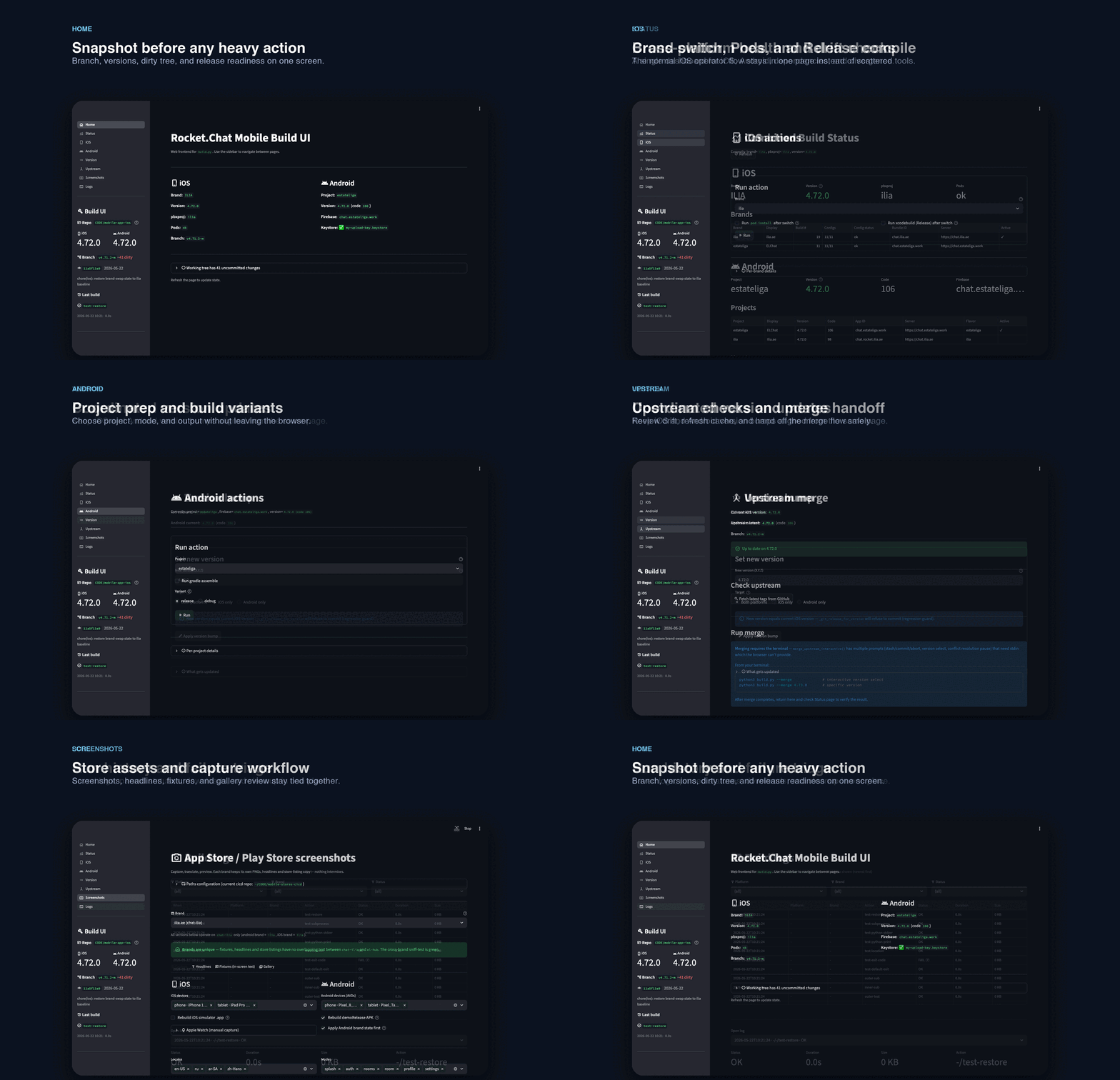
The interface has 8 pages: Home, Status, iOS, Android, Version, Upstream, Screenshots, and Logs. Navigation uses a sidebar with Material Design icons. Every page shares a global sidebar panel that displays the current repository state: active branch, clean or dirty working tree, current brand, iOS and Android version strings, and the timestamp of the last build.
Live subprocess streaming is the defining feature. When you trigger a build (iOS or Android), the UI spawns the subprocess and pipes its stdout into a st.code block that updates in real time. You see every compiler warning, every linker message, every pod install line as it happens. The subprocess handle is stored in Streamlit session state, which means you can cancel a running build from the UI without killing the whole server process.
Build ui home
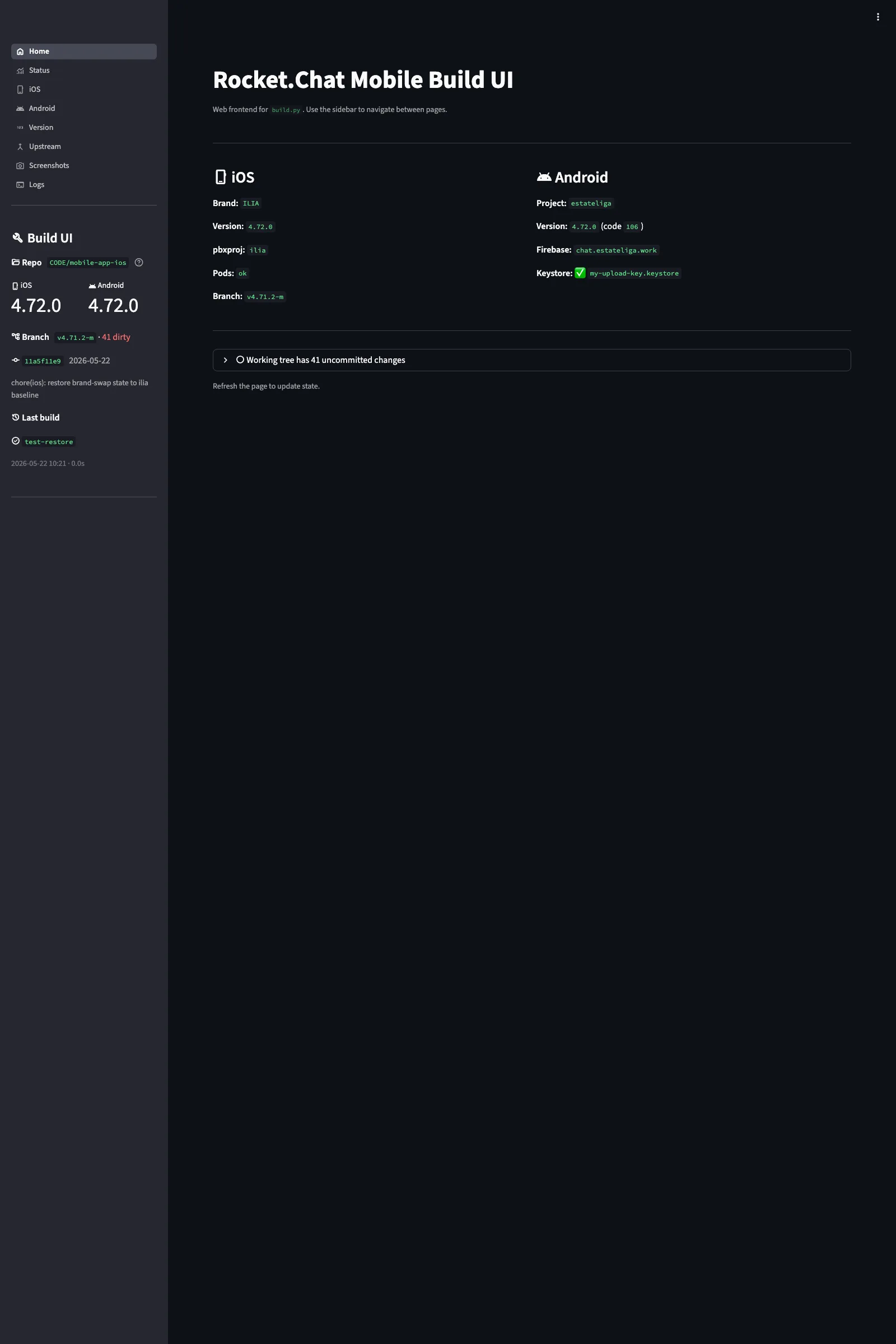
The Home page is a landing dashboard that shows the overall state of the repository. It displays the currently active brand, the iOS build status (last build time, output path, archive size), the Android build status (APK/AAB output, Gradle task), and a prominent dirty tree warning if the working directory has uncommitted changes. The dirty tree indicator matters because building from a dirty tree means the compiled binary does not correspond to any specific commit, which makes debugging release issues harder.
Home also shows the git branch and the last few commit messages, so I can confirm I am building from the right branch before starting a compile. There is no build button on this page, it is purely informational. The actual build triggers live on the iOS and Android pages.
Build ui status
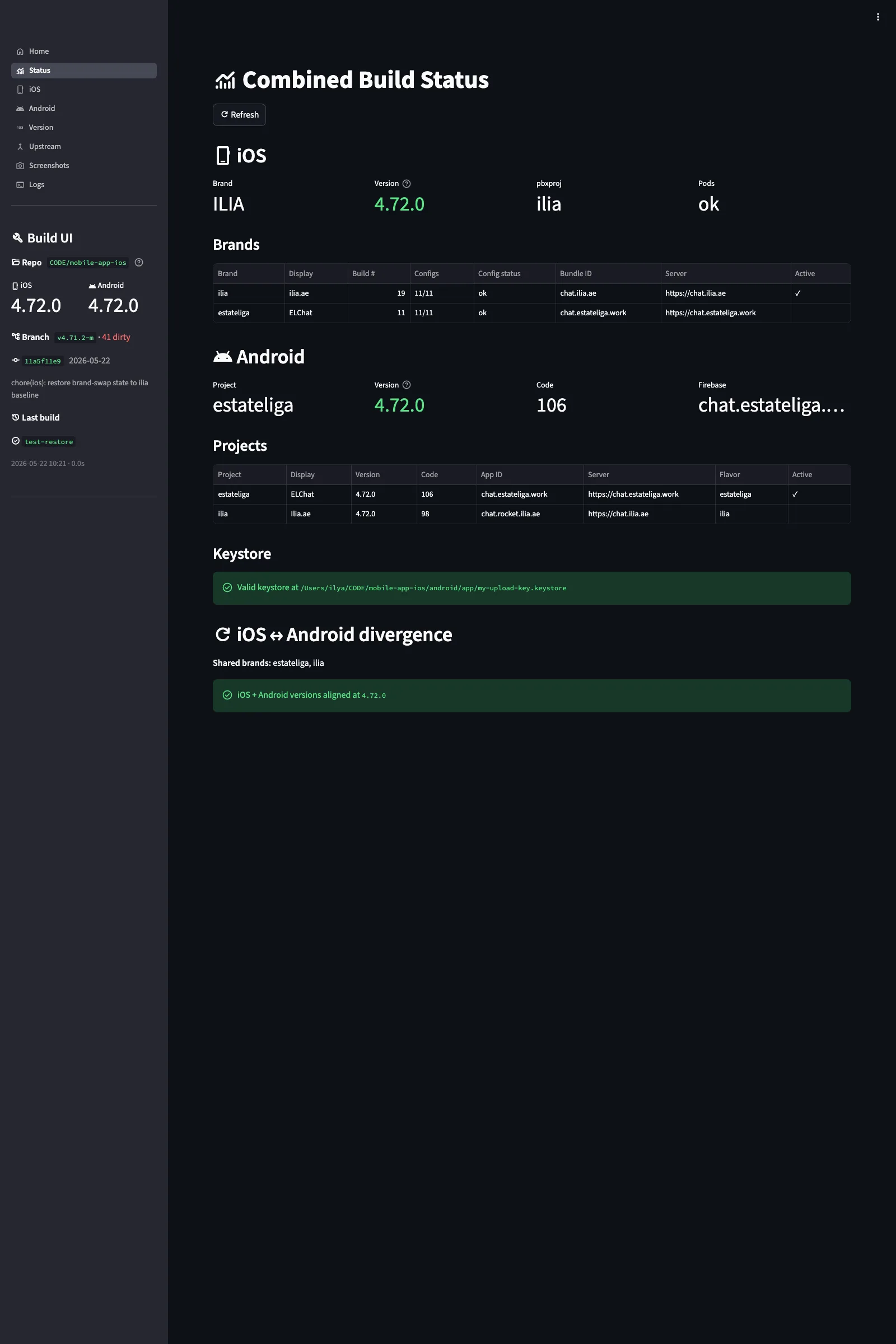
Status is the cross-platform health dashboard. It runs verification checks across both brands and both platforms, then presents the results in comparison tables. For each brand, it shows: bundle ID (iOS) and application ID (Android), version strings from all source files, Firebase config status, signing identity status, provisioning profile validity, and keystore presence.
The most useful section is the divergence check. It compares the config values that should match between files (for example, the version in package.json vs the version in Info.plist) and flags any mismatches. This catches problems before they reach compilation, where they would either fail the build or produce a binary with the wrong metadata. The keystore guard is similarly preventive: if the Android keystore for the active brand is missing or has an expired certificate, the status page reports it before you waste 10 minutes on a Gradle build that will fail at the signing step.
Build ui ios
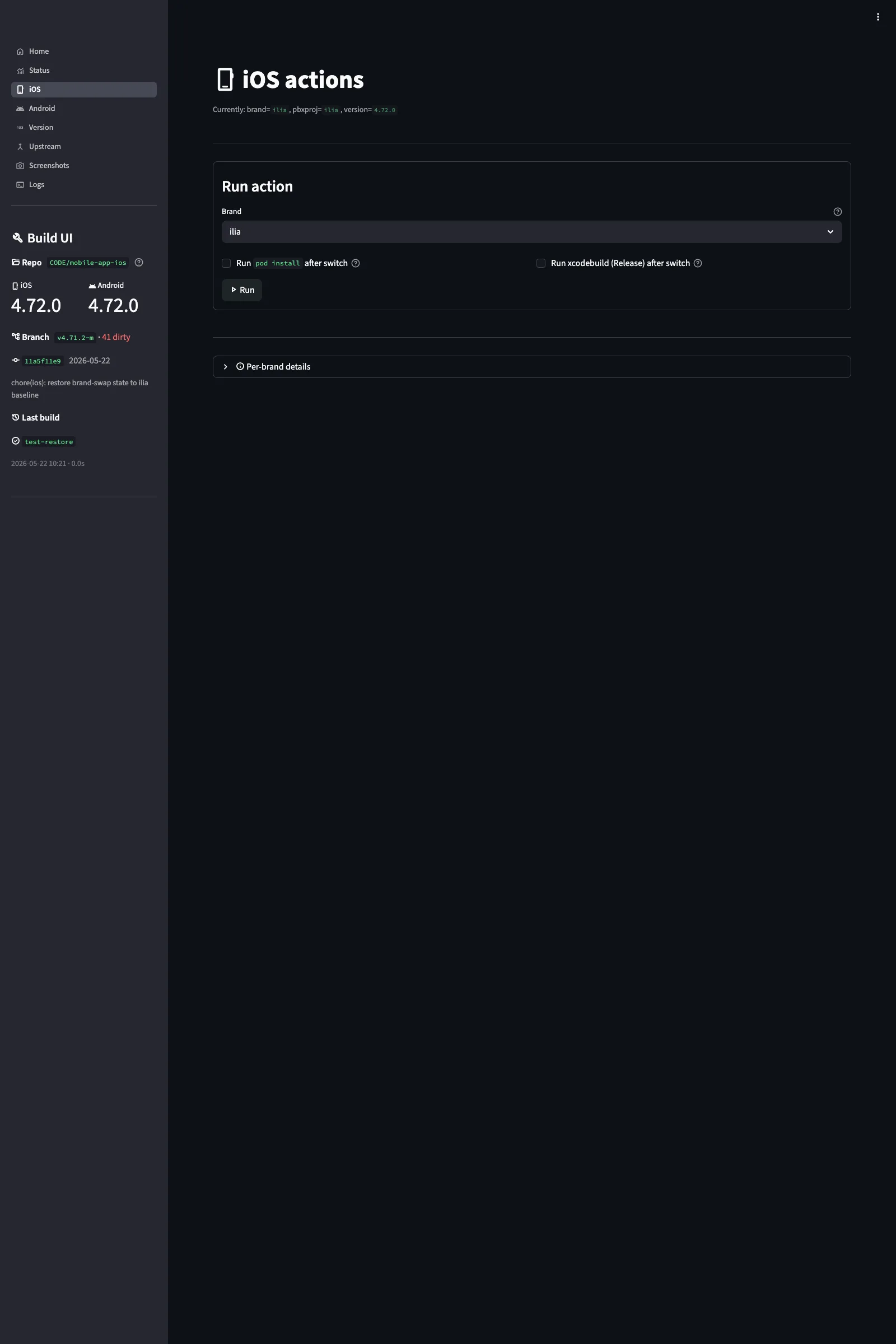
The iOS page is where builds happen. At the top is a brand selector dropdown (chat-ilia or el-hub). Below that, two optional checkboxes: “Run pod install” and “Run xcodebuild.” You can run either or both. Pod install alone is useful when you have just merged upstream changes that updated Podfile.lock. Xcodebuild alone is useful when you have already installed pods and want a faster rebuild cycle.
When you hit the build button, the brand switch runs first (if the selected brand differs from the current one), then pod install (if checked), then xcodebuild (if checked). Each step streams output to the code block. If any step fails, the pipeline stops and the error output stays visible. The build configuration defaults to Release with the App Store distribution signing identity, but you can switch to Debug for faster iteration during development.
Build ui android
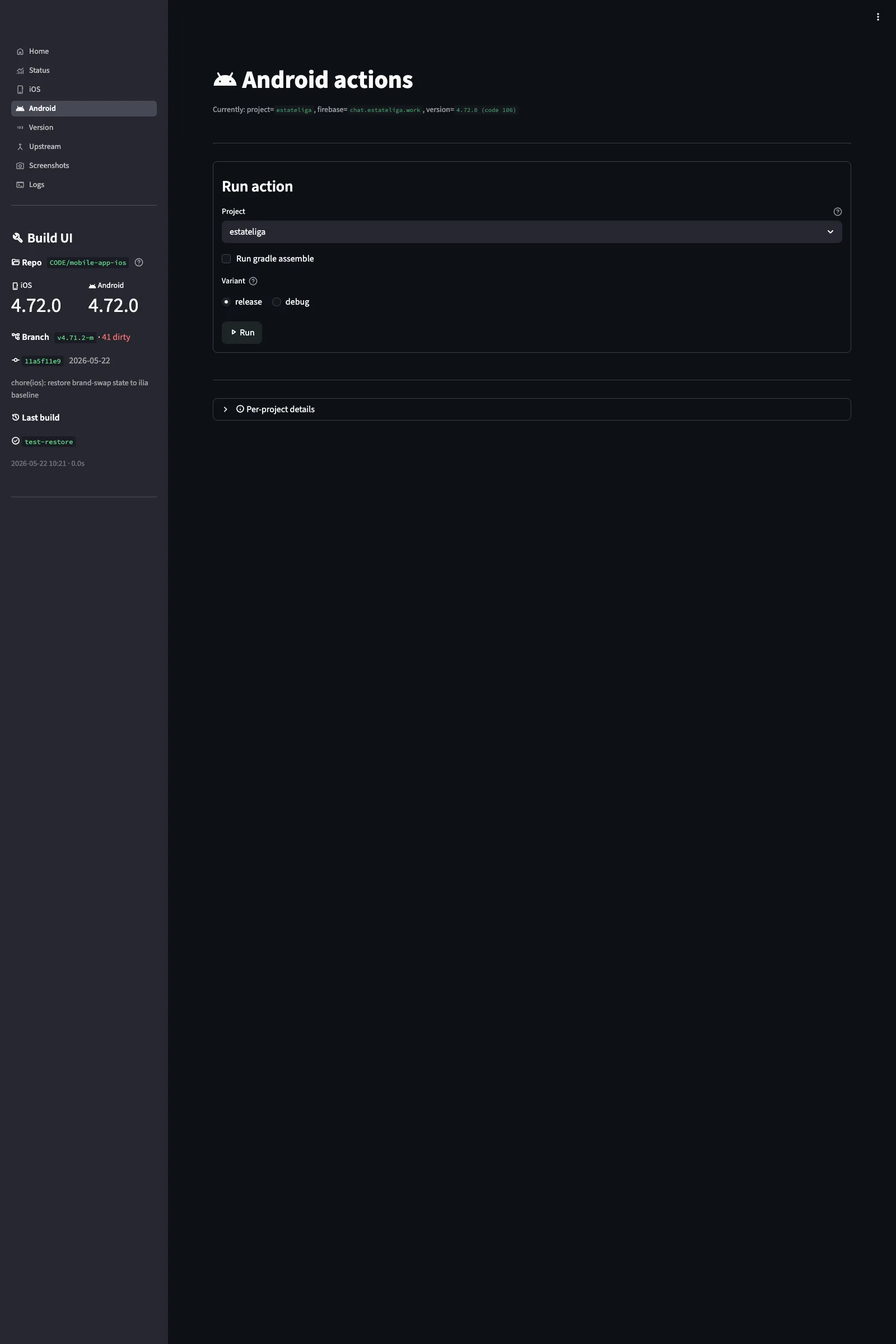
The Android page mirrors the iOS page in structure but adapts to Android-specific concerns. The project selector picks the brand. The build type toggle switches between Release and Debug. Release builds produce a signed AAB for Google Play; Debug builds produce an APK for local testing and emulator installs.
The keystore guard is always visible on this page. Before starting a Gradle build, the UI checks that the keystore file exists, that the keystore password is set in the environment, and that the key alias matches the brand. If any of these fail, the build button is disabled and the missing requirement is highlighted. This prevents the most common Android build failure: signing config errors that only surface after a 5-8 minute Gradle compilation.
Build ui version
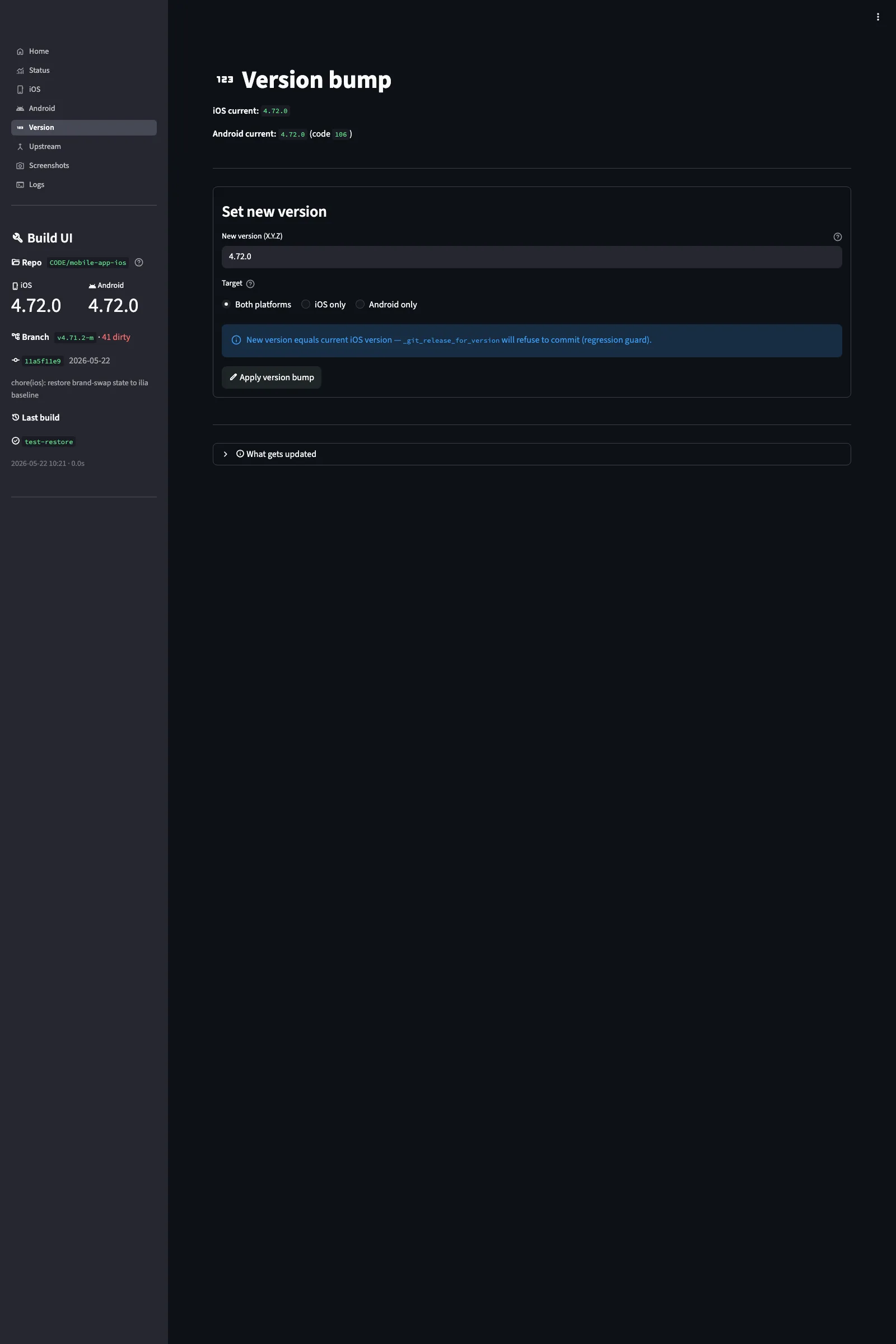
Version management across a React Native project that targets both iOS and Android involves keeping four files in sync: package.json, Info.plist, project.pbxproj, and build.gradle. The Version page reads all four, displays them side by side, and highlights any drift. A single “Bump” button increments the version across all files atomically.
The page supports semver patch, minor, and major bumps. It also supports setting a specific version string manually, which is useful when aligning with an upstream Rocket.Chat release tag. After bumping, the page re-reads all files and confirms they match. If a manual edit or a failed merge has left the files out of sync, the drift warning shows exactly which file has which version, so you can decide whether to force-align or investigate.
Build ui upstream
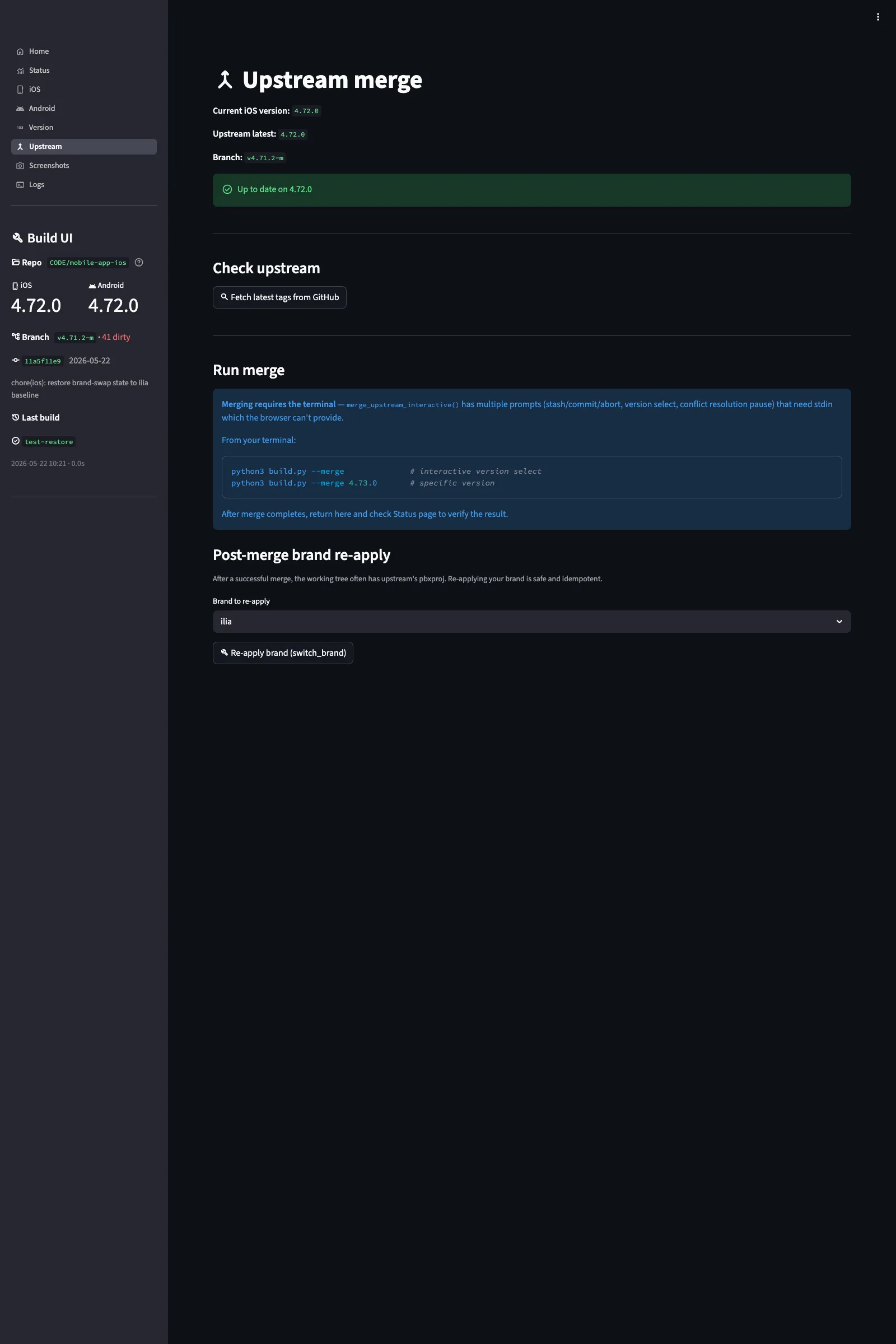
Both chat.ilia.ae and EL·Hub are forks of the official Rocket.Chat React Native mobile client. The upstream repository releases new tags regularly, and keeping the fork current requires periodic merges. The Upstream page tracks the relationship between the fork and the official repository.
It shows the current upstream remote URL, the latest fetched tags, and how many commits the fork is ahead or behind the latest upstream tag. A “Fetch tags” button updates the tag list from the remote. The actual merge is intentionally not automated through the UI. Upstream merges in a React Native project often produce conflicts in native build files, dependency lock files, and configuration files that need manual resolution. The page shows you the state and lets you decide when to merge; the merge itself happens in the terminal where you can handle conflicts properly.
Build ui screenshots
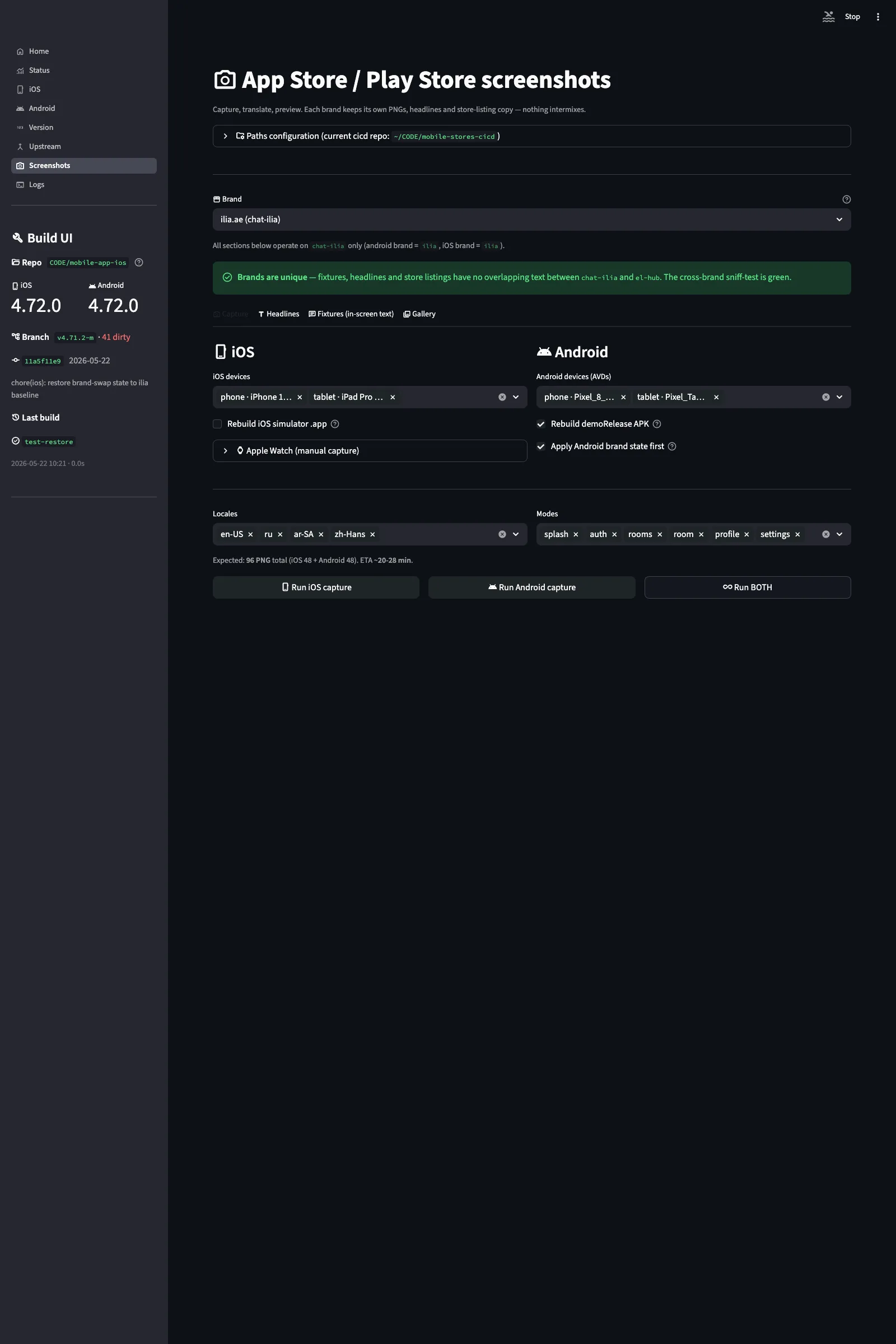
The Screenshots page is the most complex part of the Build UI. It has four tabs: Capture, Headlines, Fixtures, and Gallery. Together they manage the full pipeline from triggering screenshot capture on devices through composing final store-ready images.
Capture tab
The Capture tab triggers screenshot capture across device simulators. For iOS, it uses Maestro flows that drive the Simulator through each demo state, wait for the UI to stabilize, and capture at the correct resolution for each device family (iPhone 6.9″, iPhone 6.5″, iPad 13″). For Android, it uses custom capture commands that launch the app with specific intent extras to set the demo mode and locale, then capture via adb.
Each capture run produces raw screenshots organized by brand, device family, locale, and screen. The raw captures are not store-ready, they need device frames, headline text, and background composition. That part happens in the mobile-stores-cicd toolkit, which takes the raw captures from here and produces the final composite images for App Store Connect and Google Play Console.
Headlines tab
Each store screenshot has a headline, the text that appears above or below the device frame in the final composite image. The Headlines tab lets you edit headline text per screen, per locale. It also runs cross-brand uniqueness checks: Apple requires that screenshot metadata differ between apps from the same developer, so headlines for chat.ilia.ae cannot be identical to headlines for EL·Hub.
Fixtures tab
Fixtures define the demo data that appears in screenshots. More on the fixtures system in the next section.
Gallery tab
The Gallery tab shows all captured screenshots in a grid view, filterable by brand, device, locale, and screen. This is the review step: you scan through all captures to check for rendering issues, missing content, truncated text, or locale-specific layout problems (Arabic RTL text in particular needs visual verification). From here you can re-trigger individual captures or mark them as approved for handoff to the composition pipeline.
Crowdin sync panel
Both headline text and fixture text need to be translated into four locales. The Screenshots page includes a Crowdin sync panel that pushes English source strings to Crowdin, pulls completed translations, and writes them back to the locale-specific YAML files. This keeps the translation workflow consistent with the broader metadata pipeline managed by mobile-stores-cicd.
Build ui logs
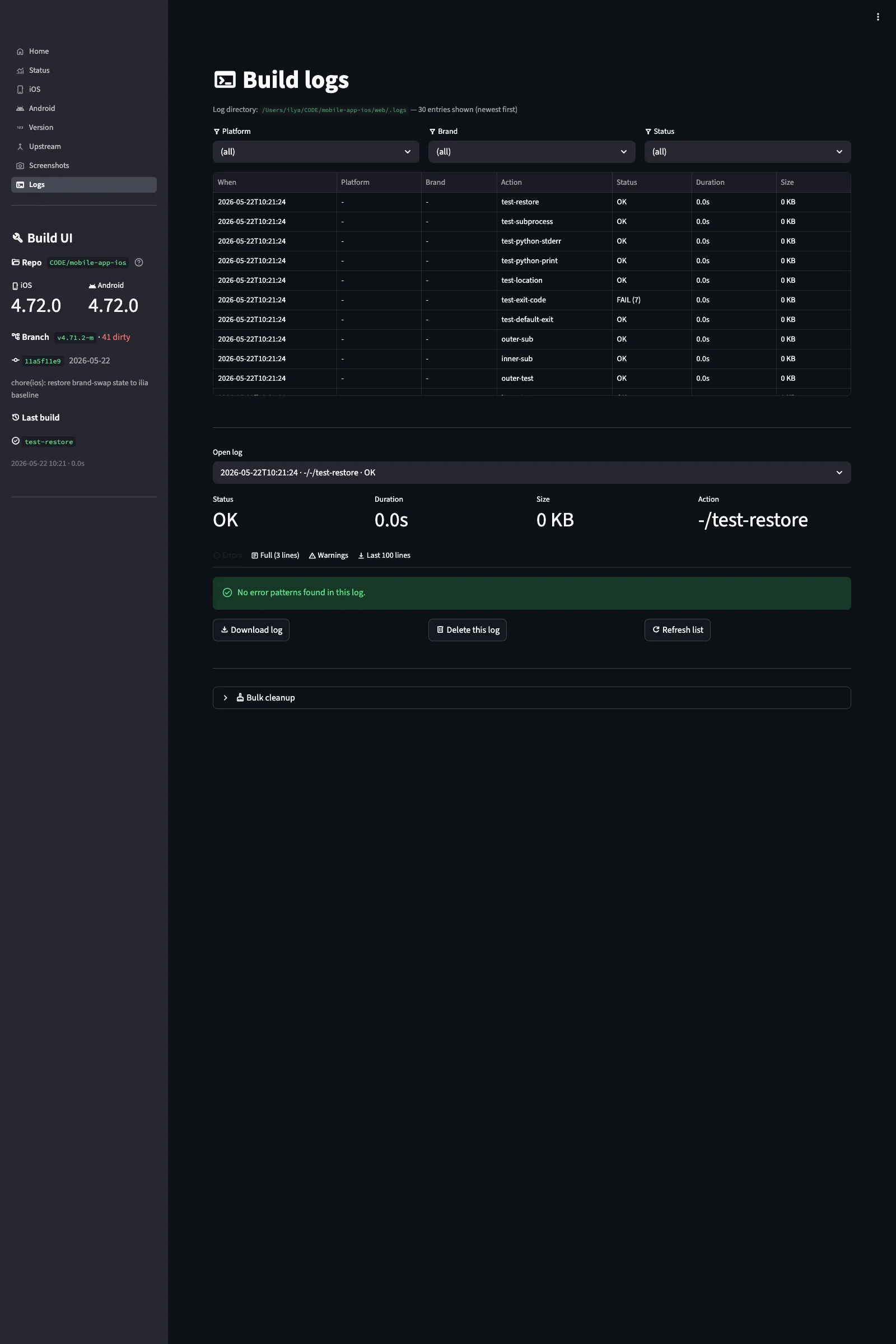
Every CLI operation and every UI-triggered build writes to a shared log surface at web/.logs/. The Logs page provides three tabs: Errors (filtered for build failures, signing issues, missing dependencies), Warnings (compiler warnings, deprecation notices, version drift alerts), and Full (the complete unfiltered output). Logs are timestamped and tagged with the operation that produced them.
The bulk cleanup button at the bottom purges old log files, keeping the most recent runs. This is useful after a week of iterative builds when the log directory has accumulated hundreds of megabytes of xcodebuild output. The log surface is shared between CLI and UI, if you run build.py from the terminal, the output still appears in the Logs page, and vice versa.
Demo mode and fixtures
Store screenshots need to show the app in a realistic state: a list of conversations with unread counts, an active chat with message bubbles, a user profile screen with details filled in. But generating this state manually, creating test users, sending messages, configuring rooms, is tedious and fragile. If the server gets reset, the demo state is gone. If you need screenshots in Arabic, you need Arabic test users sending Arabic messages in Arabic-named rooms.
The fixtures system solves this by defining demo states declaratively in YAML. A fixture file specifies everything the app should display in each demo screen: user names, avatars, room names, message content, timestamps, unread counts, typing indicators, read receipts. The React Native app reads these fixtures when launched in demo mode and renders them as if they were real data from the server.
Fixture pipeline: YAML to TypeScript codegen
The fixture data flow works like this:
- fixtures.yaml contains the source-of-truth demo data per brand and locale
- A codegen script processes the YAML and generates
fixtures.generated.ts - The generated TypeScript module exports typed fixture objects that the app imports at build time
- When the app launches with a demo mode flag, it loads fixtures instead of connecting to the server
There are 6 demo modes corresponding to the 6 screens needed for store screenshots: splash (launch screen), auth (login screen with server URL), rooms (the channel/conversation list), room (an active conversation with messages), profile (user profile view), and settings (app settings screen). Each mode renders the app in a frozen state that looks real but is entirely driven by fixture data.
A simplified fixture entry for the “rooms” screen looks like this:
rooms:
  - name: "Development"
    type: channel
    unread: 3
    last_message: "Build 4.2.1 passed all tests"
    last_sender: "CI Bot"
    timestamp: "10:42 AM"
  - name: "Sarah Chen"
    type: direct
    unread: 1
    last_message: "Updated the API docs, ready for review"
    timestamp: "10:38 AM"
  - name: "Infrastructure"
    type: channel
    unread: 0
    last_message: "MongoDB backup completed successfully"
    last_sender: "Backup Service"
    timestamp: "09:15 AM"
The codegen step transforms this YAML into TypeScript with proper type annotations, so the React Native components receive exactly the same data structures they would get from the real Rocket.Chat API. The demo mode flag is passed as a launch argument (iOS) or intent extra (Android), which means the app binary is identical between demo and production, no separate demo build required.
Brand isolation
Fixtures are brand-isolated. The chat.ilia.ae fixtures show rooms like “Development,” “Infrastructure,” and “Client Projects” with team members relevant to consulting work. The EL·Hub fixtures show rooms like “Dubai Marina Listings,” “Agent Updates,” and “Compliance” with real estate team member names. The room names, message content, user avatars, and unread counts are all different between brands. This ensures the screenshots on the App Store for chat.ilia.ae look distinct from those on the EL·Hub listing, which matters because Apple reviews both apps and will reject apps that appear to be duplicates.
Crowdin integration for fixture text
The fixture YAML files contain English source text by default. For Russian, Arabic, and Chinese screenshots, the fixture text needs translation. This is handled through Crowdin: the English fixture strings are pushed as source strings, translators (or translation memory from previous submissions) provide locale-specific versions, and the build system pulls the translations back into locale-specific fixture YAML files. The codegen step then produces separate fixtures.generated.ts modules per locale.
Screenshot pipeline integration
The Build UI captures raw screenshots. Raw means: a PNG file at the exact device resolution, showing the app in a specific demo state, with no device frame, no headline text, and no background. These raw captures are the input to the composition pipeline in mobile-stores-cicd.
The composition pipeline (described in detail in the mobile-stores-cicd article) takes each raw screenshot, overlays it onto a device frame image (iPhone, iPad, Pixel, etc.), adds a localized headline above or below the frame, renders the result onto a gradient background, and outputs the final composite image at the exact pixel dimensions required by App Store Connect and Google Play Console.
The scale of the screenshot operation is not trivial. Each app needs screenshots for 5 device families (iPhone 6.9″, iPhone 6.5″, iPad 13″, Android phone, Android tablet), 4 locales (en-US, ru, ar-SA, zh-Hans), and 6 screens (splash, auth, rooms, room, profile, settings). That is 120 screenshots per app, 240 total across both brands. The Build UI captures 120 raw screenshots per brand. Mobile-stores-cicd composes and uploads all 240 final images to the respective stores.
| Stage | Tool | Input | Output |
|---|---|---|---|
| Demo state setup | Build UI (fixtures) | fixtures.yaml | fixtures.generated.ts |
| Raw capture | Build UI (Maestro / adb) | App in demo mode | 120 raw PNGs per brand |
| Frame composition | mobile-stores-cicd | Raw PNGs + device frames | 120 composited images per brand |
| Store upload | mobile-stores-cicd | Composited images | App Store Connect + Google Play Console |
Build ui architecture
The Build UI is built with Streamlit, using the Material Design icons sidebar for navigation. The page layout follows Streamlit’s multi-page app pattern with one important modification: the pages directory is named pages_/ with a trailing underscore, which disables Streamlit’s automatic page discovery. This gives me full control over page ordering and visibility in the sidebar navigation rather than relying on filename-based alphabetical sorting.
The shared library modules live in web/lib/:
- state.py: reads repository state (git branch, working tree status, current brand, version strings) and caches it in Streamlit session state
- runner.py: subprocess management with real-time stdout streaming to
st.codeblocks, cancellation support, and exit code handling - log_parser.py: parses log files from
web/.logs/, categorizes entries by severity (error, warning, info), and provides filtered views - screenshots_config.py: manages screenshot metadata: device families, locales, screen definitions, headline text, output paths
- brand_diff.py: compares configuration across brands, detects divergence in version strings and signing identities
- crowdin_api.py: Crowdin REST API client for pushing source strings and pulling translations
The log surface is shared between the CLI and the UI. Both write to the same web/.logs/ directory with the same structured format: timestamp, operation name, severity level, and message. This means you can trigger a build from the terminal and review its output in the Logs page later, or trigger from the UI and grep the log files from the command line.
Subprocess handles are stored in Streamlit session state, which enables the cancel button. When a build is running, the session holds a reference to the subprocess.Popen object. The cancel button sends SIGTERM, waits for clean shutdown, and updates the log with a cancellation entry. This matters for xcodebuild, which can take 10-15 minutes for a clean build and should not be force-killed without cleanup.
The directory structure reflects this architecture:
web/
├── app.py                    # Streamlit entry point, sidebar layout
├── pages_/                   # Page modules (trailing underscore disables auto-discovery)
│   ├── home.py
│   ├── status.py
│   ├── ios.py
│   ├── android.py
│   ├── version.py
│   ├── upstream.py
│   ├── screenshots.py
│   └── logs.py
├── lib/                      # Shared modules
│   ├── state.py              # Repository state reader, session cache
│   ├── runner.py             # Subprocess management, streaming, cancellation
│   ├── log_parser.py         # Log file parsing and severity classification
│   ├── screenshots_config.py # Device families, locales, screen definitions
│   ├── brand_diff.py         # Cross-brand configuration comparison
│   └── crowdin_api.py        # Crowdin REST API client
├── ssl/                      # TLS certificates (gitignored)
│   ├── fullchain.pem
│   └── privkey.pem
└── .logs/                    # Shared log surface (CLI and UI write here)
Security and deployment
The Build UI has no authentication layer. It is an internal tool that runs on my development machine, accessible only from localhost or my Tailscale network. Exposing it publicly would be a bad idea, it can trigger builds, modify configuration files, and run arbitrary subprocess commands.
TLS is handled by placing certificate files in web/ssl/: fullchain.pem and privkey.pem. When these files are present, Streamlit serves over HTTPS. When they are absent, it falls back to HTTP. The certificates are typically Let’s Encrypt certs generated via Certbot on the host machine and symlinked into the web directory.
For persistent operation, the Build UI can run as a macOS launchctl service (auto-start on login, restart on crash) or a Linux systemd service. The service definition points to the Streamlit entry point with the port, TLS paths, and working directory configured. All secrets (Firebase configs, keystore passwords, signing identities) are gitignored and loaded from environment variables or local-only config files.
App Store and Google Play presence
Both brands are live on both stores:
| App | App Store | Google Play | Platforms |
|---|---|---|---|
| chat.ilia.ae | App Store | Google Play | iPhone, iPad, Mac (Apple Silicon), Apple Watch |
| EL·Hub | App Store | Google Play | iPhone, iPad, Mac (Apple Silicon), Apple Watch |
The chat.ilia.ae iOS app requires iOS 15.1 or later and supports iPhone, iPad, Mac with Apple Silicon, and Apple Watch. The App Store privacy label states “Data Not Collected,” which is accurate, the app connects directly to the self-hosted Rocket.Chat server and the server does not share any data with third parties. There is no analytics SDK, no advertising identifier, no crash reporting service that phones home to an external provider.
Both apps are localized in 4 locales: en-US (English), ru (Russian), ar-SA (Arabic), and zh-Hans (Simplified Chinese). Store metadata, app name, subtitle, description, keywords, screenshots, promotional text, is maintained through the mobile-stores-cicd metadata pipeline, rendered from Jinja2 templates with per-app and per-locale value overrides. Updates to store metadata go through the CLI, not through App Store Connect’s web interface.
The Arabic locale (ar-SA) requires special attention because of RTL (right-to-left) layout. The app supports RTL natively through React Native’s I18nManager, but fixture data and screenshots need visual verification, text alignment, icon positioning, and navigation direction all flip. The Chinese locale (zh-Hans) is included primarily for the UAE market, which has a significant Chinese-speaking business community. Both RTL and CJK typography testing happen during the screenshot capture phase, where I review every locale’s output in the Gallery tab before approving them for composition.
Why not official rocket chat app
Rocket.Chat publishes its own mobile apps. They work fine for most use cases. The reason I maintain custom forks is specific to my operational requirements:
- Server lock: The custom apps connect to a specific server URL by default. Team members do not need to type a server address on first launch, the app opens directly to the login screen for the correct instance. The official app requires selecting or entering a server URL first.
- Brand identity: EL·Hub needs to look like an Estateliga product, not a generic Rocket.Chat client. Custom app icons, splash screens, and color schemes make it feel like a first-party corporate tool.
- Demo mode: The official app has no demo mode. The fixtures system described above exists only in the forked builds. Without it, generating consistent screenshots across 4 locales and 5 device families would require maintaining a dedicated test server with pre-configured demo data.
- Release cadence: I control when updates ship. If an upstream release introduces a regression, I can skip it or cherry-pick specific fixes. The official app updates on Rocket.Chat’s schedule, not mine.
Operational workflow: a typical release
Here is what a typical release cycle looks like, from upstream merge to store submission:
- Check upstream: Open the Upstream page, fetch latest tags, review changelog for the new release
- Merge upstream: In the terminal, merge the upstream tag into the fork branch, resolve conflicts (usually in
Podfile.lock,package.json, and native build files) - Bump version: Use the Version page to increment the version across all four files
- Build chat-ilia iOS: iOS page, select chat-ilia, check pod install + xcodebuild, build
- Build chat-ilia Android: Android page, select chat-ilia, Release AAB
- Switch to el-hub: iOS page, select el-hub, build iOS; Android page, build Android
- Capture screenshots: If visual changes justify new screenshots, use the Screenshots page to capture raw screenshots for both brands across all locales and devices
- Compose and upload: Hand off raw screenshots to mobile-stores-cicd for frame composition and store upload
- Submit: Use mobile-stores-cicd to push metadata updates, release notes, and the compiled binaries to App Store Connect and Google Play Console
The entire cycle takes 2-3 hours for both brands across both platforms, including build time. Without the Build UI, the same process involved dozens of terminal commands, manual config file edits, and a checklist document to track which brand-platform combination had been built. The UI does not make the process faster in terms of compile time, but it eliminates the category of errors where you forget to switch brands before building or skip the pod install after an upstream merge.
The release checklist in the Build UI is implicit rather than explicit. Each page shows its own prerequisites: the iOS page won’t let you build if the brand switch failed, the Android page blocks on missing keystores, the Version page warns on drift. Following the pages in order, Status, Version, iOS, Android, Screenshots, naturally enforces the correct sequence. I used to maintain a separate checklist document; now the Build UI itself is the checklist.
What this costs
The server side (Rocket.Chat instance, MongoDB, nginx, backups) runs on existing infrastructure alongside other services. The incremental cost is negligible, Rocket.Chat’s resource footprint is modest for small team sizes.
The App Store side costs more in developer program fees than in infrastructure. Apple Developer Program membership is $99/year. Google Play Developer registration is a one-time $25 fee. No ongoing per-user charges. No per-message fees. No storage tier pricing. The apps are free to download and use. The total annual operating cost for having two branded messengers on both stores, with full push notification support and continuous updates, is under $200/year excluding server infrastructure.
Limitations and things I would do differently
The fixtures system works well for screenshots but adds maintenance burden. Every upstream merge needs to be checked for changes to the data models that fixtures depend on. If Rocket.Chat adds a new field to the room list item component, the fixtures need updating or the generated TypeScript will have type errors.
The Build UI being Streamlit means it has Streamlit’s limitations: no persistent WebSocket connections (every interaction triggers a full page rerun), limited customization of the layout, and occasional state management complexity with long-running subprocesses. A React-based dashboard would be more flexible, but Streamlit’s rapid development speed and Python-native subprocess integration make it the pragmatic choice for a single-operator tool.
The brand switch is a file-rewriting operation, which means it modifies the working tree. If you switch brands in the middle of uncommitted work, you need to stash first. A more sophisticated system would use build-time environment variables and conditional compilation rather than file rewriting, but the React Native + CocoaPods + Gradle toolchain makes that harder than it sounds. File rewriting is ugly but reliable.
Frequently asked questions
Can anyone use chat.ilia.ae?
The current instance is for my team and consulting clients. The apps on the App Store and Google Play are free to download, but they connect to my server, you would need an account to log in. If you want a similar setup for your organization, I can deploy a Rocket.Chat instance on your infrastructure with custom-branded apps published under your own developer accounts.
Why Rocket.Chat and not Matrix, Mattermost, or Zulip?
Rocket.Chat has the most mature mobile client codebase (React Native, well-maintained), a clean REST API, and a large enough community that upstream development continues steadily. Matrix (Element) has better federation but the mobile clients have historically been less polished. Mattermost is strong but the open-source edition has feature limitations. Zulip’s threading model is excellent but its mobile apps are less refined. For my use case, two white-label apps with custom branding and demo modes, Rocket.Chat’s React Native client was the most practical foundation to fork.
Is there an Android app?
Yes. Both chat.ilia.ae and EL·Hub have Android apps on Google Play. The Android build uses the same codebase, same brand-switching system, and same fixtures pipeline. The Build UI manages Android builds alongside iOS builds.
How is this different from WhatsApp or Telegram?
WhatsApp and Telegram are consumer messengers. They are great for personal communication but wrong for professional use. No channels with granular permissions, no threaded discussions, no admin controls for user management and retention policies, no data export, no self-hosting option. Your messages live on Meta’s or Telegram’s infrastructure. With chat.ilia.ae, messages stay on a server I operate, with full admin control, complete data ownership, and compliance with whatever regulatory framework applies to the conversation.
How does the Build UI relate to mobile-stores-cicd?
They are separate tools in a two-stage pipeline. The Build UI handles everything inside the React Native repository: brand switching, building, version management, screenshot capture, and fixture management. Mobile-stores-cicd handles everything outside the repository: App Store Connect and Google Play Console API interaction, metadata templating, screenshot composition with device frames, release submission, and sideload distribution. The handoff point is raw screenshots and compiled binaries. Build UI produces them; mobile-stores-cicd publishes them.
Can you deploy this for my team?
Yes. The deployment involves setting up a Rocket.Chat server on your infrastructure (cloud or on-premises), forking the mobile client, applying your branding, configuring Firebase for push notifications, publishing the apps on your developer accounts, and optionally setting up the Build UI for your operator. The server setup takes a day. The app branding and initial store submission take a week, including App Store review time. Reach out with your requirements.
Is the build system open source?
The build system and Build UI code are in a private repository. The Rocket.Chat mobile client is open source (MIT license), and my fork maintains that license for the base code. The branding layer, fixtures system, and Build UI are proprietary tooling. Access is available on request for consulting clients.
Source code and consulting
The repository containing the Build UI, the build system, and the fixture pipeline is private. If you want to review the codebase or evaluate it for your own self-hosted team messenger deployment, request access here.
For consulting on self-hosted communication infrastructure, white-label mobile app development, or mobile CI/CD automation (including the mobile-stores-cicd toolkit that handles the store publishing side), get in touch.
Need a consultation?
If you need professional expertise, book your free 15-minute consultation.